Deploy Gokapi on your own server.

Gokapi logo

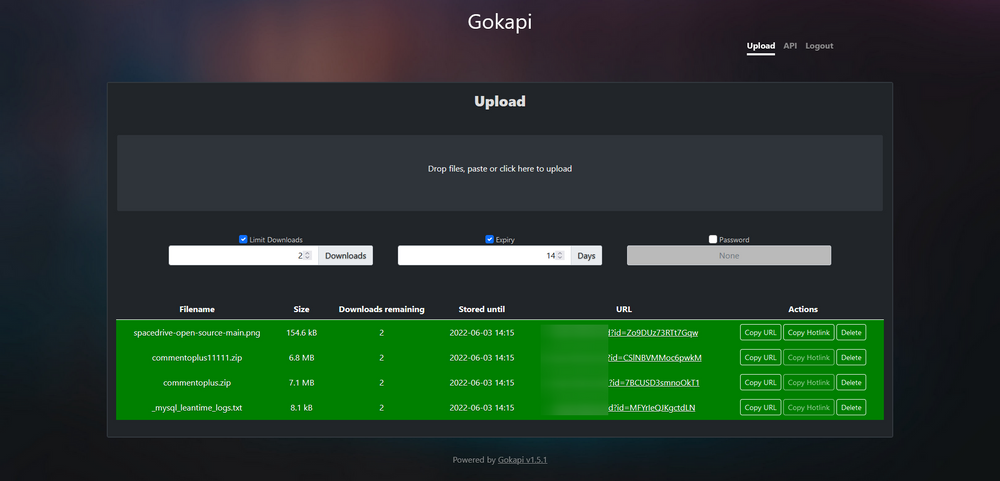
Gokapi is a lightweight file-sharing server that allows you to easily upload and share files with others. It provides a simple web interface for file uploads, generates shareable links, and supports features like password protection, automatic file expiration, and customizable download limits.

Your infrastructureAutomatic HTTPSNo lock-in

Screenshots

A closer look at Gokapi.

Gokapi screenshot 1

Setup time

A few minutes

Deployment

Your own server

Services

1 connected service

Why Gokapi

Everything you need, running where you choose.

Get the full Gokapi experience with Easypanel handling the repetitive infrastructure work around it.

Upload Management
Upload files through a web interface and generate shareable links instantly.
Access Controls
Protect shared files with passwords and set automatic expiration dates.
Download Limits
Limit the number of times a file can be downloaded before it expires.
Simple File Sharing
Easily share files with others through a clean and intuitive web interface.
Enhanced Privacy Controls
Set passwords, expiration dates, and download limits for each shared file.
Self-Hosted Solution
Keep control of your data by hosting the file sharing service on your own infrastructure.
How it works

From template to live app in three steps.

Easypanel turns the template into real services, storage, and domains on the server you already control.

Already have Easypanel? Open your dashboard at the URL or IP of your own installation.

Installation guide
1
Open your dashboard
Visit the URL or IP of your Easypanel installation and choose the target project.
2
Choose Gokapi
Open Templates, select Gokapi, then review its service names and configuration.
3
Deploy and open your app
Easypanel starts every service and provisions an HTTPS domain for you.
Installation options
The template asks for these values before creating your services.
OptionDefaultRequired

App Service Name

gokapiRequired

App Service Image

f0rc3/gokapi:v2.2.4Required
Resources
Project documentation and source code.
Latest template update
Apr 29, 2026

Version bumped to v2.2.4

Questions

Deploy with confidence.

The template handles the application setup while Easypanel keeps the infrastructure understandable and under your control.

Gokapi logo
Ready to deploy Gokapi?
Open your own Easypanel dashboard, choose Gokapi from Templates, and review the deployment options.