All templates

Deploy Answer on your own server.

Answer logo

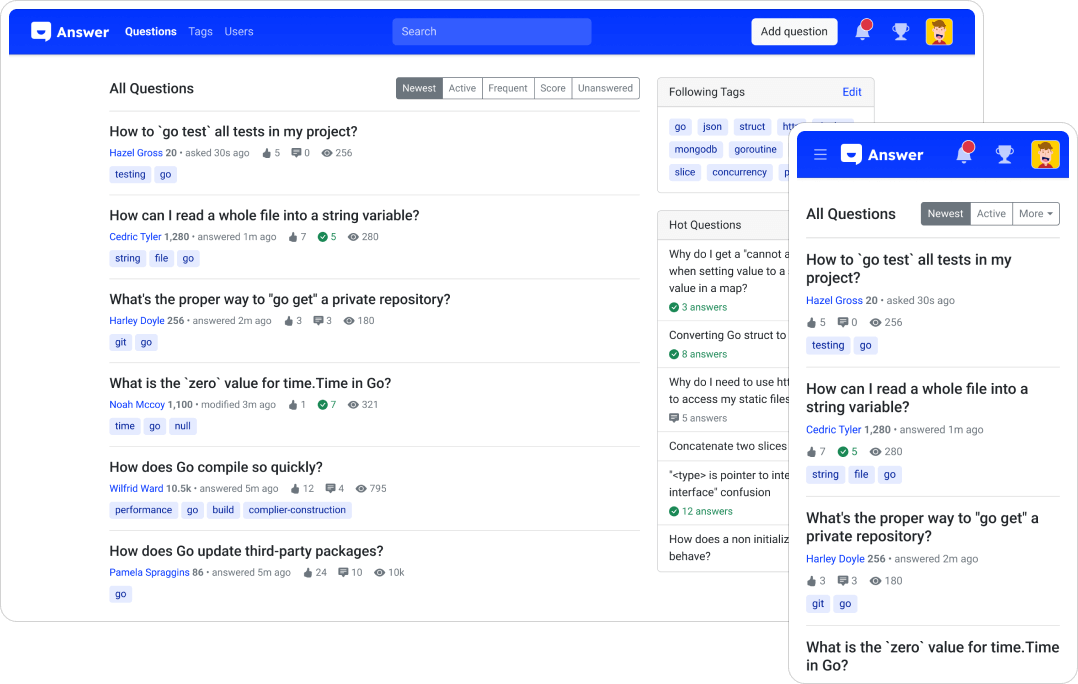
Answer is an open-source knowledge-based software designed to facilitate a Q&A environment for your products, customers, teams, and more. It allows users to ask questions and get answers, fostering a dynamic exchange of information. The app features a modern and responsive UI, and it's extensible with plugins. It also offers content…

Your infrastructureAutomatic HTTPSNo lock-in

Screenshots

A closer look at Answer.

Answer screenshot 1

Setup time

A few minutes

Deployment

Your own server

Services

2 connected services

Why Answer

Everything you need, running where you choose.

Get the full Answer experience with Easypanel handling the repetitive infrastructure work around it.

Questions and Answers
Users can ask questions and get answers from other users and your team, fostering a sense of community and shared knowledge.
Content Organization
Organize your content into categories and tags to make it easy for users to find the information they need.
Integrations
Integrate Answer with your existing tools and services to improve your workflow and enhance your other tools.
Gamification
Reward your users for their contributions with a gamified system of reputation and badges.
Modern UI
Answer features a modern and responsive user interface, making it easy and enjoyable to use.
Extensibility
Extend the functionality of Answer with plugins to meet your specific needs.
How it works

From template to live app in three steps.

Easypanel turns the template into real services, storage, and domains on the server you already control.

Already have Easypanel? Open your dashboard at the URL or IP of your own installation.

Installation guide
1
Open your dashboard
Visit the URL or IP of your Easypanel installation and choose the target project.
2
Choose Answer
Open Templates, select Answer, then review its service names and configuration.
3
Deploy and open your app
Easypanel starts every service and provisions an HTTPS domain for you.
Installation options
The template asks for these values before creating your services.
OptionDefaultRequired

App Service Name

answerRequired

App Service Image

answerdev/answer:1.2.0Required

Site Name

AnswerOptional

Site Url

answer.apache.orgOptional

Language

en-USOptional

Admin Username

Required

Admin Password

Set during installRequired

Admin Mail

Required

Contact Mail

Required

Database Type

Postgres / SQLite / MySQL / MariaDBRequired

Database Service Name

answer-dbRequired

Auto Install

trueOptional
Resources
Project documentation and source code.
Latest template update
Mar 3, 2024

Updated application version to 1.2.0 and added automatic installation support

Questions

Deploy with confidence.

The template handles the application setup while Easypanel keeps the infrastructure understandable and under your control.

Keep exploring

Related templates

Browse all
AnonymousOverflow logo
AnonymousOverflow
AnonymousOverflow is an anonymous question and answer platform inspired by Stack Overflow, designed for creating a safe space where users can ask questions without revealing their identity. The platform provides a community-driven Q&A experience with features like upvoting, downvoting, question categorization, and answer moderation. Built with privacy in mind, AnonymousOverflow allows users to participate in discussions and share knowledge while maintaining complete anonymity. Perfect for organizations wanting to create internal Q&A forums, educational institutions seeking anonymous student feedback platforms, or communities that value privacy in knowledge sharing.
View template
Papercups logo
Papercups
Papercups is a privacy-focused, open-source app designed to streamline communication with your customers. It provides a powerful dashboard to coordinate and reply to messages over various platforms including chat, email, Slack, and SMS. The app offers a customizable widget that you can tailor to your brand's aesthetics, without the need for any coding. Papercups also integrates seamlessly with your existing work environment, eliminating the need to log in to another dashboard. It supports HTML, React, React Native, and Flutter integrations. The app is built with Elixir on top of BEAM for incredible scalability, making it a suitable choice for businesses of all sizes. It also offers personalized support, managing your deployment on your infrastructure while providing the benefits of self-hosting with the reliability and scalability of the cloud.
View template
OtterWiki logo
OtterWiki
OtterWiki is a simple, easy-to-use wiki software for personal use and small teams. It's designed to be minimalist, focusing on the essentials without unnecessary complexity. OtterWiki stores all content as Markdown files in a Git repository, providing automatic version control and the ability to edit pages using your favorite text editor. It features a clean, modern interface with syntax highlighting, file attachments, full-text search, and dark mode support. The wiki requires no database setup - everything is stored in plain text files, making backups and migrations simple. OtterWiki supports user authentication, page permissions, and comes with a built-in editor with live preview. Perfect for documentation, note-taking, knowledge management, and collaborative writing in small teams.
View template
Answer logo
Ready to deploy Answer?
Open your own Easypanel dashboard, choose Answer from Templates, and review the deployment options.