All templates

Deploy CubeJS on your own server.

CubeJS logo

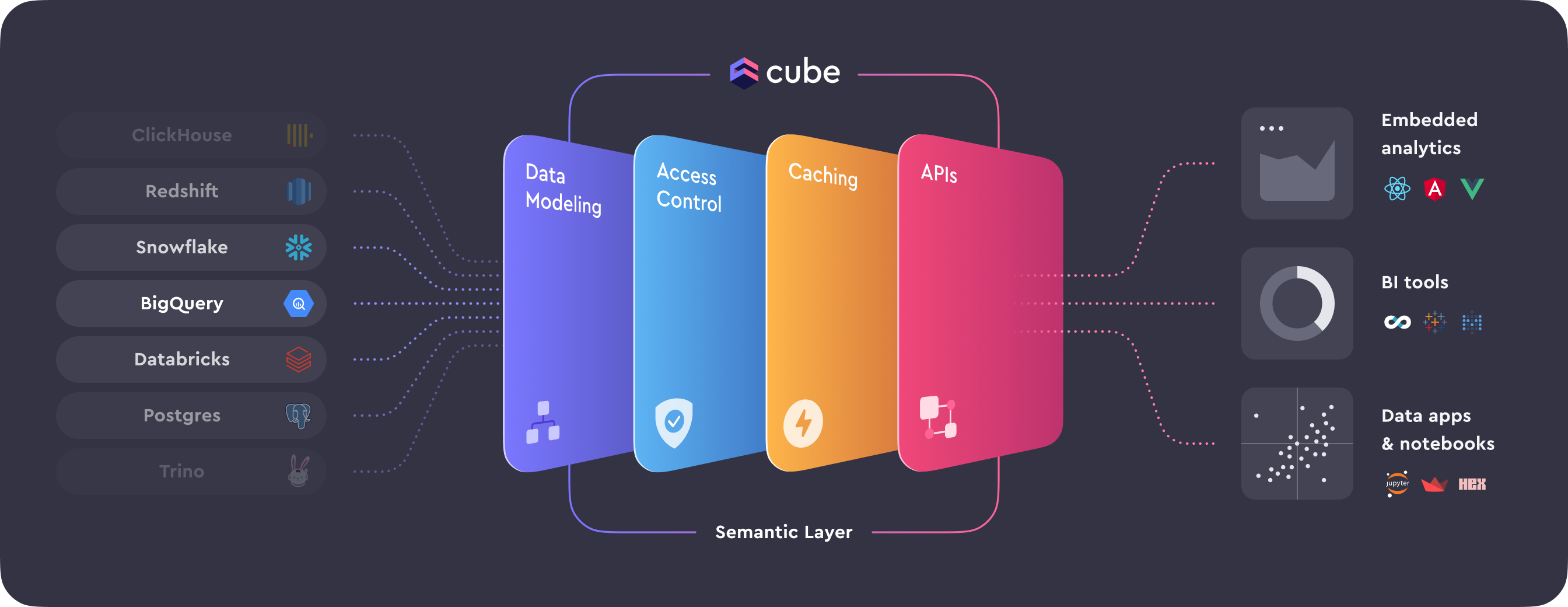
Cube is a Semantic Layer for every data app that aims to connect data silos, drive consistent metrics, and power your AI and analytics with context. It allows you to define and manage metrics upstream to consolidate your workflow, centralize definitions, and create a single source of truth. The app also provides granular access controls…

Your infrastructureAutomatic HTTPSNo lock-in

Screenshots

A closer look at CubeJS.

CubeJS screenshot 1

Setup time

A few minutes

Deployment

Your own server

Services

2 connected services

Why CubeJS

Everything you need, running where you choose.

Get the full CubeJS experience with Easypanel handling the repetitive infrastructure work around it.

Data Modeling
Define and manage metrics upstream to consolidate your workflow, centralize definitions, and create a single source of truth. The app uses Data Models to model raw data into meaningful business definitions and pre-aggregate data for optimal results.
Access Control
Grant column- and role-based operational and viewing permissions upstream with granular access controls. In the app, authorization is based on the security context, and authentication tokens are generated based on your API secret.
Caching
Ensure your data is reliably performant with a powerful caching layer and advanced pre-aggregation capabilities. The app provides a two-level caching system: in-memory cache and configurable pre-aggregations.
APIs
Connect your data to any front-end application to build beautiful custom visualizations. The app’s SQL, REST, and GraphQL APIs provide the universal compatibility data engineers and developers need.
Unified Data Management
The app serves as a semantic layer for every data application, connecting data silos and driving consistent metrics. It powers your AI and analytics with context, creating a single source of truth for your data.
Enhanced Data Security
The app provides granular access controls, granting column- and role-based operational and viewing permissions. It ensures that only the right people have access to the right metrics.
How it works

From template to live app in three steps.

Easypanel turns the template into real services, storage, and domains on the server you already control.

Already have Easypanel? Open your dashboard at the URL or IP of your own installation.

Installation guide
1
Open your dashboard
Visit the URL or IP of your Easypanel installation and choose the target project.
2
Choose CubeJS
Open Templates, select CubeJS, then review its service names and configuration.
3
Deploy and open your app
Easypanel starts every service and provisions an HTTPS domain for you.
Installation options
The template asks for these values before creating your services.
OptionDefaultRequired

App Service Name

cubejsRequired

App Service Image

cubejs/cube:v1.6.39Required

Database Service Name

cubejs-dbRequired
Resources
Project documentation and source code.
Latest template update
Apr 29, 2026

Version bumped to v1.6.39

Questions

Deploy with confidence.

The template handles the application setup while Easypanel keeps the infrastructure understandable and under your control.

Keep exploring

Related templates

Browse all
Kimai logo
Kimai
Kimai is an open-source time-tracking solution designed for freelancers, small businesses, and enterprises to manage time-tracking needs efficiently. It enables users to track work hours, manage projects, and create accurate reports and invoices based on time entries. With a focus on simplicity and flexibility, Kimai is ideal for organizations looking to improve productivity, manage employee timesheets, and handle client billing without the complexity of traditional ERP systems. Kimai offers a modular architecture, allowing for easy customization to meet unique requirements, and it supports multi-user environments with permissions to manage data access.
View template
NodeBB logo
NodeBB
NodeBB is a next-generation forum software that is powerful, mobile-ready, and easy to use. It is designed to provide a modern platform for your audience, fostering engagement and retaining customers. With NodeBB, you can enjoy a perfect experience on every device and screen, thanks to its mobile-first software. It offers built-in localization support with over 50 languages actively translated, making it a truly global platform. NodeBB is also search optimized with human-readable URLs, semantic HTML with embedded microdata, and more. It allows for social media integration, bringing more visitors to your community by sharing content to Facebook, Google, and Twitter. NodeBB also offers real-time interaction with instant notifications, streaming posts, and real-time chats. It comes with a native analytics dashboard so you can know what content your users enjoy most. Whether you're a self-starter, a growing business, or a large corporation, NodeBB has a plan that works best for you.
View template
GHStats logo
GHStats
GHStats is a self-hosted GitHub statistics and analytics tool that helps you track and visualize your GitHub repository metrics. Monitor stars, traffic, clones, views, and other important repository statistics over time with an intuitive web interface. The application collects and stores historical data from your GitHub repositories, allowing you to analyze trends and growth patterns that would otherwise be lost after GitHub's 14-day statistics retention period. Perfect for developers, project maintainers, and organizations who want to maintain long-term analytics of their GitHub presence. GHStats requires a GitHub personal access token to fetch repository statistics and stores all collected data persistently for historical analysis and visualization.
View template
CubeJS logo
Ready to deploy CubeJS?
Open your own Easypanel dashboard, choose CubeJS from Templates, and review the deployment options.