All templates

Deploy CyberChef on your own server.

CyberChef logo

CyberChef, also known as the Cyber Swiss Army Knife, is a versatile web app designed to perform a wide array of 'cyber' operations within a web browser. It offers simple encoding methods like XOR and Base64, alongside more complex encryption techniques such as AES, DES, and Blowfish. CyberChef also provides tools for creating binary and…

Your infrastructureAutomatic HTTPSNo lock-in

Screenshots

A closer look at CyberChef.
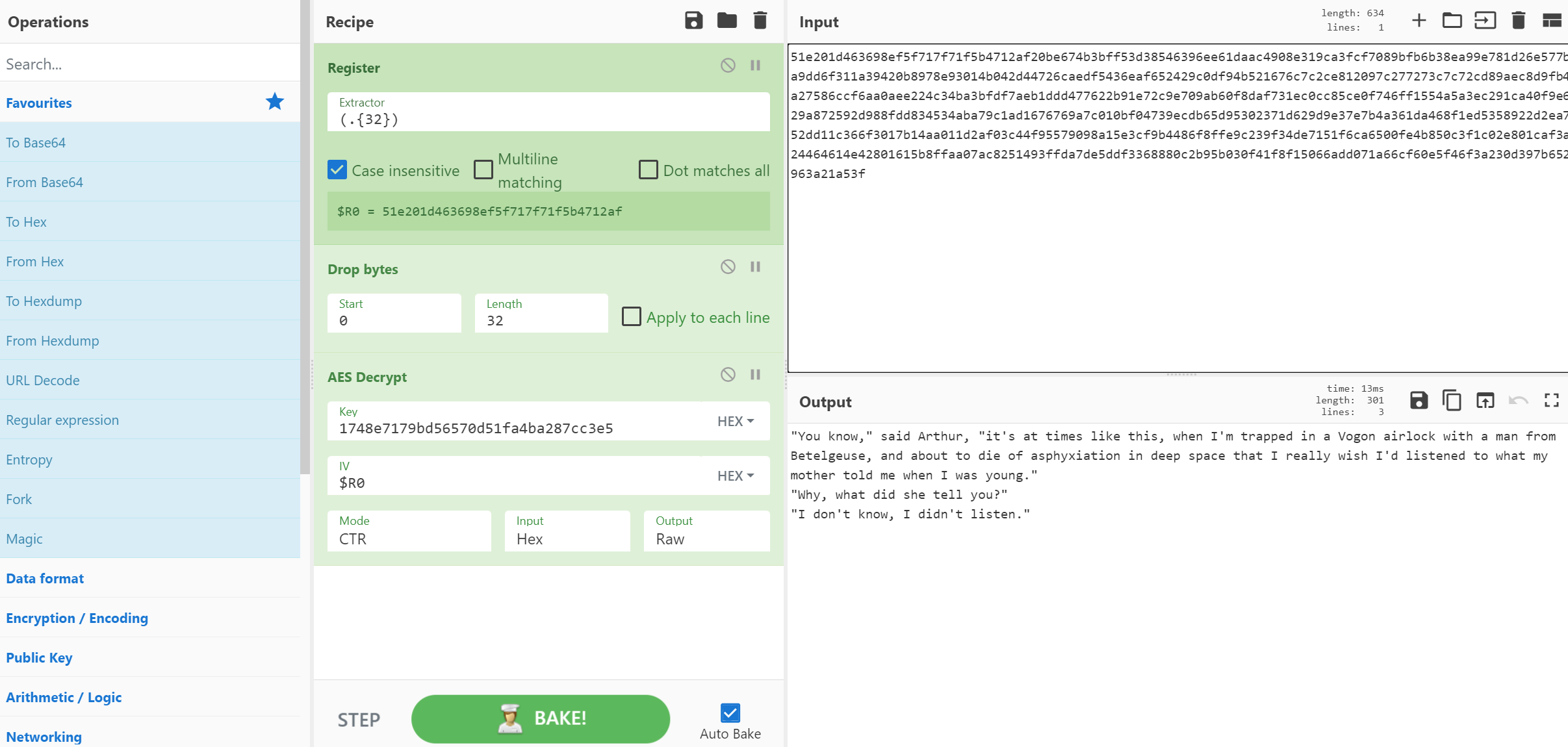
CyberChef screenshot 1

Setup time

A few minutes

Deployment

Your own server

Services

1 connected service

Why CyberChef

Everything you need, running where you choose.

Get the full CyberChef experience with Easypanel handling the repetitive infrastructure work around it.

Drag and Drop
Operations can be dragged in and out of the recipe list, or reorganised. Files up to 2GB can be dragged over the input box to load them directly into the browser.
Auto Bake
Whenever you modify the input or the recipe, CyberChef will automatically 'bake' for you and produce the output immediately. This can be turned off and operated manually if it is affecting performance.
Breakpoints
You can set breakpoints on any operation in your recipe to pause execution before running it. You can also step through the recipe one operation at a time to see what the data looks like at each stage.
Save and Load Recipes
If you come up with an awesome recipe that you know you’ll want to use again, just click 'Save recipe' and add it to your local storage. It'll be waiting for you next time you visit CyberChef. You can also copy the URL, which includes your recipe and input, to easily share it with others.
Search
If you know the name of the operation you want or a word associated with it, start typing it into the search field and any matching operations will immediately be shown.
Highlighting
When you highlight text in the input or output, the offset and length values will be displayed and, if possible, the corresponding data will be highlighted in the output or input respectively.
How it works

From template to live app in three steps.

Easypanel turns the template into real services, storage, and domains on the server you already control.

Already have Easypanel? Open your dashboard at the URL or IP of your own installation.

Installation guide
1
Open your dashboard
Visit the URL or IP of your Easypanel installation and choose the target project.
2
Choose CyberChef
Open Templates, select CyberChef, then review its service names and configuration.
3
Deploy and open your app
Easypanel starts every service and provisions an HTTPS domain for you.
Installation options
The template asks for these values before creating your services.
OptionDefaultRequired

App Service Name

cyberchefRequired

App Service Image

mpepping/cyberchef:v10.24.0Required
Resources
Project documentation and source code.
Latest template update
Apr 29, 2026

Version bumped to v10.24.0

Questions

Deploy with confidence.

The template handles the application setup while Easypanel keeps the infrastructure understandable and under your control.

Keep exploring

Related templates

Browse all
FOSSFlow logo
FOSSFlow
FOSSFlow is an open-source diagramming and flowchart application that enables users to create, edit, and manage technical diagrams, flowcharts, and process visualizations. Built for developers, system architects, and technical teams, FOSSFlow provides an intuitive interface for designing workflows, system architectures, database schemas, and network diagrams. The application supports server-side storage for persistent diagram saving and optional Git backup integration for version control and collaboration. With a lightweight Node.js backend and modern frontend, FOSSFlow offers a self-hosted alternative to cloud-based diagramming tools, giving you complete control over your technical documentation and diagrams. Perfect for teams that need to document systems, design workflows, create technical specifications, and maintain architectural diagrams without relying on external services or sharing sensitive information with third parties.
View template
Illa logo
Illa
Illa Cloud is a revolutionary browser-based code editor designed to streamline and modernize the process of website development. It allows you to code directly within your web browser, either online or offline, eliminating the need for multiple programs. With Illa Cloud, you can test your sites on actual web servers and maintain them with ease after development, making for a fast and intelligent development process. It's not just limited to online use - you can also use it as a desktop code editor, provided you have PHP 7.0+. It comes packed with a multitude of features and plugins to enhance your coding experience, including multiple cursors, 80+ highlighting themes, a find & replace builder, login security, coding assistance, visual code difference display, and database management with the Adminer plugin. The latest version, Illa Cloud 8.1, introduces regex search on find and replace, double click tab to collapse file manager, active line number highlighting, and many more improvements and bug fixes.
View template
Gitea logo
Gitea
Gitea is a lightweight DevOps platform designed to streamline operations from planning to production. It enables the creation and management of repositories, exploration of commit history and code files, review and merging of code commits, and more. Gitea also supports standard Git features, including tags, cherry-picking, hooks, and integrated collaboration tools. It features an integrated CI/CD system, Gitea Actions, that is compatible with GitHub Actions. With Gitea, you can efficiently manage a project's requirements, features, and bugs through issue tasks, labeling, and kanban project boards. It supports more than 20 different kinds of public or private package management. Gitea is an open-source project that accelerates development and collaboration, offering universal compatibility and flexible deployment options. It also provides a powerful built-in CI/CD system and is developed with a focus on security. Gitea can be tailored to your requirements and is integrated with your favorite tools to boost your workflow.
View template
CyberChef logo
Ready to deploy CyberChef?
Open your own Easypanel dashboard, choose CyberChef from Templates, and review the deployment options.