All templates

Deploy Damselfly on your own server.

Damselfly is a modern, self-hosted photo management system that helps you organize, search, and share your photo collection. It uses AI-powered image recognition to automatically tag and categorize your photos, making it easy to find specific images in your collection.

Your infrastructureAutomatic HTTPSNo lock-in

Screenshots

A closer look at Damselfly.
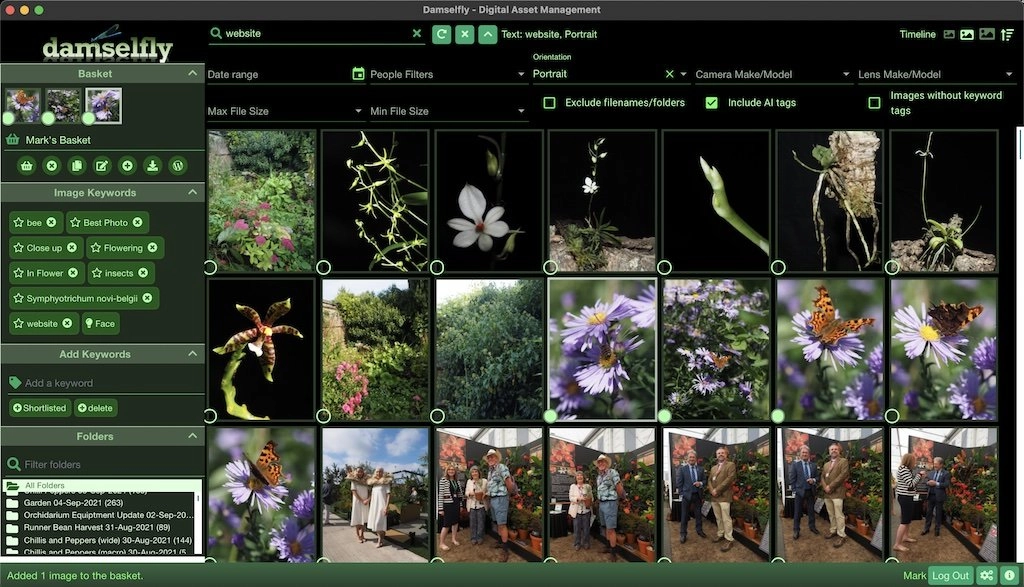
Damselfly screenshot 1

Setup time

A few minutes

Deployment

Your own server

Services

1 connected service

Why Damselfly

Everything you need, running where you choose.

Get the full Damselfly experience with Easypanel handling the repetitive infrastructure work around it.

Automatic Tagging
AI-powered image recognition for automatic photo tagging
Face Recognition
Identify and group photos by people in them
Metadata Extraction
Extract and search by EXIF data and image metadata
Duplicate Detection
Find and manage duplicate photos in your collection
Thumbnail Generation
Automatic thumbnail generation for fast browsing
Search & Filter
Advanced search and filtering capabilities
How it works

From template to live app in three steps.

Easypanel turns the template into real services, storage, and domains on the server you already control.

Already have Easypanel? Open your dashboard at the URL or IP of your own installation.

Installation guide
1
Open your dashboard
Visit the URL or IP of your Easypanel installation and choose the target project.
2
Choose Damselfly
Open Templates, select Damselfly, then review its service names and configuration.
3
Deploy and open your app
Easypanel starts every service and provisions an HTTPS domain for you.
Installation options
The template asks for these values before creating your services.
OptionDefaultRequired

App Service Name

damselflyRequired

App Service Image

webreaper/damselfly:4.5.3Required
Resources
Project documentation and source code.
Latest template update
Apr 29, 2026

Version bumped to 4.5.3

Questions

Deploy with confidence.

The template handles the application setup while Easypanel keeps the infrastructure understandable and under your control.

Keep exploring

Related templates

Browse all
Lychee
Lychee is a free, self-hosted photo-management tool designed to make managing your photos a breeze. It allows you to upload, move, rename, describe, delete, and search your photos all in one place, right from your browser. With Lychee, you can easily share your photos and albums with just one click, and even protect them with passwords for added security. The app also allows you to view your images in full-screen mode, navigate using your keyboard, and make your photos public for others to enjoy. Lychee supports batch editing with desktop-like multi-select and displays your EXIF and IPTC Metadata. You can import your photos from various sources, tag them, or mark them as important. Lychee is designed with a beautiful, intuitive interface and is perfect for photographers as it offers unlimited storage, no compression, and no loss in data.
View template
Photoview logo
Photoview
Photoview is a user-friendly photo gallery designed for photographers. It allows you to easily navigate through directories filled with high-resolution photos and videos. The app syncs with your file system, automatically organizing your media based on the file structure. Directories become albums filled with the photos and videos found within them. Photoview also automatically rescans for new media, keeping your gallery updated. Multiple users can be configured, each with their own directory of photos and videos, and each user's media is kept private with a username and password. Albums and individual photos or videos can be shared through public or password-protected links. Photoview also analyzes photos for EXIF metadata, displaying this information next to the photo and using it to present photos on a map. The app also has a mobile version for iOS, allowing you to quickly access your media library from your phone. Photoview supports RAW images, automatically extracts metadata from images and videos, and optimizes videos for the web. It also generates thumbnails automatically and ensures that your media is secure and private.
View template
Immich logo
Immich
Immich is a self-hosted photo and video backup solution designed for individuals and families to store and manage their media files efficiently. It provides a modern interface with features like automatic uploads, deduplication, and powerful search capabilities. Immich ensures that you maintain full control over your media while offering a smooth and user-friendly experience.
View template
Ready to deploy Damselfly?
Open your own Easypanel dashboard, choose Damselfly from Templates, and review the deployment options.