All templates

Deploy Komga on your own server.

Komga logo

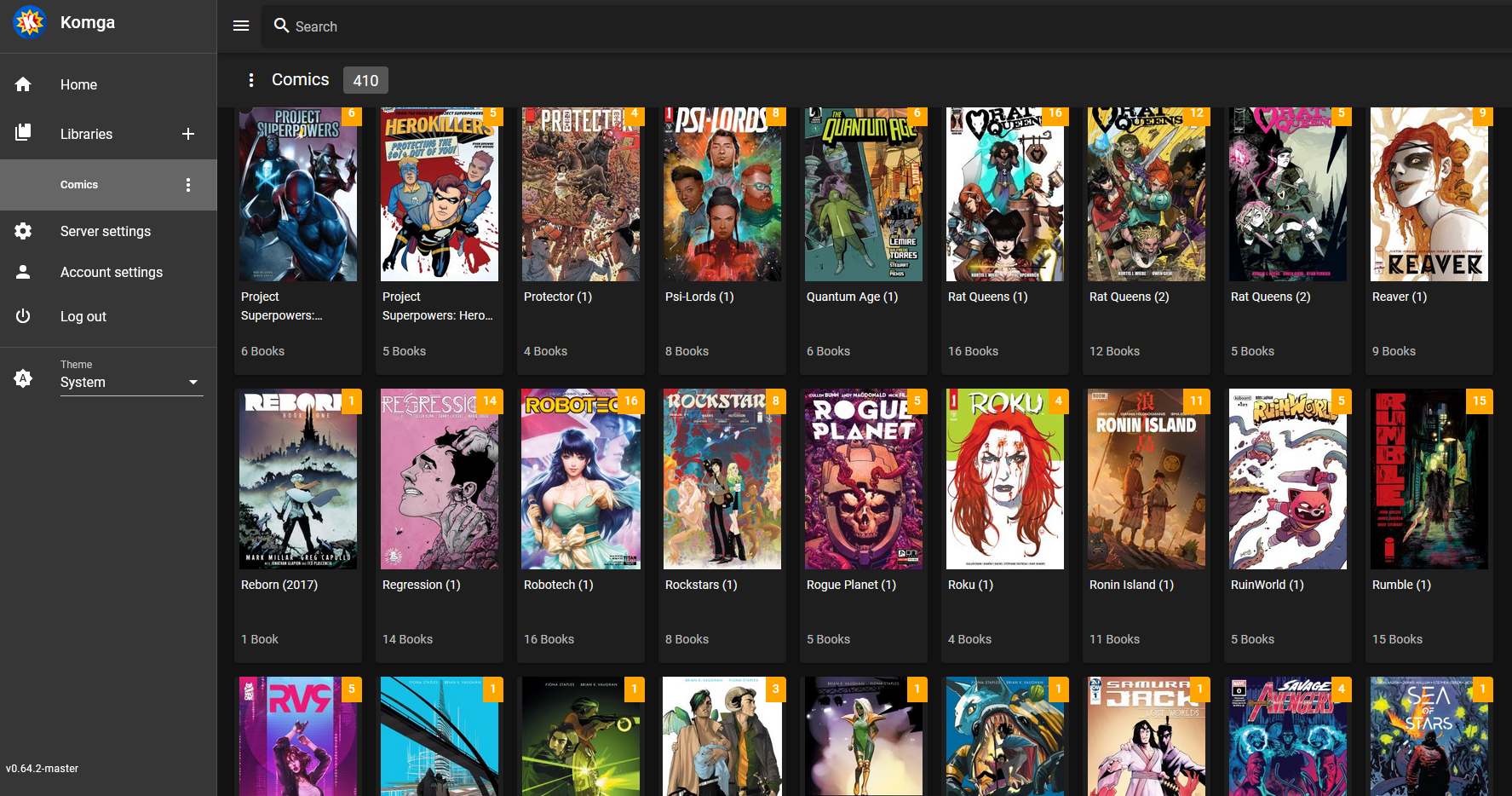
Komga is a free and open source comics/mangas server that provides an intuitive platform for comic and manga enthusiasts. It allows you to browse libraries, series, and books via a responsive web UI that is compatible with desktops, tablets, and phones. With Komga, you can easily organize your library with collections and read lists, and…

Your infrastructureAutomatic HTTPSNo lock-in

Screenshots

A closer look at Komga.

Komga screenshot 1

Setup time

A few minutes

Deployment

Your own server

Services

1 connected service

Why Komga

Everything you need, running where you choose.

Get the full Komga experience with Easypanel handling the repetitive infrastructure work around it.

Library Browsing
Browse libraries, series and books via a responsive web UI that works on desktop, tablets and phones.
Library Organization
Organize your library with collections and read lists.
Metadata Editing
Edit metadata for your series and books. Import embedded metadata automatically.
REST API
Komga offers a REST API, allowing various tools and scripts to interact with it.
File Download
Download book files, whole series, or read lists directly from the app.
Import Books
Import books from outside your libraries directly into your series folder.
How it works

From template to live app in three steps.

Easypanel turns the template into real services, storage, and domains on the server you already control.

Already have Easypanel? Open your dashboard at the URL or IP of your own installation.

Installation guide
1
Open your dashboard
Visit the URL or IP of your Easypanel installation and choose the target project.
2
Choose Komga
Open Templates, select Komga, then review its service names and configuration.
3
Deploy and open your app
Easypanel starts every service and provisions an HTTPS domain for you.
Installation options
The template asks for these values before creating your services.
OptionDefaultRequired

App Service Name

komgaRequired

App Service Image

gotson/komga:1.24.4Required
Resources
Project documentation and source code.
Latest template update
May 4, 2026

Version bumped to 1.24.4

Questions

Deploy with confidence.

The template handles the application setup while Easypanel keeps the infrastructure understandable and under your control.

Keep exploring

Related templates

Browse all
Ubooquity logo
Ubooquity
Ubooquity is a free, lightweight and easy-to-use home server for your comics and ebooks. It provides a clean web interface to browse, read, and organize your digital library from any device. Ubooquity supports various formats including CBZ, CBR, CB7, PDF, EPUB, and many more. It features user management, reading progress tracking, and can serve your media collection to multiple users simultaneously. The server includes both a library interface for browsing and an admin interface for configuration, making it perfect for managing your digital book and comic collection at home.
View template
Grimmory logo
Grimmory
Grimmory is a self-hosted digital library for serious readers and a community fork of Booklore. It lets you organize, read, and manage books across multiple formats including EPUB, MOBI, AZW3, PDF, CBZ, and audiobook formats. Features include metadata enrichment, a built-in browser reader, Kobo and KOReader device sync, OPDS catalog, multi-user support, and a BookDrop watched folder for automatic imports.
View template
MediaManager logo
MediaManager
MediaManager is a self-hosted media management application designed to help you organize, catalog, and manage your media collection. The application provides a clean web interface for browsing and managing your media files including movies, TV shows, music, and other digital content. With support for custom metadata, tagging, and categorization, MediaManager makes it easy to keep your media library organized and accessible. The application features automatic media scanning, metadata extraction, thumbnail generation, and search capabilities to quickly find content in large collections. Built with a PostgreSQL backend for reliable data storage, MediaManager can handle extensive media libraries with thousands of items. The flexible configuration system allows you to customize media directories, scanning behavior, and display preferences to match your needs. Perfect for home media enthusiasts who want to organize their digital collections, content creators managing large media archives, small organizations needing a simple media asset management solution, or anyone looking for a lightweight self-hosted alternative to complex media management systems.
View template
Komga logo
Ready to deploy Komga?
Open your own Easypanel dashboard, choose Komga from Templates, and review the deployment options.