All templates

Deploy Moodle on your own server.

Moodle logo

Moodle is a robust, scalable, and open-source learning management system (LMS) designed to provide educators and learners with a customizable platform to create and deliver personalized learning experiences. With Moodle, you can manage courses, track progress, and collaborate using a variety of tools like forums, assignments, and…

Your infrastructureAutomatic HTTPSNo lock-in

Screenshots

A closer look at Moodle.

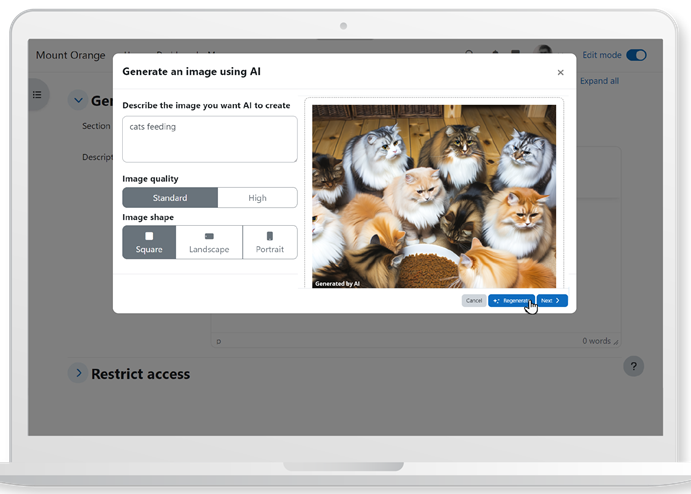
Moodle screenshot 1

Setup time

A few minutes

Deployment

Your own server

Services

2 connected services

Why Moodle

Everything you need, running where you choose.

Get the full Moodle experience with Easypanel handling the repetitive infrastructure work around it.

Course Management
Moodle provides extensive tools for managing courses, including assignments, quizzes, and tracking student progress.
Collaboration Tools
Moodle offers forums, chats, and group activities to facilitate collaboration and communication among users.
Mobile-Friendly
Moodle’s mobile app allows users to access their courses and learning materials on the go, ensuring seamless learning experiences across devices.
Personalized Learning Experience
Moodle enables educators to create customized learning environments for their students, enhancing engagement and improving outcomes.
Scalable and Flexible
Moodle can scale from small classes to large organizations and integrates with various third-party tools and plugins to meet diverse needs.
Open Source and Free
Moodle is distributed under the GNU General Public License, ensuring that it remains free and open-source, empowering communities worldwide to improve education.
How it works

From template to live app in three steps.

Easypanel turns the template into real services, storage, and domains on the server you already control.

Already have Easypanel? Open your dashboard at the URL or IP of your own installation.

Installation guide
1
Open your dashboard
Visit the URL or IP of your Easypanel installation and choose the target project.
2
Choose Moodle
Open Templates, select Moodle, then review its service names and configuration.
3
Deploy and open your app
Easypanel starts every service and provisions an HTTPS domain for you.
Installation options
The template asks for these values before creating your services.
OptionDefaultRequired

App Service Name

moodleRequired

App Service Image

bitnamilegacy/moodle:5.0.2Required
Resources
Project documentation and source code.
Latest template update
Feb 6, 2026

Version bumped to 5.0.2

Questions

Deploy with confidence.

The template handles the application setup while Easypanel keeps the infrastructure understandable and under your control.

Keep exploring

Related templates

Browse all
Frappe LMS logo
Frappe LMS
LMS (Learning Management System) is a comprehensive educational platform built on the Frappe framework that enables organizations to create, manage, and deliver online learning content. The system provides course management, student enrollment, progress tracking, assessments, and interactive learning features. Built with modern web technologies, it offers a robust and scalable solution for educational institutions, corporate training programs, and online learning platforms. The Frappe-based architecture ensures reliability, extensibility, and ease of customization for specific learning requirements.
View template
Leantime logo
Leantime
Leantime is an open-source project management system designed for startups and small teams. It offers a simple and intuitive interface to manage tasks, projects, and team collaboration efficiently. With Leantime, you can organize your work using timelines, kanban boards, and task lists. It also includes features like time tracking, milestones, and idea boards to streamline project workflows. Leantime supports integrations with various third-party tools, making it a flexible and scalable solution. Its emphasis on usability and simplicity ensures that teams can focus on productivity and achieving goals. Leantime is distributed under an open-source license, allowing for customization to meet the unique needs of any organization.
View template
Convertx logo
Convertx
Convertx is a free, open-source application designed to provide a fast, lightweight media conversion tool that you can use on your desktop or integrate into your workflows. It offers a range of features including support for multiple file formats, batch processing, video trimming, audio extraction, and format customization. It also supports hot-reloading of tasks and notifications upon completion.
View template
Moodle logo
Ready to deploy Moodle?
Open your own Easypanel dashboard, choose Moodle from Templates, and review the deployment options.