Deploy Operately on your own server.

Operately logo

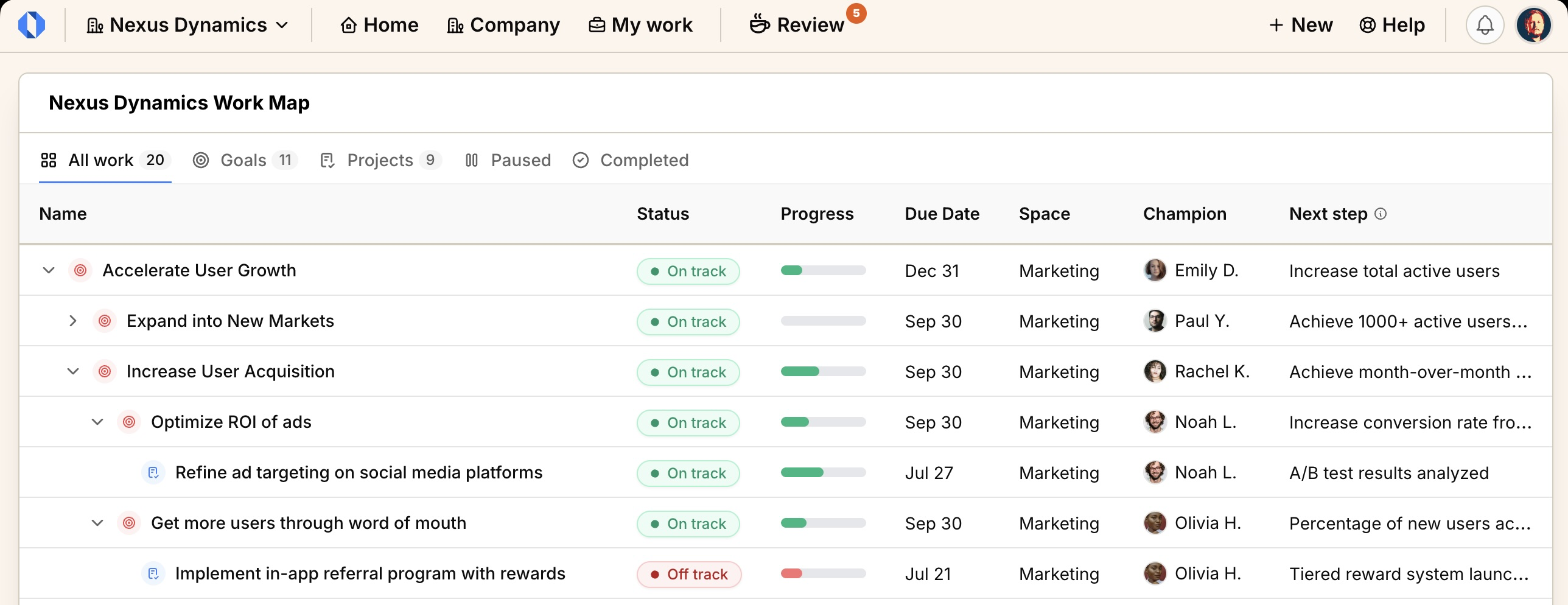
Operately is an open-source company operating system for managing goals, projects, and work reviews. It gives every team a shared work map of goals and projects, with structured check-ins and reviews instead of status meetings.

Your infrastructureAutomatic HTTPSNo lock-in

Screenshots

A closer look at Operately.
Operately screenshot 1

Setup time

A few minutes

Deployment

Your own server

Services

2 connected services

Why Operately

Everything you need, running where you choose.

Get the full Operately experience with Easypanel handling the repetitive infrastructure work around it.

Goals & Projects
Nest goals and projects arbitrarily deep, each with an owner, status, and due date.
Company Review
A weekly review queue surfaces exactly what needs your attention across the company.
Rich Discussions
Threaded discussions and documents attached directly to work items.
Shared Work Map
Goals and projects in one hierarchical map instead of scattered docs and spreadsheets.
Async Reviews
Structured check-ins and reviews replace most status meetings.
No Limits
Open source with no seat limits or paywalled core features.
How it works

From template to live app in three steps.

Easypanel turns the template into real services, storage, and domains on the server you already control.

Already have Easypanel? Open your dashboard at the URL or IP of your own installation.

Installation guide
1
Open your dashboard
Visit the URL or IP of your Easypanel installation and choose the target project.
2
Choose Operately
Open Templates, select Operately, then review its service names and configuration.
3
Deploy and open your app
Easypanel starts every service and provisions an HTTPS domain for you.
Installation options
The template asks for these values before creating your services.
OptionDefaultRequired

App Service Name

operatelyRequired

App Service Image

operately/operately:1.9.0Required

Allow Signup With Email

trueOptional

SMTP Server

Optional. Required to send invitations and notifications.

—Optional

SMTP Port

587Optional

SMTP Username

—Optional

SMTP Password

Set during installOptional

SMTP Use SSL

falseOptional
Resources
Project documentation and source code.
Latest template update
Sep 3, 2026

first release

Questions

Deploy with confidence.

The template handles the application setup while Easypanel keeps the infrastructure understandable and under your control.

Keep exploring

Related templates

Browse all
4ga Boards logo
4ga Boards
4ga Boards is a modern, open-source project management and collaboration platform inspired by Trello. It provides a powerful Kanban-style board system for organizing tasks, projects, and workflows. With its intuitive drag-and-drop interface, 4ga Boards makes it easy to visualize work, track progress, and collaborate with teams. The application features customizable boards, lists, and cards, along with support for attachments, user avatars, and project backgrounds. Built with modern web technologies, 4ga Boards offers a seamless experience for managing projects of any size. It's perfect for teams looking for a self-hosted alternative to commercial project management tools, providing full control over your data and workflows. Whether you're managing software development sprints, marketing campaigns, or personal todo lists, 4ga Boards provides the flexibility and features you need.
View template
Eigenfocus logo
Eigenfocus
Eigenfocus is a self-hosted project management tool built around boards, issues, and time tracking, without the bloat of larger tools like Jira or Linear. It has no built-in login system by design, since it is meant for a single person or a small trusted team, so this template protects it with HTTP Basic Auth instead. Data is stored in SQLite on a persistent volume.
View template
Papra logo
Papra
Papra is a modern, open-source project management and collaboration platform designed to help teams organize their work, track progress, and collaborate effectively. It provides a comprehensive suite of tools for task management, team communication, file sharing, and project tracking in a single, integrated platform. Papra offers an intuitive interface with powerful features for managing complex projects and workflows.
View template
Operately logo
Ready to deploy Operately?
Open your own Easypanel dashboard, choose Operately from Templates, and review the deployment options.