All templates

Deploy SeatSurfing on your own server.

SeatSurfing logo

SeatSurfing is a comprehensive desk and room booking system that helps organizations manage their workspace efficiently. It provides a user-friendly interface for employees to book desks and meeting rooms, while giving administrators powerful tools to manage spaces, users, and bookings. The system includes features like real-time…

Your infrastructureAutomatic HTTPSNo lock-in

Screenshots

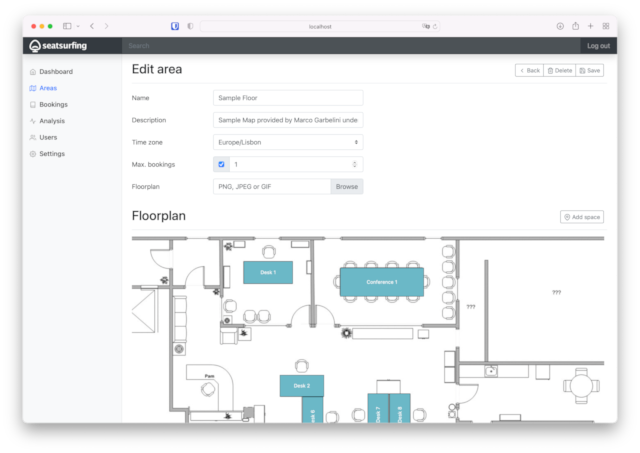
A closer look at SeatSurfing.
SeatSurfing screenshot 1

Setup time

A few minutes

Deployment

Your own server

Services

4 connected services

Why SeatSurfing

Everything you need, running where you choose.

Get the full SeatSurfing experience with Easypanel handling the repetitive infrastructure work around it.

Desk Booking
Book desks with real-time availability and flexible booking options.
Room Management
Manage meeting rooms with capacity tracking and equipment booking.
User Management
Manage users, roles, and permissions with ease.
Analytics
Track space utilization and generate reports for better decision making.
Mobile Support
Access the system from any device with responsive design.
Workspace Management
Efficiently manage desks and meeting rooms with real-time availability tracking.
How it works

From template to live app in three steps.

Easypanel turns the template into real services, storage, and domains on the server you already control.

Already have Easypanel? Open your dashboard at the URL or IP of your own installation.

Installation guide
1
Open your dashboard
Visit the URL or IP of your Easypanel installation and choose the target project.
2
Choose SeatSurfing
Open Templates, select SeatSurfing, then review its service names and configuration.
3
Deploy and open your app
Easypanel starts every service and provisions an HTTPS domain for you.
Installation options
The template asks for these values before creating your services.
OptionDefaultRequired

App Service Name

seatsurfingRequired

App Service Image

seatsurfing/backend:1.28.0Required

Booking Service Image

seatsurfing/booking-ui:1.28.0Required

Admin Service Image

seatsurfing/admin-ui:1.28.0Required
Resources
Project documentation and source code.
Latest template update
Apr 7, 2025

First Release

Questions

Deploy with confidence.

The template handles the application setup while Easypanel keeps the infrastructure understandable and under your control.

Keep exploring

Related templates

Browse all
QloApps logo
QloApps
QloApps is a comprehensive hotel booking and property management system built on PrestaShop. It provides a complete solution for hoteliers to manage their properties, bookings, and customers. The system includes features like room management, booking engine, customer management, and payment processing. QloApps is designed to help hotels streamline their operations and improve guest experience.
View template
Castopod logo
Castopod
Castopod is an open-source hosting platform made for podcasters who want full control over their content. It provides a comprehensive solution for creating, managing, and distributing podcasts with features like built-in analytics, automatic RSS feed generation, and support for the ActivityPub protocol for social interactions. Castopod helps podcasters save time with automatic episode publishing to podcast platforms and social media. The platform includes powerful tools for audience engagement, SEO optimization, and monetization options. With its modern, intuitive interface, Castopod makes podcast hosting accessible while giving creators complete ownership of their content and audience data.
View template
Crontab Guru logo
Crontab Guru
Crontab Guru is a simple web interface for managing and testing cron expressions. It provides an intuitive dashboard for creating, editing, and validating crontab entries with real-time feedback. Perfect for system administrators and developers who need to schedule tasks and want to ensure their cron expressions are correct before deployment.
View template
SeatSurfing logo
Ready to deploy SeatSurfing?
Open your own Easypanel dashboard, choose SeatSurfing from Templates, and review the deployment options.