All templates

Deploy Snappymail on your own server.

Snappymail logo

SnappyMail is a lightweight, fast, and self-hosted webmail client designed for efficient email management. Built with a focus on speed and security, SnappyMail offers a clean user interface, seamless IMAP integration, and multi-account support. It is optimized for both desktop and mobile use, providing a smooth and responsive email…

Your infrastructureAutomatic HTTPSNo lock-in

Screenshots

A closer look at Snappymail.
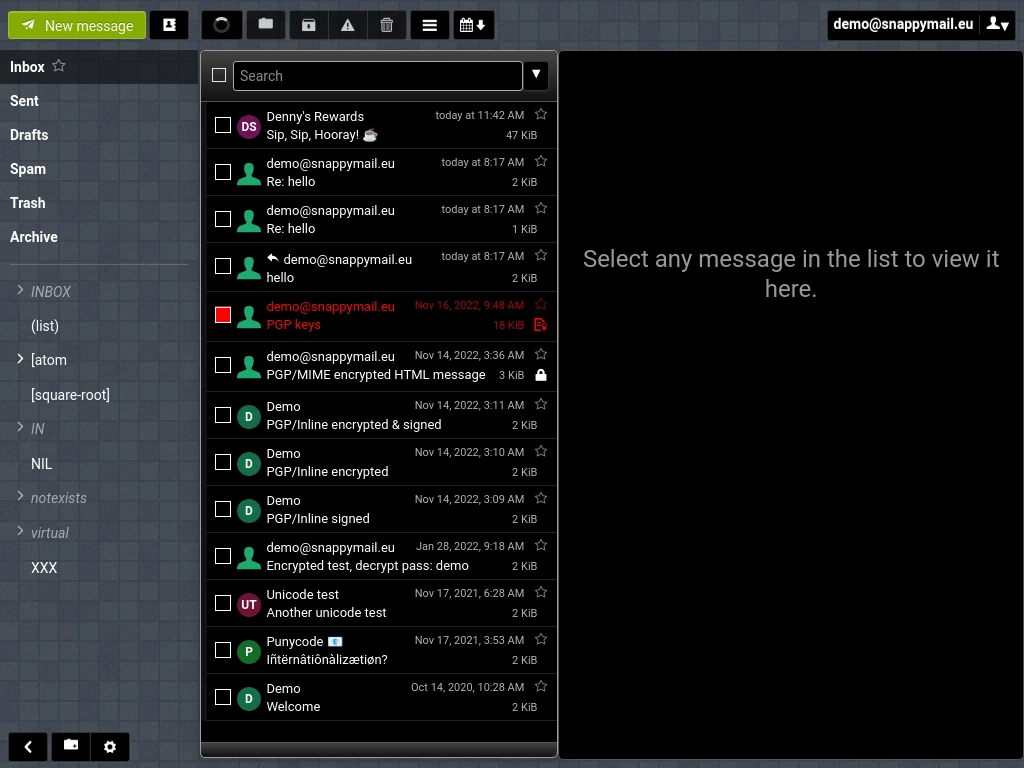
Snappymail screenshot 1

Setup time

A few minutes

Deployment

Your own server

Services

1 connected service

Why Snappymail

Everything you need, running where you choose.

Get the full Snappymail experience with Easypanel handling the repetitive infrastructure work around it.

IMAP and SMTP Support
SnappyMail seamlessly integrates with IMAP and SMTP servers, making it compatible with most email providers.
PGP Encryption
The built-in PGP encryption feature allows users to send and receive encrypted emails for enhanced security.
Customizable UI
SnappyMail offers various themes and customization options to personalize the email interface.
Mobile-Friendly Design
The responsive UI adapts to different screen sizes, ensuring a seamless experience across desktop and mobile devices.
Advanced Email Features
Includes functionalities such as custom folders, message filtering, and auto-completion for improved email management.
Fast and Lightweight
SnappyMail is optimized for speed and efficiency, ensuring a smooth and responsive email experience, even on low-resource servers.
How it works

From template to live app in three steps.

Easypanel turns the template into real services, storage, and domains on the server you already control.

Already have Easypanel? Open your dashboard at the URL or IP of your own installation.

Installation guide
1
Open your dashboard
Visit the URL or IP of your Easypanel installation and choose the target project.
2
Choose Snappymail
Open Templates, select Snappymail, then review its service names and configuration.
3
Deploy and open your app
Easypanel starts every service and provisions an HTTPS domain for you.
Installation options
The template asks for these values before creating your services.
OptionDefaultRequired

App Service Name

snappymailRequired

App Service Image

djmaze/snappymail:v2.38.2Required
Resources
Project documentation and source code.
Latest template update
Jan 31, 2025

First Release

Questions

Deploy with confidence.

The template handles the application setup while Easypanel keeps the infrastructure understandable and under your control.

Snappymail logo
Ready to deploy Snappymail?
Open your own Easypanel dashboard, choose Snappymail from Templates, and review the deployment options.