All templates

Deploy Sonarr on your own server.

Sonarr logo

Sonarr is a Personal Video Recorder (PVR) designed for Usenet and BitTorrent users. It monitors multiple RSS feeds for new episodes of your favorite shows and automatically grabs, sorts, and renames them. Sonarr can also be configured to automatically upgrade the quality of files already downloaded when a better quality format becomes…

Your infrastructureAutomatic HTTPSNo lock-in

Screenshots

A closer look at Sonarr.

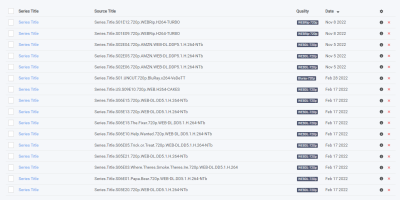
Sonarr screenshot 1

Setup time

A few minutes

Deployment

Your own server

Services

1 connected service

Why Sonarr

Everything you need, running where you choose.

Get the full Sonarr experience with Easypanel handling the repetitive infrastructure work around it.

Calendar
See all your upcoming episodes in one convenient location. This feature allows you to keep track of your shows and never miss an episode.
Manual Search
Find all the releases, choose the one you want and send it right to your download client. This gives you full control over what you download.
Episode Renaming
Sonarr offers fully configurable episode renaming. This feature helps you to keep your library organized in the way you prefer.
Integration
Sonarr provides full integration with SABnzbd and NZBGet, as well as with Kodi and Plex for notifications, library updates, and metadata.
Support for Specials and Multi-Episode Releases
Sonarr fully supports specials and multi-episode releases, ensuring you get every piece of content you want from your favorite shows.
Automated TV Show Management
Sonarr is a Personal Video Recorder (PVR) that automates the process of downloading your favorite TV shows. It monitors multiple RSS feeds for new episodes and grabs, sorts, and renames them for your convenience.
How it works

From template to live app in three steps.

Easypanel turns the template into real services, storage, and domains on the server you already control.

Already have Easypanel? Open your dashboard at the URL or IP of your own installation.

Installation guide
1
Open your dashboard
Visit the URL or IP of your Easypanel installation and choose the target project.
2
Choose Sonarr
Open Templates, select Sonarr, then review its service names and configuration.
3
Deploy and open your app
Easypanel starts every service and provisions an HTTPS domain for you.
Installation options
The template asks for these values before creating your services.
OptionDefaultRequired

App Service Name

sonarrRequired

App Service Image

linuxserver/sonarr:4.0.16Required
Resources
Project documentation and source code.
Latest template update
Dec 29, 2025

Version bumped to 4.0.16

Questions

Deploy with confidence.

The template handles the application setup while Easypanel keeps the infrastructure understandable and under your control.

Keep exploring

Related templates

Browse all
Radarr logo
Radarr
Radarr is a movie collection manager designed for Usenet and BitTorrent users. It monitors multiple RSS feeds for new movies and interfaces with clients and indexers to grab, sort, and rename them. Radarr also has the ability to automatically upgrade the quality of existing files in your library when a better quality format becomes available. The app features a calendar to see all your upcoming movies in one place, manual search to find all the releases and choose the one you want, and automatic handling of failed downloads. Radarr ensures you get the right release every time with its custom formats feature, which allows fine control over release prioritization and selection. It also supports major platforms like Windows, Linux, macOS, and others.
View template
Readarr logo
Readarr
Readarr is an ebook and audiobook collection manager designed for Usenet and BitTorrent users. It monitors multiple RSS feeds for new ebooks and audiobooks and interfaces with clients and indexers to grab, sort, and rename them. Readarr also has the ability to automatically upgrade the quality of existing files in your library when a better quality format becomes available. The app features a calendar to see all your upcoming releases in one place, manual search to find all the releases and choose the ones you want, and automatic handling of failed downloads. Readarr ensures you get the right release every time with its custom formats feature, which allows fine control over release prioritization and selection. It also supports major platforms like Windows, Linux, macOS, and others.
View template
Lidarr logo
Lidarr
Lidarr is an audio collection manager designed for Usenet and BitTorrent users. It monitors multiple RSS feeds for new music and interfaces with clients and indexers to grab, sort, and rename albums and songs. Lidarr also has the capability to automatically upgrade the quality of existing tracks in your library when a better quality format becomes available. The app features a calendar to see all your upcoming releases in one place, manual search to find all the releases and choose the ones you want, and automatic handling of failed downloads. Lidarr ensures you get the right release every time with its custom formats feature, which allows fine control over release prioritization and selection. It also supports major platforms like Windows, Linux, macOS, and others.
View template
Sonarr logo
Ready to deploy Sonarr?
Open your own Easypanel dashboard, choose Sonarr from Templates, and review the deployment options.