All templates

Deploy Teable on your own server.

Teable logo

Teable is a powerful, self-hosted service designed for managing team collaboration and projects efficiently. It offers a clean and user-friendly interface, supports plugins for extended functionality, and provides detailed analytics on team activities. With Teable, you can maintain full control over your data and workflows.

Your infrastructureAutomatic HTTPSNo lock-in

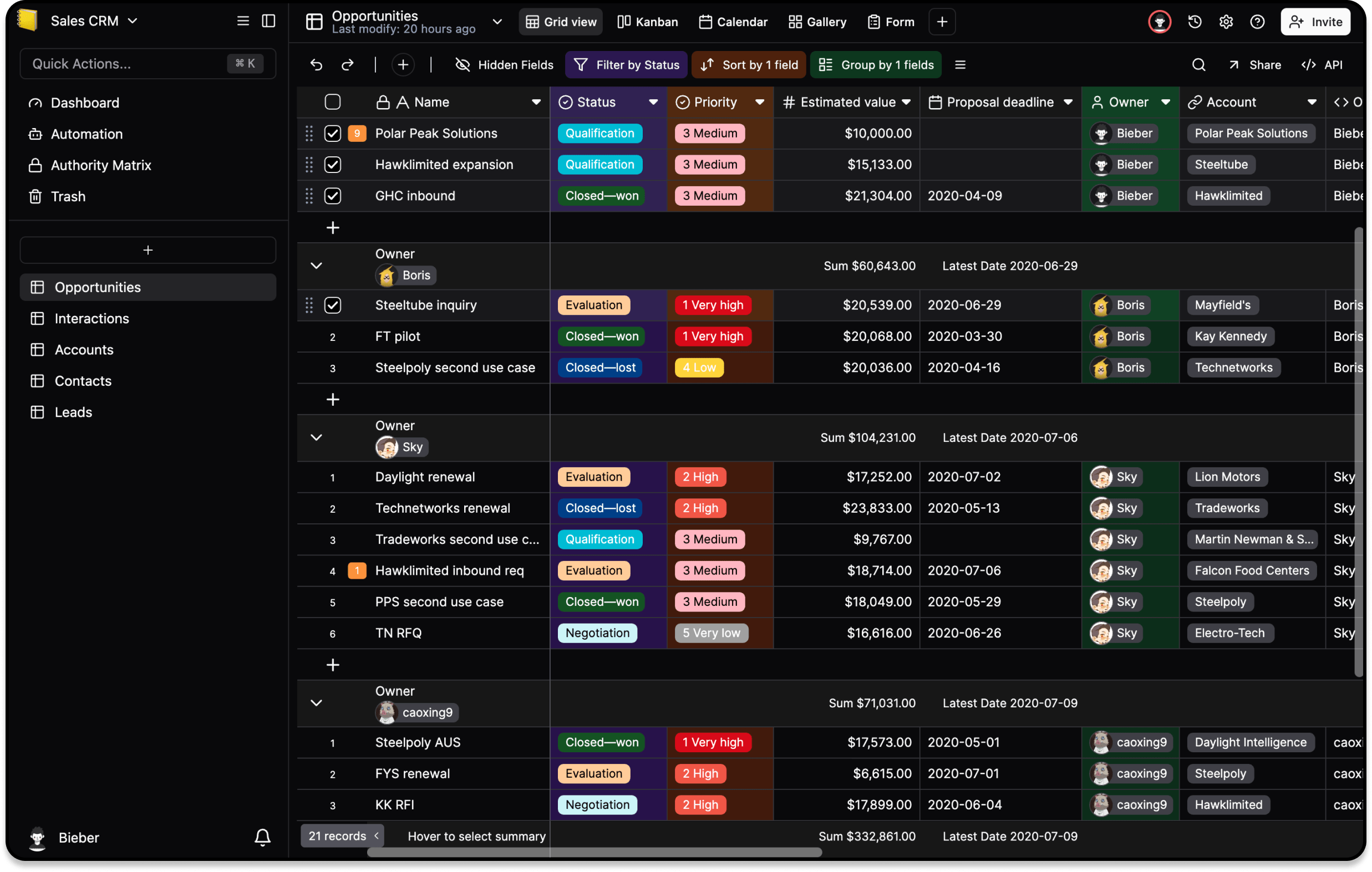
Screenshots

A closer look at Teable.

Teable screenshot 1

Setup time

A few minutes

Deployment

Your own server

Services

3 connected services

Why Teable

Everything you need, running where you choose.

Get the full Teable experience with Easypanel handling the repetitive infrastructure work around it.

API Access
Integrate Teable with other tools using its flexible API for programmatic access.
Plugin Support
Extend Teable’s functionality with various plugins to meet specific team needs.
Activity Analytics
Gain insights into project progress, team activities, and overall performance.
Task Management
Organize tasks, set priorities, and track progress in one place for effective project management.
Efficient Collaboration
Teable simplifies team collaboration and project management through a unified platform.
Self-Hosted Solution
Stay in control of your data with a self-hosted service, ensuring privacy and flexibility.
How it works

From template to live app in three steps.

Easypanel turns the template into real services, storage, and domains on the server you already control.

Already have Easypanel? Open your dashboard at the URL or IP of your own installation.

Installation guide
1
Open your dashboard
Visit the URL or IP of your Easypanel installation and choose the target project.
2
Choose Teable
Open Templates, select Teable, then review its service names and configuration.
3
Deploy and open your app
Easypanel starts every service and provisions an HTTPS domain for you.
Installation options
The template asks for these values before creating your services.
OptionDefaultRequired

App Service Name

teableRequired

App Service Image

ghcr.io/teableio/teable:bfd290f274cf8b0cc1defe9e1e6fd2b6826fed6bRequired

Migration Service Image

ghcr.io/teableio/teable-db-migrate:bfd290f274cf8b0cc1defe9e1e6fd2b6826fed6bRequired

Enable Arm

falseOptional
Resources
Project documentation and source code.
Latest template update
Feb 24, 2026

Version bumped to bfd290f274cf8b0cc1defe9e1e6fd2b6826fed6b

Questions

Deploy with confidence.

The template handles the application setup while Easypanel keeps the infrastructure understandable and under your control.

Keep exploring

Related templates

Browse all
Papra logo
Papra
Papra is a modern, open-source project management and collaboration platform designed to help teams organize their work, track progress, and collaborate effectively. It provides a comprehensive suite of tools for task management, team communication, file sharing, and project tracking in a single, integrated platform. Papra offers an intuitive interface with powerful features for managing complex projects and workflows.
View template
YOURLS logo
YOURLS
YOURLS (Your Own URL Shortener) is a powerful, self-hosted service designed for creating and managing short URLs. It provides a clean and simple interface, supports plugins for extended functionality, and offers detailed link tracking analytics. With YOURLS, you can maintain control over your short links and branding. The application is accessible via your host on ports 8080 and 8081. This container is based on Docker Baseimage KasmVNC, providing additional environment variables and configurations for enhanced flexibility. It also supports the docker manifest for multi-platform awareness, ensuring the correct image for your architecture.
View template
Kan logo
Kan
Kan is a self-hosted Kanban app (Trello-style) built with Next.js, tRPC, Better Auth, and PostgreSQL. It supports boards, workspaces, labels, comments, Trello import, and optional email, Redis, S3, and OAuth. The published web container does not apply database migrations on startup; upstream expects a separate migrate image (Drizzle) to run before the web process, matching their Docker Compose stack.
View template
Teable logo
Ready to deploy Teable?
Open your own Easypanel dashboard, choose Teable from Templates, and review the deployment options.