All templates

Deploy WPS Office on your own server.

WPS Office logo

WPS Office is a comprehensive office suite that is lightweight yet feature-rich. It offers high compatibility and a range of professional office software tools. With WPS Office, you can edit files in Writer, Presentation, Spreadsheet, and PDF, enhancing your work efficiency. The application can be accessed at your host on ports 3000 and…

Your infrastructureAutomatic HTTPSNo lock-in

Screenshots

A closer look at WPS Office.
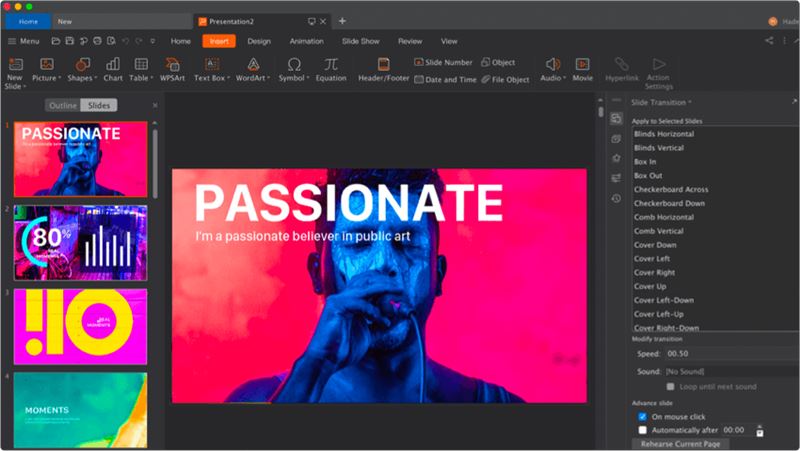
WPS Office screenshot 1

Setup time

A few minutes

Deployment

Your own server

Services

1 connected service

Why WPS Office

Everything you need, running where you choose.

Get the full WPS Office experience with Easypanel handling the repetitive infrastructure work around it.

Writer
Edit and create documents with advanced formatting and editing tools.
Presentation
Create and deliver professional presentations with customizable templates and multimedia support.
Spreadsheet
Manage and analyze data with powerful spreadsheet tools, including formulas, charts, and data manipulation functions.
PDF
Edit and annotate PDF files, convert files to PDF format, and fill out PDF forms.
Comprehensive Office Suite
WPS Office is a feature-rich office suite that includes tools for editing files in Writer, Presentation, Spreadsheet, and PDF formats.
High Compatibility
WPS Office has high compatibility with other office software, allowing you to easily edit and collaborate on files with others.
How it works

From template to live app in three steps.

Easypanel turns the template into real services, storage, and domains on the server you already control.

Already have Easypanel? Open your dashboard at the URL or IP of your own installation.

Installation guide
1
Open your dashboard
Visit the URL or IP of your Easypanel installation and choose the target project.
2
Choose WPS Office
Open Templates, select WPS Office, then review its service names and configuration.
3
Deploy and open your app
Easypanel starts every service and provisions an HTTPS domain for you.
Installation options
The template asks for these values before creating your services.
OptionDefaultRequired

App Service Name

wps-officeRequired

App Service Image

lscr.io/linuxserver/wps-office:11.1.0Required
Resources
Project documentation and source code.
Latest template update
Jul 25, 2025

Version bumped to 11.1.0

Questions

Deploy with confidence.

The template handles the application setup while Easypanel keeps the infrastructure understandable and under your control.

Keep exploring

Related templates

Browse all
LibreOffice logo
LibreOffice
LibreOffice is a free and powerful office suite app that serves as a successor to OpenOffice.org. It features a clean interface and feature-rich tools that help you unleash your creativity and enhance your productivity. The app can be accessed at http://yourhost:3000/ or https://yourhost:3001/. It is designed to deliver a true lossless image at a high framerate to your web browser. The app also supports multiple architectures, ensuring that it can be used on a variety of platforms. This app is perfect for those who need a comprehensive office suite for their daily tasks.
View template
OnlyOffice logo
OnlyOffice
OnlyOffice is a self-hosted office suite that provides powerful document, spreadsheet, and presentation editing capabilities. It offers full compatibility with Microsoft Office formats and allows real-time document collaboration. Designed for businesses, teams, and individuals, OnlyOffice ensures secure, private, and efficient document management. It includes integration with various cloud storage services, supports plugins for extended functionality, and provides a modern web-based interface. OnlyOffice can be deployed on-premise or in the cloud and is ideal for organizations that need control over their document workflow. Additional features include a built-in document management system, mail integration, calendar, CRM tools, and a powerful API for automation.
View template
Gotenberg logo
Gotenberg
Gotenberg is a Docker-powered stateless API designed to handle PDF files. It offers a developer-friendly interface to interact with robust tools like Chromium and LibreOffice, enabling the conversion of various document formats such as HTML, Markdown, Word, Excel, and more into PDF files. The app also supports an asynchronous workflow with a webhook feature, allowing you to upload the output file to your preferred destination. Gotenberg is a modular platform, meaning you can customize each module according to your needs. Additionally, it provides the option to build your own Docker image by adding new tools and creating modules that offer new routes to the API.
View template
WPS Office logo
Ready to deploy WPS Office?
Open your own Easypanel dashboard, choose WPS Office from Templates, and review the deployment options.