All templates

Deploy ArchiveBox on your own server.

ArchiveBox logo

ArchiveBox is a self-hosted open-source internet archiving solution that allows you to save and browse webpages offline. It enables users to store full snapshots of web pages, including HTML, media, PDFs, and more, preserving them for future reference. ArchiveBox supports various input formats such as bookmarks, RSS feeds, and browser…

Your infrastructureAutomatic HTTPSNo lock-in

Screenshots

A closer look at ArchiveBox.
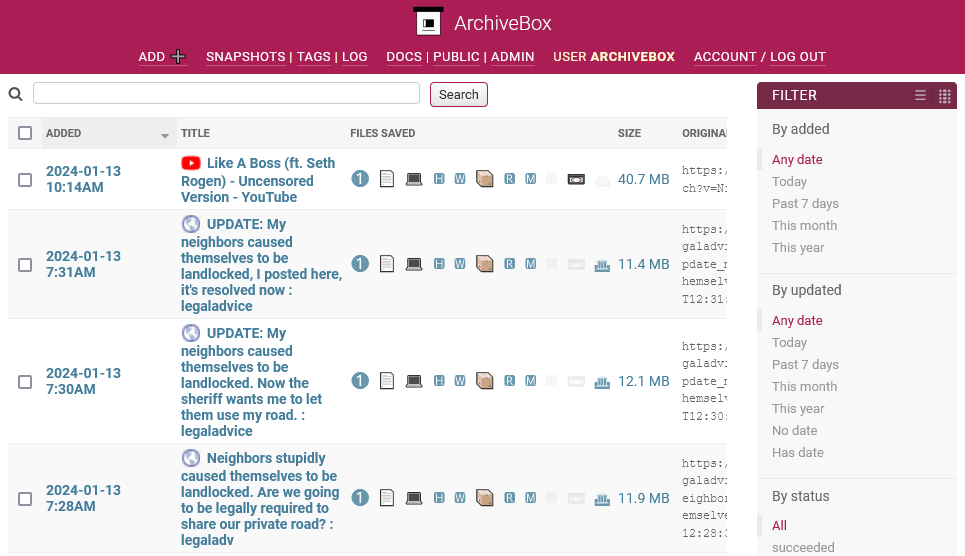
ArchiveBox screenshot 1

Setup time

A few minutes

Deployment

Your own server

Services

1 connected service

Why ArchiveBox

Everything you need, running where you choose.

Get the full ArchiveBox experience with Easypanel handling the repetitive infrastructure work around it.

Multi-Format Archiving
ArchiveBox saves pages in multiple formats, including HTML, screenshots, PDFs, and WARC files, ensuring robust long-term preservation.
Automation & API Access
ArchiveBox provides an API for programmatic archiving, allowing seamless integration with other tools and automated workflows.
Private & Public Archives
Users can control access by setting public or private modes, ensuring that sensitive data remains secure while allowing sharing of curated content.
Full-Text Search
The system enables fast and efficient search across archived content, making it easy to retrieve specific information.
Self-Hosted & Open Source
ArchiveBox is self-hosted and fully open-source, giving users complete control over their data without relying on third-party services.
Webpage Archiving
ArchiveBox allows you to save full snapshots of web pages, including text, media, and interactive elements. This ensures long-term access to content even if the original webpage is deleted or altered.
How it works

From template to live app in three steps.

Easypanel turns the template into real services, storage, and domains on the server you already control.

Already have Easypanel? Open your dashboard at the URL or IP of your own installation.

Installation guide
1
Open your dashboard
Visit the URL or IP of your Easypanel installation and choose the target project.
2
Choose ArchiveBox
Open Templates, select ArchiveBox, then review its service names and configuration.
3
Deploy and open your app
Easypanel starts every service and provisions an HTTPS domain for you.
Installation options
The template asks for these values before creating your services.
OptionDefaultRequired

App Service Name

archiveboxRequired

App Service Image

archivebox/archivebox:0.7.3Required
Resources
Project documentation and source code.
Latest template update
May 6, 2026

Version bumped to 0.7.3

Questions

Deploy with confidence.

The template handles the application setup while Easypanel keeps the infrastructure understandable and under your control.

Keep exploring

Related templates

Browse all
LinkWarden logo
LinkWarden
LinkWarden is a powerful, self-hosted service designed for managing and archiving bookmarks. It provides an intuitive interface for organizing and accessing your saved links, supports advanced features for enhanced productivity, and offers detailed link preservation options. With LinkWarden, you can maintain control over your bookmarks and ensure they remain accessible.
View template
Browserless logo
Browserless
Browserless is a powerful self-hosted headless browser service designed to automate web interactions. It enables developers to run headless Chrome instances efficiently for web scraping, testing, PDF generation, and automation tasks. Browserless supports Puppeteer, Playwright, and Selenium, providing a scalable and secure environment for handling complex browser automation tasks. The application is optimized for performance, offering session management, request queuing, and robust security features. With Browserless, developers can offload browser-based automation to a dedicated service, reducing local resource consumption and improving workflow efficiency.
View template
Usermemos logo
Usermemos
Usermemos is a lightweight, self-hosted note-taking application designed for simplicity, accessibility, and efficiency. It provides an intuitive interface for capturing and organizing memos with support for markdown formatting, tagging, and searching. This app is a Docker containerized version of Usermemos, making it easy to deploy and manage in various environments. The app supports multiple architectures, including x86-64 and arm64, and can be accessed via HTTP or HTTPS. It offers additional environment variables and configurations to enable customization. Usermemos is designed for both personal and collaborative usage, ensuring that users can manage their notes effectively.
View template
ArchiveBox logo
Ready to deploy ArchiveBox?
Open your own Easypanel dashboard, choose ArchiveBox from Templates, and review the deployment options.