All templates

Deploy Change Detection on your own server.

Change Detection logo

Changedetection.io is an intelligent tool designed to monitor changes on websites. It is perfect for smart shoppers, data journalists, research engineers, data scientists, security researchers, and more. The app allows you to watch up to 5,000 URLs and supports over 85 notification formats. It is capable of monitoring simple changes on a…

Your infrastructureAutomatic HTTPSNo lock-in

Screenshots

A closer look at Change Detection.

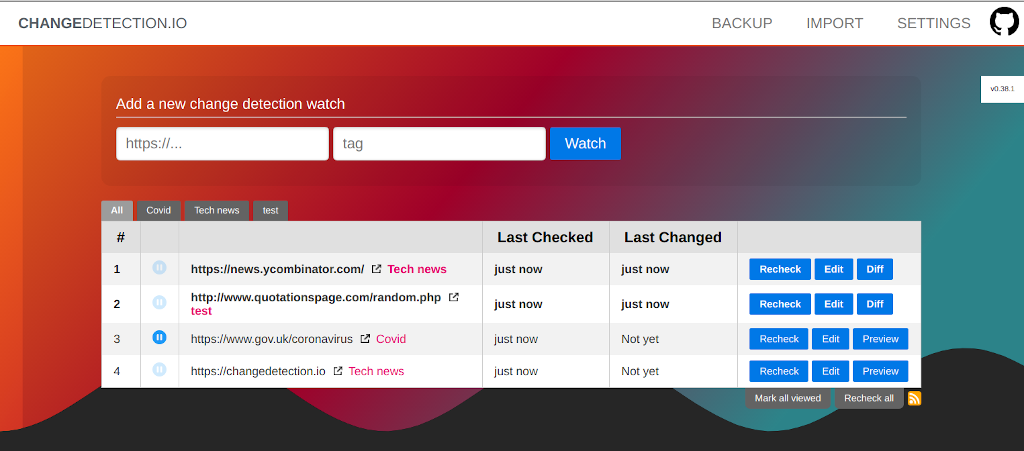
Change Detection screenshot 1

Setup time

A few minutes

Deployment

Your own server

Services

1 connected service

Why Change Detection

Everything you need, running where you choose.

Get the full Change Detection experience with Easypanel handling the repetitive infrastructure work around it.

PDF Text Support
Our app supports PDF text monitoring, allowing you to track and receive notifications when a PDF file undergoes text changes.
JSON and XML Monitoring
Stay updated with changes in JSON and XML data on websites. This feature is particularly useful for developers and data scientists.
Visual Selector Tool
Target specific parts of a webpage for monitoring using our Visual Selector tool. This feature allows you to focus on the content you're most interested in.
Interactive Browser Steps
Set up your change detection scenario by performing interactive browser steps such as filling in text boxes, clicking buttons, and more.
85+ Notification Formats Supported
Receive notifications in a format that suits you. Our app supports over 85 notification formats, including Discord, Email, Slack, Telegram, API calls, and many more.
Real-Time Website Change Detection
Stay ahead of the curve by receiving instant notifications when a website you're monitoring undergoes changes. This is particularly useful for tracking price changes, restock notifications, and more.
How it works

From template to live app in three steps.

Easypanel turns the template into real services, storage, and domains on the server you already control.

Already have Easypanel? Open your dashboard at the URL or IP of your own installation.

Installation guide
1
Open your dashboard
Visit the URL or IP of your Easypanel installation and choose the target project.
2
Choose Change Detection
Open Templates, select Change Detection, then review its service names and configuration.
3
Deploy and open your app
Easypanel starts every service and provisions an HTTPS domain for you.
Installation options
The template asks for these values before creating your services.
OptionDefaultRequired

App Service Name

changedetectionRequired

App Service Image

ghcr.io/dgtlmoon/changedetection.io:0.55.3Required
Resources
Project documentation and source code.
Latest template update
Apr 29, 2026

Version bumped to 0.55.3

Questions

Deploy with confidence.

The template handles the application setup while Easypanel keeps the infrastructure understandable and under your control.

Keep exploring

Related templates

Browse all
Statping-ng logo
Statping-ng
Statping is a web and app status monitoring tool designed for any type of project. It automatically fetches your application and generates a beautiful, feature-rich status page. This status page generator supports MySQL, Postgres, or SQLite on multiple operating systems, ensuring future-proof and resilient monitoring. If your server crashes, your Statping service will remain online to notify your users of downtime. Lightweight and fast, Statping is available for Linux, Mac, and Windows, and even on a Raspberry Pi. The mobile app, available on the App Store and Google Play, allows you to view services, receive notifications when a service is offline, and manage groups, users, services, and messages. Statping can run on any server, from Docker to AWS EC2, and offers custom SASS styling for complete customization of your status page. It includes email notification via SMTP and Slack integration, and allows you to create your own plugins to interact with every element of your status page. With its easy-to-use dashboard, you can monitor your websites and applications with a basic HTTP GET request or a POST request with your own JSON.
View template
GlitchTip logo
GlitchTip
GlitchTip is a simple, open-source error tracking application designed to collect, organize, and alert you about every error from your project in real time. It allows you to monitor your software's performance, track errors, and check your site's uptime all in one place. GlitchTip is compatible with Sentry client SDKs, offering a more straightforward operation. It provides a comprehensive error tracking system, reporting your website or application's exceptions, log messages, Content Security Policy violations, and more. With GlitchTip, you can also monitor your application's performance, identifying slow web requests, database calls, and other transactions. Additionally, it offers uptime monitoring, pinging your site and alerting you when it's not responding. GlitchTip is the perfect choice for those who value simplicity, affordability, and the freedom provided by open source.
View template
Tautuilli logo
Tautuilli
Tautulli is a powerful web application designed to monitor, analyze, and notify you about your Plex Media Server's activities. It runs alongside your Plex Media Server, tracking a variety of statistics including what has been watched, who watched it, when and where it was watched, and how it was watched. The app presents all these statistics in a clean, user-friendly interface with tables and graphs. Tautulli also allows you to monitor current activity on your Plex Media Server, log watch history for all your users, view streaming trends with intuitive graphs, trigger notifications or scripts from events on your Plex server, and keep track of when content is added to your Plex library. You can also create and send newsletters for recently added media, view and delete all synced content from your server, see detailed information on all of your media, and even download the official app to view activity and stats on the go. Tautulli is compatible with any system that supports python.

View template
Change Detection logo
Ready to deploy Change Detection?
Open your own Easypanel dashboard, choose Change Detection from Templates, and review the deployment options.