All templates

Deploy Collabora Office on your own server.

Collabora Office logo

Collabora Online is a powerful, flexible, and secure online office suite designed to break free from vendor lock-in and put you in full control of your documents. It offers a private office suite in the cloud, compatible with trillions of existing documents, and can be integrated into your own infrastructure or accessed via one of our…

Your infrastructureAutomatic HTTPSNo lock-in

Screenshots

A closer look at Collabora Office.
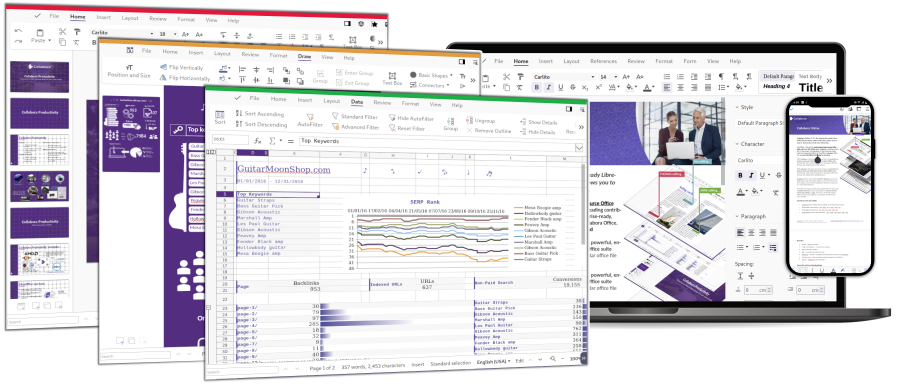
Collabora Office screenshot 1

Setup time

A few minutes

Deployment

Your own server

Services

1 connected service

Why Collabora Office

Everything you need, running where you choose.

Get the full Collabora Office experience with Easypanel handling the repetitive infrastructure work around it.

Collaborative Editing
Collabora Online offers collaborative editing with professional features. This allows multiple users to work on the same document simultaneously, enhancing productivity and efficiency.
Customizable Integration and User Interface
The app can be customized to integrate perfectly with your own solution. It also offers a flexible user interface that can be tailored to your needs.
Writer
Collabora Online’s text document editor provides a true WYSIWYG editing experience. You can open any document, add comments, track changes, format and style your pages with endless options.
Calc
From simple spreadsheets to advanced formulas, Calc can do it all. Create giant spreadsheets, add charts, sparklines and hyperlinks, and benefit from powerful multi-column sort and filter options.
Impress
Create impressive presentations with ease. Design attractive master slides, add text, images, tables and SmartArt, and collaboratively edit with your colleagues. Insert speaker notes, custom timings and transitions to engage your audience.
Draw
Draw shapes and diagrams, add text, charts and tables, insert fields and links. Comment and collaborate with others, then download as an image or pdf to insert into your documents and presentations.
How it works

From template to live app in three steps.

Easypanel turns the template into real services, storage, and domains on the server you already control.

Already have Easypanel? Open your dashboard at the URL or IP of your own installation.

Installation guide
1
Open your dashboard
Visit the URL or IP of your Easypanel installation and choose the target project.
2
Choose Collabora Office
Open Templates, select Collabora Office, then review its service names and configuration.
3
Deploy and open your app
Easypanel starts every service and provisions an HTTPS domain for you.
Installation options
The template asks for these values before creating your services.
OptionDefaultRequired

Username

Required

Password

Set during installRequired

App Service Name

collaboraRequired

App Service Image

collabora/code:25.04.9.4.1Required
Resources
Project documentation and source code.
Latest template update
Apr 29, 2026

Version bumped to 25.04.9.4.1

Questions

Deploy with confidence.

The template handles the application setup while Easypanel keeps the infrastructure understandable and under your control.

Keep exploring

Related templates

Browse all
OnlyOffice logo
OnlyOffice
OnlyOffice is a self-hosted office suite that provides powerful document, spreadsheet, and presentation editing capabilities. It offers full compatibility with Microsoft Office formats and allows real-time document collaboration. Designed for businesses, teams, and individuals, OnlyOffice ensures secure, private, and efficient document management. It includes integration with various cloud storage services, supports plugins for extended functionality, and provides a modern web-based interface. OnlyOffice can be deployed on-premise or in the cloud and is ideal for organizations that need control over their document workflow. Additional features include a built-in document management system, mail integration, calendar, CRM tools, and a powerful API for automation.
View template
WPS Office logo
WPS Office
WPS Office is a comprehensive office suite that is lightweight yet feature-rich. It offers high compatibility and a range of professional office software tools. With WPS Office, you can edit files in Writer, Presentation, Spreadsheet, and PDF, enhancing your work efficiency. The application can be accessed at your host on ports 3000 and 3001. This container is based on Docker Baseimage KasmVNC, which provides additional environment variables and run configurations to enable or disable specific functionality. The application also supports the docker manifest for multi-platform awareness, ensuring the correct image for your architecture is retrieved.
View template
LibreOffice logo
LibreOffice
LibreOffice is a free and powerful office suite app that serves as a successor to OpenOffice.org. It features a clean interface and feature-rich tools that help you unleash your creativity and enhance your productivity. The app can be accessed at http://yourhost:3000/ or https://yourhost:3001/. It is designed to deliver a true lossless image at a high framerate to your web browser. The app also supports multiple architectures, ensuring that it can be used on a variety of platforms. This app is perfect for those who need a comprehensive office suite for their daily tasks.
View template
Collabora Office logo
Ready to deploy Collabora Office?
Open your own Easypanel dashboard, choose Collabora Office from Templates, and review the deployment options.