All templates

Deploy DocuSeal on your own server.

DocuSeal logo

DocuSeal is an open source platform that provides secure and efficient digital document signing and processing. Create PDF forms to have them filled and signed online on any device with an easy-to-use, mobile-optimized web tool.

Your infrastructureAutomatic HTTPSNo lock-in

Screenshots

A closer look at DocuSeal.
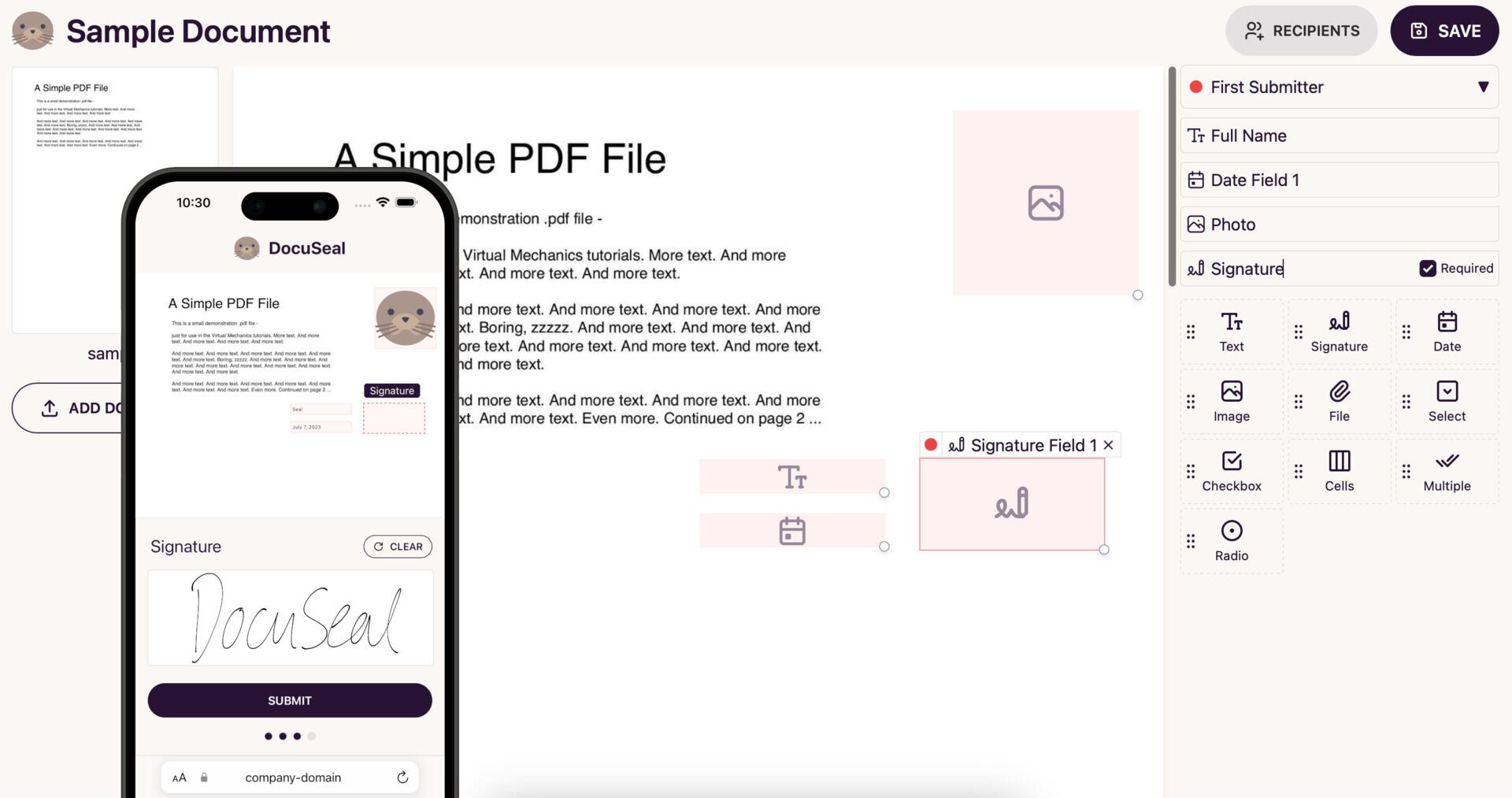
DocuSeal screenshot 1

Setup time

A few minutes

Deployment

Your own server

Services

2 connected services

Why DocuSeal

Everything you need, running where you choose.

Get the full DocuSeal experience with Easypanel handling the repetitive infrastructure work around it.

PDF form fields builder (WYSIWYG)
11 field types available (Signature, Date, File, Checkbox etc.)
Multiple submitters per document
Automated emails via SMTP
Files storage on disk or AWS S3, Google Storage, Azure Cloud
Automatic PDF eSignature
How it works

From template to live app in three steps.

Easypanel turns the template into real services, storage, and domains on the server you already control.

Already have Easypanel? Open your dashboard at the URL or IP of your own installation.

Installation guide
1
Open your dashboard
Visit the URL or IP of your Easypanel installation and choose the target project.
2
Choose DocuSeal
Open Templates, select DocuSeal, then review its service names and configuration.
3
Deploy and open your app
Easypanel starts every service and provisions an HTTPS domain for you.
Installation options
The template asks for these values before creating your services.
OptionDefaultRequired

App Service Name

docusealRequired

App Service Image

docuseal/docuseal:2.5.1Required

Database Service Name

docuseal-dbRequired
Resources
Project documentation and source code.
Latest template update
Apr 29, 2026

Version bumped to 2.5.1

Questions

Deploy with confidence.

The template handles the application setup while Easypanel keeps the infrastructure understandable and under your control.

Keep exploring

Related templates

Browse all
BentoPDF logo
BentoPDF
BentoPDF is a powerful self-hosted PDF manipulation and conversion service that provides a comprehensive API for working with PDF documents. It enables developers and teams to automate PDF operations including conversion, merging, splitting, compression, watermarking, and more through a simple REST API. Built with modern technologies, BentoPDF offers a web interface for manual operations and programmatic access for integration into your applications and workflows. The service supports converting various document formats to PDF, extracting text and images, adding annotations, and manipulating PDF metadata. With no external dependencies on third-party services, BentoPDF ensures your documents remain private and secure on your own infrastructure. Perfect for document management systems, automated report generation, form processing, digital archiving, and any application that requires reliable PDF handling capabilities without the costs and privacy concerns of cloud-based PDF services.
View template
StirlingPDF logo
StirlingPDF
StirlingPDF is an open-source PDF management tool designed to streamline PDF handling tasks for both individual users and businesses. It enables users to create, merge, split, compress, and convert PDF documents with ease. Built to support a wide range of platforms, including Linux, Windows, and macOS, StirlingPDF ensures flexibility and resilience for everyday PDF management. Its user-friendly interface and powerful backend make it suitable for both simple and complex PDF workflows. StirlingPDF can run on personal computers or be deployed on servers, offering seamless API access for integration into larger systems. Lightweight and efficient, StirlingPDF is ideal for individual users, small businesses, and large enterprises alike, ensuring reliable PDF manipulation without the need for costly subscriptions. It supports MySQL, PostgreSQL, or SQLite databases, providing robust data handling across various infrastructures.
View template
Seafile logo
Seafile
Seafile is a professional, open-source file synchronization and sharing platform with privacy protection and teamwork features. It provides secure file storage, synchronization, and sharing capabilities with end-to-end encryption, making it perfect for teams and organizations that need to collaborate on files while maintaining data security. Seafile supports file versioning, online editing, and mobile access across all platforms.
View template
DocuSeal logo
Ready to deploy DocuSeal?
Open your own Easypanel dashboard, choose DocuSeal from Templates, and review the deployment options.