All templates

Deploy EmailEngine on your own server.

EmailEngine logo

EmailEngine is a powerful email automation and integration tool designed to simplify email processing for applications. It provides a seamless interface for managing IMAP and SMTP connections, allowing applications to send, receive, and process emails efficiently. With built-in webhook support and extensive API capabilities, EmailEngine…

Your infrastructureAutomatic HTTPSNo lock-in

Screenshots

A closer look at EmailEngine.
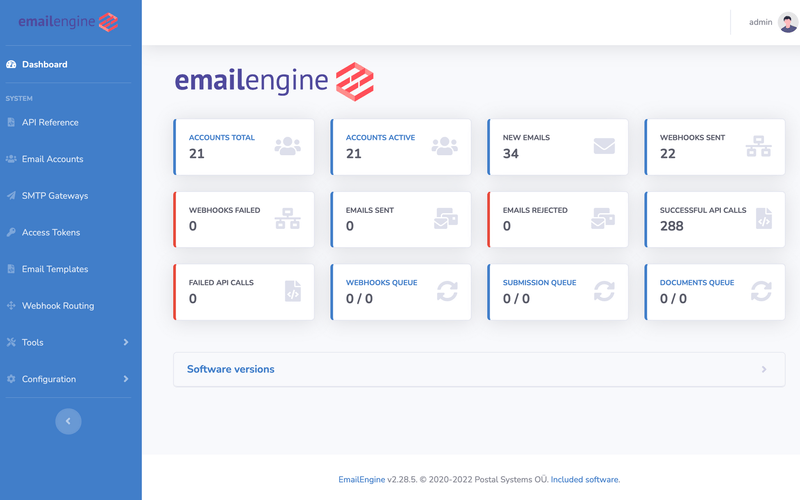
EmailEngine screenshot 1

Setup time

A few minutes

Deployment

Your own server

Services

2 connected services

Why EmailEngine

Everything you need, running where you choose.

Get the full EmailEngine experience with Easypanel handling the repetitive infrastructure work around it.

IMAP and SMTP Support
EmailEngine simplifies working with IMAP and SMTP, abstracting complexities and making email handling more efficient.
Webhook-Driven Processing
Automate email workflows with real-time webhooks for incoming and outgoing emails, reducing manual email processing.
Advanced Email Parsing
Extract email content, attachments, and metadata easily with built-in parsing tools, enabling better email workflow automation.
Secure Authentication
Supports OAuth2 and other authentication mechanisms to ensure secure email handling and access control.
Seamless Email Integration
EmailEngine provides a robust solution for integrating IMAP and SMTP functionality, allowing applications to manage emails effortlessly.
Webhook Support
Built-in webhook functionality enables real-time email event tracking, making it easy to trigger automated actions based on incoming or outgoing emails.
How it works

From template to live app in three steps.

Easypanel turns the template into real services, storage, and domains on the server you already control.

Already have Easypanel? Open your dashboard at the URL or IP of your own installation.

Installation guide
1
Open your dashboard
Visit the URL or IP of your Easypanel installation and choose the target project.
2
Choose EmailEngine
Open Templates, select EmailEngine, then review its service names and configuration.
3
Deploy and open your app
Easypanel starts every service and provisions an HTTPS domain for you.
Installation options
The template asks for these values before creating your services.
OptionDefaultRequired

App Service Name

emailengineRequired

App Service Image

postalsys/emailengine:v2.63.3Required

SMTP Message Submission

2525Required

IMAP Port

9993Required

SMTP Password

Set during installRequired
Resources
Project documentation and source code.
Latest template update
Apr 29, 2026

Version bumped to v2.63.3

Questions

Deploy with confidence.

The template handles the application setup while Easypanel keeps the infrastructure understandable and under your control.

Keep exploring

Related templates

Browse all
StirlingPDF logo
StirlingPDF
StirlingPDF is an open-source PDF management tool designed to streamline PDF handling tasks for both individual users and businesses. It enables users to create, merge, split, compress, and convert PDF documents with ease. Built to support a wide range of platforms, including Linux, Windows, and macOS, StirlingPDF ensures flexibility and resilience for everyday PDF management. Its user-friendly interface and powerful backend make it suitable for both simple and complex PDF workflows. StirlingPDF can run on personal computers or be deployed on servers, offering seamless API access for integration into larger systems. Lightweight and efficient, StirlingPDF is ideal for individual users, small businesses, and large enterprises alike, ensuring reliable PDF manipulation without the need for costly subscriptions. It supports MySQL, PostgreSQL, or SQLite databases, providing robust data handling across various infrastructures.
View template
Trigger logo
Trigger
Trigger.dev is a free and open-source platform that simplifies building workflows and automations directly within your codebase. It provides a powerful way to connect your application to APIs, schedule tasks, and manage real-time and delayed workflows with ease. By integrating seamlessly into your development process, Trigger.dev allows developers to focus on delivering high-value features instead of managing complex infrastructure. Its scalability and ease of use make it a great fit for modern web applications and cloud-based systems.
View template
Mautic logo
Mautic
Mautic is a powerful marketing automation platform designed to revolutionize the way businesses engage with their audience. Offering a comprehensive suite of features, Mautic enables marketers to automate and optimize their marketing strategies. The platform excels in open-source flexibility, allowing users to customize and extend its capabilities according to their unique needs. With a focus on lead tracking and nurturing, Mautic provides valuable insights into user behavior, enabling personalized and targeted campaigns for effective customer acquisition and retention. Its multi-channel marketing support ensures seamless engagement across various platforms, from email campaigns to social media interactions. Mautic's robust campaign management tools, email marketing module, analytics, and reporting features contribute to a data-driven approach, empowering marketers to refine their strategies and achieve optimal return on investment. Integration capabilities further enhance its functionality, ensuring a connected marketing ecosystem. Whether you're a marketing professional or a business owner, Mautic serves as a centralized solution to elevate and streamline your marketing efforts, fostering innovation and success.
View template
EmailEngine logo
Ready to deploy EmailEngine?
Open your own Easypanel dashboard, choose EmailEngine from Templates, and review the deployment options.