All templates

Deploy FileWizard on your own server.

FileWizard logo

FileWizard is a self hosted browser based utility for file conversion OCR and audio transcription. It wraps FFmpeg LibreOffice Pandoc ImageMagick faster-whisper Tesseract and more behind a FastAPI backend and a simple web UI.

Your infrastructureAutomatic HTTPSNo lock-in

Screenshots

A closer look at FileWizard.
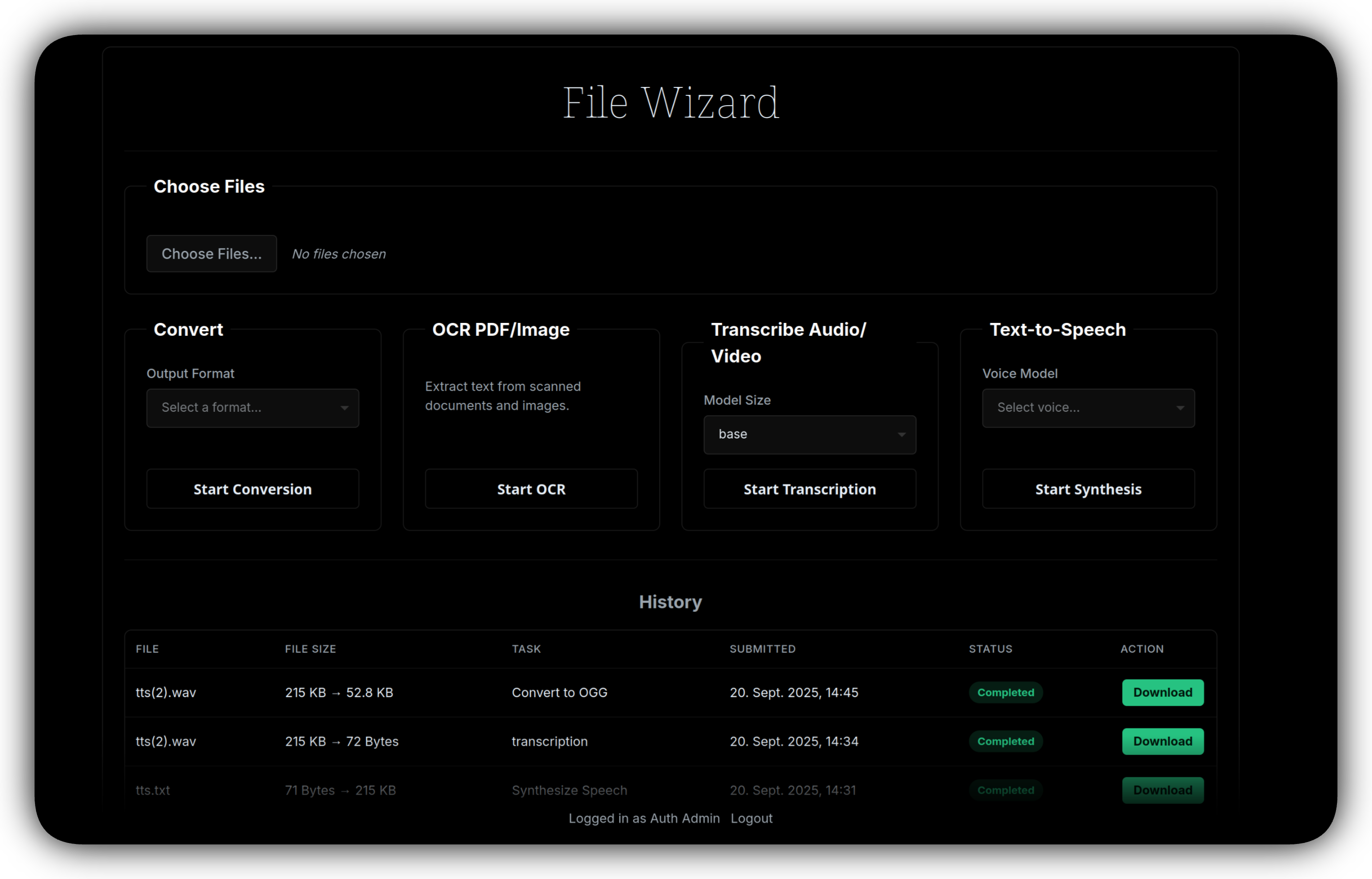
FileWizard screenshot 1

Setup time

A few minutes

Deployment

Your own server

Services

1 connected service

Why FileWizard

Everything you need, running where you choose.

Get the full FileWizard experience with Easypanel handling the repetitive infrastructure work around it.

Format Conversion
Broad format support through LibreOffice Pandoc FFmpeg Ghostscript and related tools.
Job History
Background jobs with status updates and persistent history in the app.
Configurable Tools
Extend or tune conversions using settings.yml in the mounted config volume.
Many Conversion Pipelines
Convert documents media and images using well known CLI tools configured from the UI and settings file.
OCR and Transcription
Run Tesseract OCR and Whisper style transcription for local speech to text workflows.
Self Hosted Control
Keep files on your own storage volumes with a straightforward Docker image from the upstream maintainers.
How it works

From template to live app in three steps.

Easypanel turns the template into real services, storage, and domains on the server you already control.

Already have Easypanel? Open your dashboard at the URL or IP of your own installation.

Installation guide
1
Open your dashboard
Visit the URL or IP of your Easypanel installation and choose the target project.
2
Choose FileWizard
Open Templates, select FileWizard, then review its service names and configuration.
3
Deploy and open your app
Easypanel starts every service and provisions an HTTPS domain for you.
Installation options
The template asks for these values before creating your services.
OptionDefaultRequired

App Service Name

filewizardRequired

App Service Image

loredcast/filewizard:0.4-latestRequired

Local Only (disable for OIDC)

trueOptional

Download Kokoro on Startup

trueOptional

OMP Threads

1Optional

Transcription Device (optional)

cpu or cuda when using a GPU image

Optional

Transcription Compute Type (optional)

e.g. int8 float16 int8_float16 for GPU builds

Optional

Transcription Device Index (optional)

GPU index when multiple devices are available

Optional
Resources
Project documentation and source code.
Latest template update
Apr 3, 2026

Initial Template Release

Questions

Deploy with confidence.

The template handles the application setup while Easypanel keeps the infrastructure understandable and under your control.

Keep exploring

Related templates

Browse all
Vexa Dashboard
Vexa Dashboard is a complete, all-in-one solution for self-hosted meeting transcription. This template deploys both the Vexa API (real-time meeting transcription engine) and its web dashboard in a single click. Vexa captures audio from Google Meet and Microsoft Teams meetings, transcribes it in real-time using Whisper AI, and provides a beautiful web interface to manage everything. Own your data, self-host everything, no cloud dependencies. This template includes: - Vexa API: The transcription engine with bot management - Vexa Dashboard: Web interface for managing meetings and transcripts - PostgreSQL: Database for storing all your data Perfect for teams who want enterprise-grade meeting transcription without sending data to third parties.
View template
8MB Local
8MB Local is a self-hosted file processing and conversion application that provides tools for handling files and generating outputs. Built with modern architecture, 8MB Local offers a web-based interface accessible on port 8001 for processing files and managing uploads and outputs. The system stores uploaded files and generated outputs in separate persistent volumes, ensuring your data is preserved across container restarts. Perfect for individuals and organizations looking for a self-hosted solution for file processing and management.
View template
BentoPDF logo
BentoPDF
BentoPDF is a powerful self-hosted PDF manipulation and conversion service that provides a comprehensive API for working with PDF documents. It enables developers and teams to automate PDF operations including conversion, merging, splitting, compression, watermarking, and more through a simple REST API. Built with modern technologies, BentoPDF offers a web interface for manual operations and programmatic access for integration into your applications and workflows. The service supports converting various document formats to PDF, extracting text and images, adding annotations, and manipulating PDF metadata. With no external dependencies on third-party services, BentoPDF ensures your documents remain private and secure on your own infrastructure. Perfect for document management systems, automated report generation, form processing, digital archiving, and any application that requires reliable PDF handling capabilities without the costs and privacy concerns of cloud-based PDF services.
View template
FileWizard logo
Ready to deploy FileWizard?
Open your own Easypanel dashboard, choose FileWizard from Templates, and review the deployment options.