All templates

Deploy Glance on your own server.

Glance logo

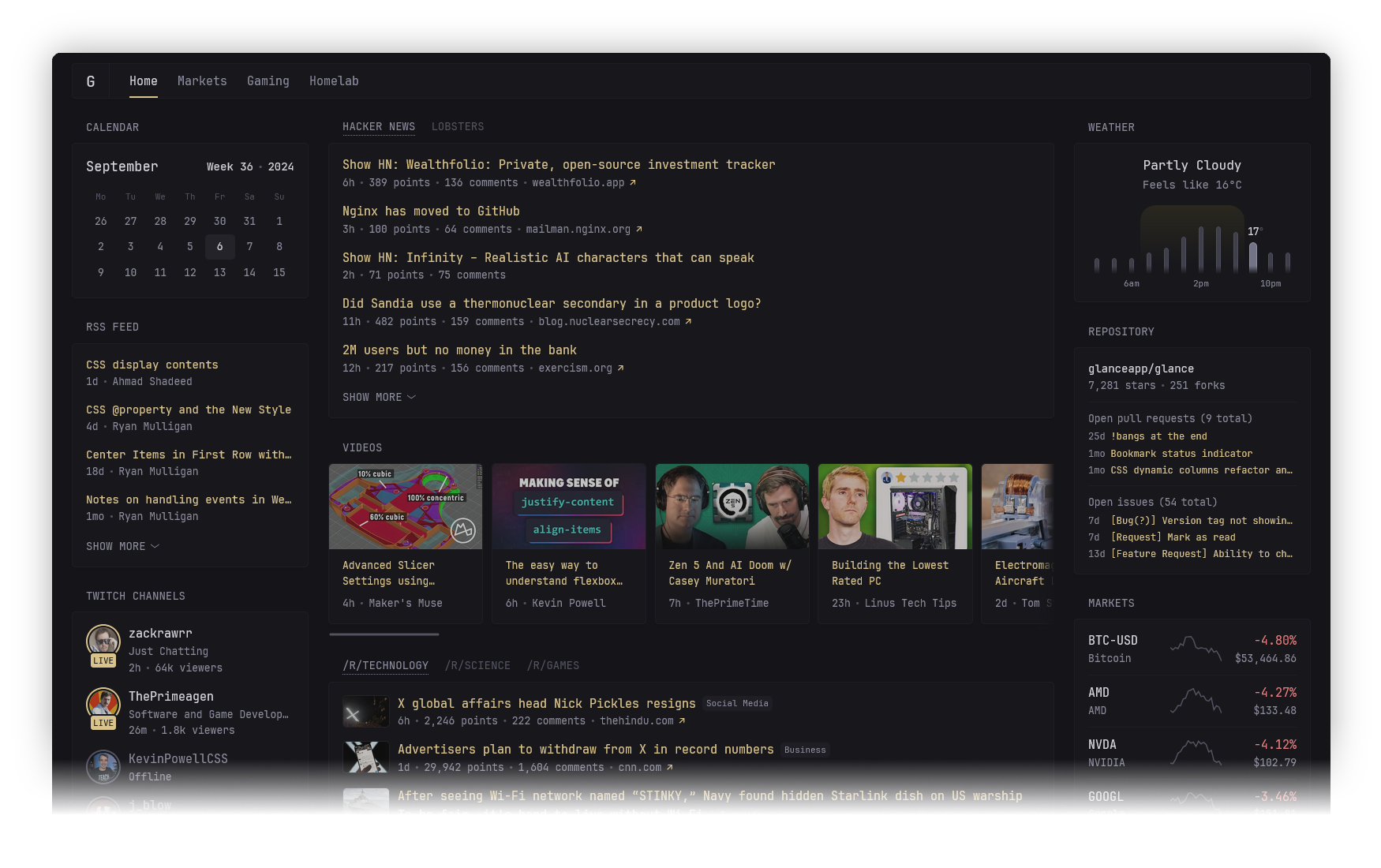
Glance is a fast and lightweight self-hosted dashboard that allows you to monitor various real-time data sources through customizable widgets. With support for RSS feeds, market prices, YouTube uploads, Twitch streams, weather forecasts, server stats, Docker container status, and more, Glance provides a centralized hub for tracking…

Your infrastructureAutomatic HTTPSNo lock-in

Screenshots

A closer look at Glance.

Glance screenshot 1

Setup time

A few minutes

Deployment

Your own server

Services

1 connected service

Why Glance

Everything you need, running where you choose.

Get the full Glance experience with Easypanel handling the repetitive infrastructure work around it.

Various Widgets
Supports RSS feeds, subreddit posts, Hacker News updates, YouTube channel uploads, Twitch streams, weather forecasts, market prices, Docker container statuses, server stats, and more.
YAML-Based Configuration
Easily configure widgets, pages, and layouts using a simple YAML-based setup.
Multi-Page Support
Users can create multiple pages/tabs with different sets of widgets for better organization.
Minimal and Efficient
Glance is designed to be fast and efficient, with an uncached page loading time of ~1s depending on network speed and number of widgets.
Theme and Style Customization
Modify CSS styles, change widget designs, and adjust layout settings to match user preferences.
Fully Customizable Dashboard
Glance allows users to create their own dashboard layouts with multiple pages, tabs, and widgets, tailored to their specific needs.
How it works

From template to live app in three steps.

Easypanel turns the template into real services, storage, and domains on the server you already control.

Already have Easypanel? Open your dashboard at the URL or IP of your own installation.

Installation guide
1
Open your dashboard
Visit the URL or IP of your Easypanel installation and choose the target project.
2
Choose Glance
Open Templates, select Glance, then review its service names and configuration.
3
Deploy and open your app
Easypanel starts every service and provisions an HTTPS domain for you.
Installation options
The template asks for these values before creating your services.
OptionDefaultRequired

App Service Name

glanceRequired

App Service Image

glanceapp/glance:v0.8.4Required
Resources
Project documentation and source code.
Latest template update
Jul 21, 2025

Version bumped to v0.8.4

Questions

Deploy with confidence.

The template handles the application setup while Easypanel keeps the infrastructure understandable and under your control.

Keep exploring

Related templates

Browse all
Homarr logo
Homarr
Homarr is a powerful dashboard designed to simplify the management of your server. It provides a sleek, modern interface that brings all your apps and services together in one place, allowing you to access and control everything with ease. Homarr seamlessly integrates with the apps you've added, offering valuable insights and complete control. You can add your self-hosted applications or favorite websites to your dashboard and organize them as you like. Homarr supports integration with many popular applications to enhance your user experience. It is customizable, accessible, and supports 23 languages. With Homarr, you can control and monitor your network directly, use integrations to display data and control apps, and even create your own dashboard using a comprehensible and easy-to-use visual editor. Homarr is open-source and allows commercial usage. It features a quick search function to easily navigate through your apps and supported integrations.
View template
Homepage logo
Homepage
Homepage is a self-hosted dashboard designed to provide a centralized hub for accessing and managing your server and web services. With an intuitive and customizable interface, Homepage makes it easy to organize links, monitor system health, and view important metrics in one place. It supports a wide range of integrations, including Docker, Kubernetes, and popular web services, making it an ideal tool for individuals and teams looking to streamline access and management of their infrastructure. Being open-source, Homepage offers transparency, flexibility, and control to users.
View template
DCM
DCM is a lightweight self-hosted web interface for managing and monitoring Docker containers. It provides a simple dashboard to view container status, start/stop operations, and inspect basic container details. Designed to be minimal and easy to deploy, DCM helps you keep an eye on your containers without exposing the full Docker API or using heavier management stacks. Ideal for small home labs or users who want a quick overview of their running services via a browser.
View template
Glance logo
Ready to deploy Glance?
Open your own Easypanel dashboard, choose Glance from Templates, and review the deployment options.