All templates

Deploy It Tools on your own server.

It Tools logo

IT-Tools is a comprehensive suite of handy tools designed to assist developers in their day-to-day tasks. It includes a wide range of features such as Crypto Token generator, Hash text Bcrypt, UUIDs v4 generator, Encrypt/Decrypt text, BIP39 passphrase generator, and many more. The app also offers various converters like Date-time…

Your infrastructureAutomatic HTTPSNo lock-in

Screenshots

A closer look at It Tools.
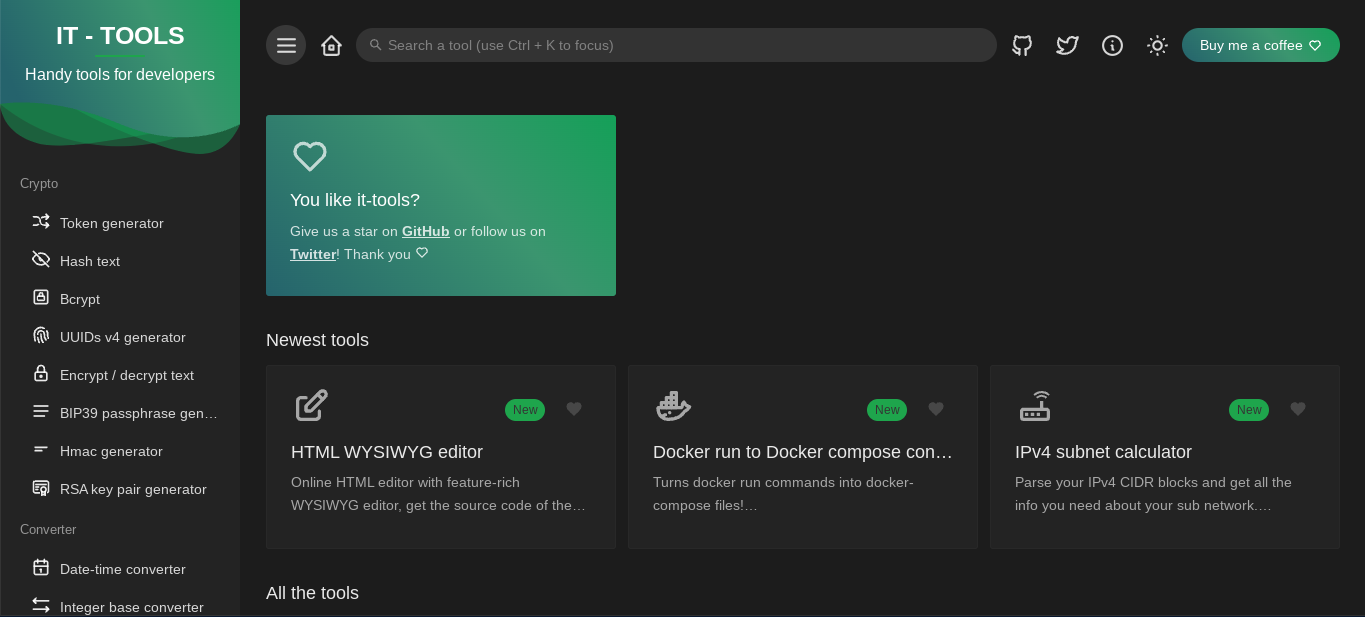
It Tools screenshot 1

Setup time

A few minutes

Deployment

Your own server

Services

1 connected service

Why It Tools

Everything you need, running where you choose.

Get the full It Tools experience with Easypanel handling the repetitive infrastructure work around it.

Wide Range of Tools
IT-Tools offers a vast array of utilities for developers. These include crypto token generators, hash text, bcrypt, UUIDs v4 generator, encrypt/decrypt text, BIP39 passphrase generator, HMAC generator, RSA key pair generator, and many more.
Convenient Converters
The app includes a variety of converters for different data types and formats. These include date-time converter, integer base converter, Roman numeral converter, Base64 string encoder/decoder, color converter, case converter, and more.
Device Information and Code Generators
IT-Tools provides device information, basic auth generator, open graph meta generator, OTP code generator, MIME types, JWT parser, keycode info, slugify string, HTML WYSIWYG editor, user-agent parser, HTTP status codes, and JSON diff.
Image and Video Tools
The app includes tools for generating QR codes, SVG placeholders, and even a camera recorder for capturing images and videos.
Development Helpers
IT-Tools also offers a Git cheatsheet, random port generator, crontab generator, JSON prettify and format, JSON minify, JSON to CSV, SQL prettify and format, chmod calculator, Docker run to Docker compose converter, and XML formatter.
Network and Math Tools
The app provides a range of network and math tools, including IPv4 subnet calculator, IPv4 address converter, IPv4 range expander, MAC address lookup, IPv6 ULA generator, math evaluator, ETA calculator, and percentage calculator.
How it works

From template to live app in three steps.

Easypanel turns the template into real services, storage, and domains on the server you already control.

Already have Easypanel? Open your dashboard at the URL or IP of your own installation.

Installation guide
1
Open your dashboard
Visit the URL or IP of your Easypanel installation and choose the target project.
2
Choose It Tools
Open Templates, select It Tools, then review its service names and configuration.
3
Deploy and open your app
Easypanel starts every service and provisions an HTTPS domain for you.
Installation options
The template asks for these values before creating your services.
OptionDefaultRequired

App Service Name

ittoolsRequired

App Service Image

corentinth/it-tools:2024.10.22-7ca5933Required
Resources
Project documentation and source code.
Latest template update
May 23, 2025

update to v2024.10.22-7ca5933

Questions

Deploy with confidence.

The template handles the application setup while Easypanel keeps the infrastructure understandable and under your control.

Keep exploring

Related templates

Browse all
Omni Tools logo
Omni Tools
Omni Tools is a comprehensive collection of web-based utilities and tools designed to simplify everyday tasks for developers, designers, and general users. It provides a unified interface for accessing dozens of useful tools including text converters, encoders/decoders, formatters, generators, calculators, image processors, and more. With no need for installation or external dependencies, Omni Tools offers instant access to commonly needed utilities without leaving your browser. The self-hosted solution ensures your data remains private and never leaves your infrastructure, making it ideal for handling sensitive information. All tools run entirely in the web interface with a clean, intuitive design that makes finding and using utilities effortless. Perfect for development teams, content creators, system administrators, and anyone who regularly needs quick access to conversion, formatting, encoding, or calculation tools without relying on multiple online services or installing separate applications.
View template
Authorizer logo
Authorizer
Authorizer is a powerful tool designed to simplify the process of user authentication and authorization in your applications. It allows you to build secure apps 10x faster with its low code tool and low-cost deployment. With Authorizer, you have full control over your user data, which can be stored in your preferred database. The app supports multiple authentication recipes and allows you to authorize users based on your business roles. It is compatible with OAuth2 and OpenID APIs. Authorizer also offers secure session management with the best services baked in, including HTTP only cookies and Authorization Code flow for mobile-based authentication. It supports a wide range of databases, including major SQL, NoSQL, and GraphDBs. You can customize emails, configure webhooks for various events, and add an extra layer of security with email-based OTP for basic authentication. With Authorizer, you can deploy your authentication and authorization service anywhere with multiple deployment options. It is a comprehensive solution for all your authentication and authorization needs.
View template
Gotenberg logo
Gotenberg
Gotenberg is a Docker-powered stateless API designed to handle PDF files. It offers a developer-friendly interface to interact with robust tools like Chromium and LibreOffice, enabling the conversion of various document formats such as HTML, Markdown, Word, Excel, and more into PDF files. The app also supports an asynchronous workflow with a webhook feature, allowing you to upload the output file to your preferred destination. Gotenberg is a modular platform, meaning you can customize each module according to your needs. Additionally, it provides the option to build your own Docker image by adding new tools and creating modules that offer new routes to the API.
View template
It Tools logo
Ready to deploy It Tools?
Open your own Easypanel dashboard, choose It Tools from Templates, and review the deployment options.