All templates

Deploy Jaeger on your own server.

Jaeger logo

Jaeger is an end-to-end distributed tracing system used for monitoring and troubleshooting microservices-based architectures. It helps developers track requests across complex systems, visualize latencies, and diagnose performance issues. Jaeger supports multiple storage backends and provides powerful querying and visualization…

Your infrastructureAutomatic HTTPSNo lock-in

Screenshots

A closer look at Jaeger.

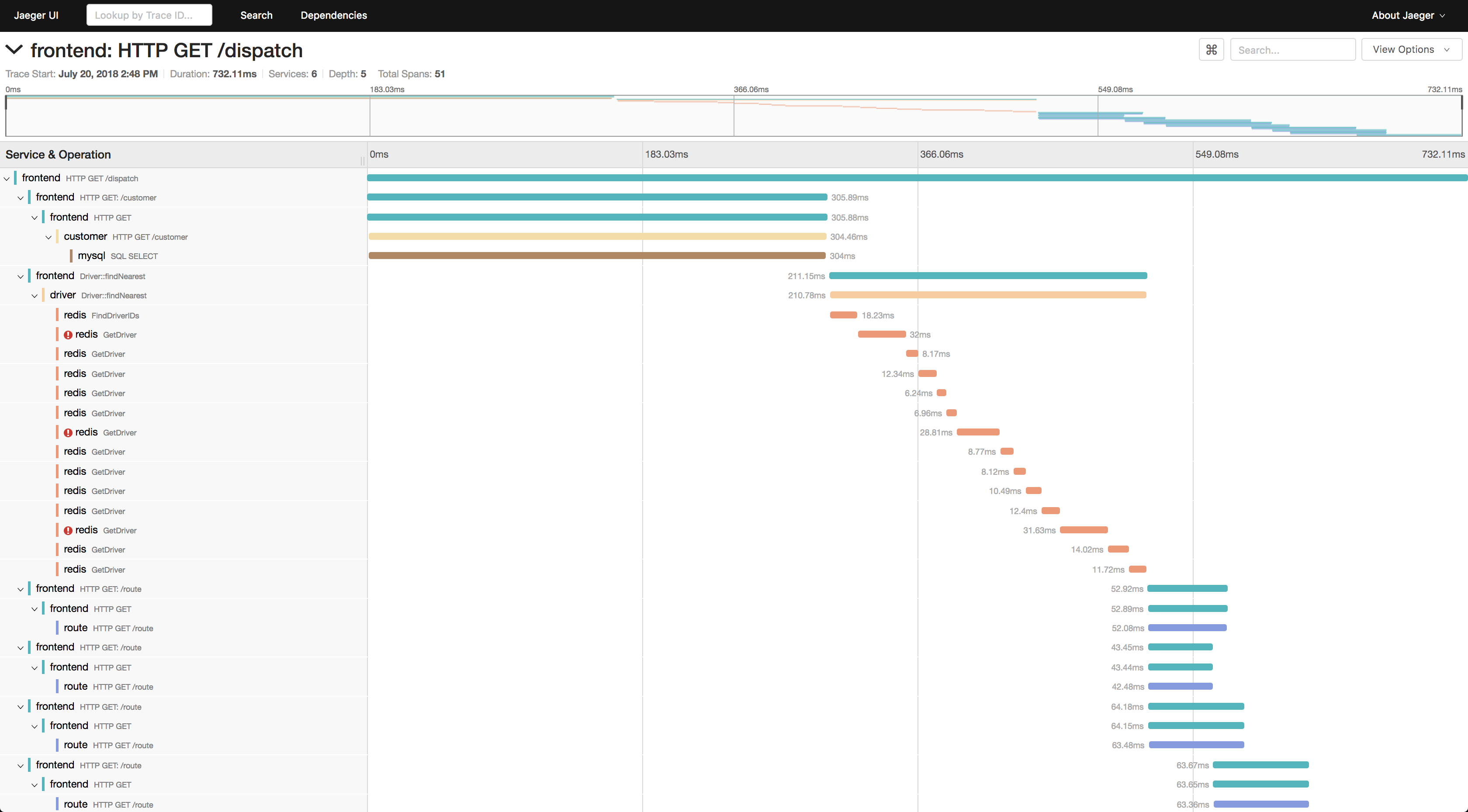
Jaeger screenshot 1

Setup time

A few minutes

Deployment

Your own server

Services

1 connected service

Why Jaeger

Everything you need, running where you choose.

Get the full Jaeger experience with Easypanel handling the repetitive infrastructure work around it.

End-to-End Tracing
Capture and analyze traces from service to service.
Trace Visualization
View trace timelines and dependencies in an intuitive UI.
Latency Analysis
Identify slow services and optimize performance.
Adaptive Sampling
Control trace sampling dynamically for efficient data collection.
Storage Flexibility
Store traces in Elasticsearch, Cassandra, Kafka, or local memory.
OpenTelemetry Support
Natively integrates with OpenTelemetry for seamless instrumentation.
How it works

From template to live app in three steps.

Easypanel turns the template into real services, storage, and domains on the server you already control.

Already have Easypanel? Open your dashboard at the URL or IP of your own installation.

Installation guide
1
Open your dashboard
Visit the URL or IP of your Easypanel installation and choose the target project.
2
Choose Jaeger
Open Templates, select Jaeger, then review its service names and configuration.
3
Deploy and open your app
Easypanel starts every service and provisions an HTTPS domain for you.
Installation options
The template asks for these values before creating your services.
OptionDefaultRequired

App Service Name

jaegerRequired

App Service Image

jaegertracing/all-in-one:1.76.0Required

Compact Format

5775Required

Jaeger Instrumentation

6831Required

Binary Format

6832Required

Port Sampling

5778Required

Collector Port

14268Required

Zipkin Port

9411Required
Resources
Project documentation and source code.
Latest template update
Dec 25, 2025

Version bumped to v1.76.0

Questions

Deploy with confidence.

The template handles the application setup while Easypanel keeps the infrastructure understandable and under your control.

Keep exploring

Related templates

Browse all
HyperDX logo
HyperDX
HyperDX is an open-source observability platform that unifies logs, metrics, traces, and session replays in one place. Built on ClickHouse for blazing-fast performance, it allows you to search terabytes of events in seconds without complex syntax. Perfect for debugging production issues, monitoring application performance, and correlating user sessions with backend traces. Recently acquired by ClickHouse to accelerate the future of open-source observability.
View template
Grafana OTEL LGTM logo
Grafana OTEL LGTM
Grafana OTEL LGTM is an all-in-one OpenTelemetry backend bundled into a single Docker image. It includes the OpenTelemetry Collector, Prometheus for metrics, Grafana Loki for logs, Grafana Tempo for traces, Grafana Pyroscope for application profiles, and Grafana for unified visualization. The collector automatically routes telemetry signals to the correct backend — metrics to Prometheus, logs to Loki, traces to Tempo, and profiles to Pyroscope. It works out of the box with OpenTelemetry's default settings, so applications instrumented with any OpenTelemetry SDK can send data immediately. Optional eBPF auto-instrumentation (OBI) can generate traces and RED metrics for HTTP/gRPC services with zero code changes.
View template
Uptrace logo
Uptrace
Uptrace is an open-source APM platform for traces, metrics, and logs using OpenTelemetry, with ClickHouse storage and PostgreSQL metadata. This template follows the official example/docker compose stack (Uptrace, ClickHouse, Postgres, Redis, OTel Collector, Vector, Grafana, Prometheus, Alertmanager, Mailpit). The Vector image uses timberio/vector:0.28.X-alpine to match that upstream example (legacy Docker Hub namespace); migrate to distroless/vector only when you intentionally diverge from upstream.
View template
Jaeger logo
Ready to deploy Jaeger?
Open your own Easypanel dashboard, choose Jaeger from Templates, and review the deployment options.