Deploy Lingva Translate on your own server.

Lingva Translate is a free, open-source alternative front-end for Google Translate. Supports 100+ languages via scraping—no direct Google access, no user tracking. Built with Next.js and ChakraUI. Provides REST API for translation, audio, and language detection. Privacy-focused translation.
Screenshots
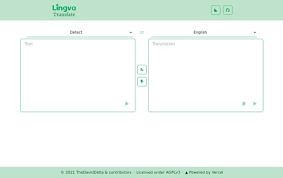
A closer look at Lingva Translate.
Setup time
A few minutes
Deployment
Your own server
Services
1 connected service
Everything you need, running where you choose.
Get the full Lingva Translate experience with Easypanel handling the repetitive infrastructure work around it.
From template to live app in three steps.
Easypanel turns the template into real services, storage, and domains on the server you already control.
Already have Easypanel? Open your dashboard at the URL or IP of your own installation.
Installation guide| Option | Default | Required |
|---|---|---|
App Service Name | lingva | Required |
App Service Image | thedaviddelta/lingva-translate:latest | Required |
Site Domain Your public URL (e.g. https://lingva.yourdomain.com). Leave blank to use assigned domain. | — | Optional |
Default Theme | light | Optional |
Default Source Language Initial source language (auto for detection) | auto | Optional |
Default Target Language | en | Optional |
First Release
Deploy with confidence.
The template handles the application setup while Easypanel keeps the infrastructure understandable and under your control.
Related templates