All templates

Deploy MailCrab on your own server.

MailCrab logo

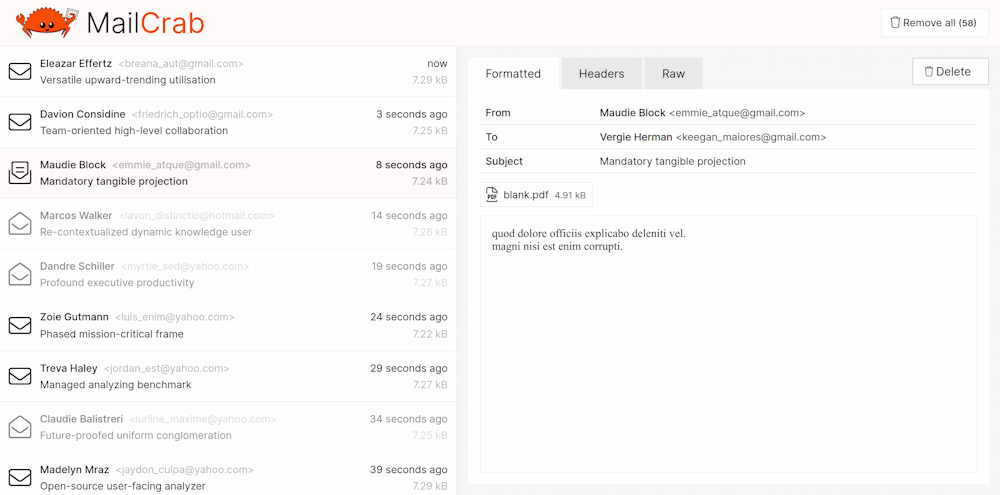
MailCrab is an email test server designed for development purposes. It is an accept-all SMTP server that provides a web interface for viewing and inspecting all incoming emails. You can view formatted mail, download attachments, view headers, or view the complete raw mail contents. The app runs on all amd64 and arm64 platforms using…

Your infrastructureAutomatic HTTPSNo lock-in

Screenshots

A closer look at MailCrab.
MailCrab screenshot 1

Setup time

A few minutes

Deployment

Your own server

Services

1 connected service

Why MailCrab

Everything you need, running where you choose.

Get the full MailCrab experience with Easypanel handling the repetitive infrastructure work around it.

Accept-all SMTP Server
MailCrab operates as an accept-all SMTP server, allowing you to test a wide range of email functionalities.
Web Interface
The app provides a web interface where you can view and inspect all incoming emails, offering a user-friendly way to manage your email tests.
Email Inspection Tools
MailCrab offers tools to view formatted mail, download attachments, view headers, or see the complete raw mail contents, giving you a detailed insight into your email tests.
Cross-Platform Compatibility
MailCrab is compatible with all amd64 and arm64 platforms using docker, making it a versatile tool for various development environments.
Efficient Email Testing
MailCrab is an email test server that allows developers to efficiently test their email functionalities during development. It accepts all SMTP server emails, making it a versatile tool for various email testing scenarios.
Comprehensive Email Inspection
With MailCrab, you can view and inspect all incoming emails in a user-friendly web interface. It allows you to view formatted mail, download attachments, view headers, or see the complete raw mail contents, providing a comprehensive overview of your email tests.
How it works

From template to live app in three steps.

Easypanel turns the template into real services, storage, and domains on the server you already control.

Already have Easypanel? Open your dashboard at the URL or IP of your own installation.

Installation guide
1
Open your dashboard
Visit the URL or IP of your Easypanel installation and choose the target project.
2
Choose MailCrab
Open Templates, select MailCrab, then review its service names and configuration.
3
Deploy and open your app
Easypanel starts every service and provisions an HTTPS domain for you.
Installation options
The template asks for these values before creating your services.
OptionDefaultRequired

App Service Name

mailcrabRequired

App Service Image

marlonb/mailcrab:v1.6.5Required
Resources
Project documentation and source code.
Latest template update
May 4, 2026

Version bumped to v1.6.5

Questions

Deploy with confidence.

The template handles the application setup while Easypanel keeps the infrastructure understandable and under your control.

Keep exploring

Related templates

Browse all
Maildev logo
Maildev
Maildev is a simple, self-hosted SMTP server designed for testing and debugging emails in development environments. It captures all outgoing emails and provides a web-based UI to view, inspect, and test them. Maildev supports real-time email updates, allowing developers to see emails as they are sent. It also includes an API for programmatic access to emails and supports multiple inboxes for testing different email scenarios. Maildev is lightweight, easy to set up, and works seamlessly in local development and CI/CD pipelines.
View template
Mailpit logo
Mailpit
Mailpit is a modern email testing tool designed for developers. It allows you to configure your application to use Mailpit for SMTP delivery, enabling you to view your outgoing emails in a user-friendly web UI. The app also offers the option to forward messages to real SMTP servers for delivery. With Mailpit, you can view messages in the web UI or retrieve them using the JSON API. It supports SMTP AUTH and PIPELINING and provides real-time updates using WebSocket. Mailpit also includes message search functionality, custom SMTP configurations, and HTTP basic authentication for its UI and API. It's lightweight, portable, and easy to deploy.
View template
Gray Duck Mail logo
Gray Duck Mail
Gray Duck Mail is a user-friendly email discussion list application that offers an alternative to traditional email discussion group software. It is designed to be simple to set up and manage, making the process of running an email discussion list effortless. Gray Duck Mail is perfect for managing mailing lists between small to medium size groups, such as neighborhoods, schools, workplaces, and families. With Gray Duck Mail, you can send one email and automatically keep everyone in the loop. The application monitors a remote mail server for messages and processes them by relaying the message to all list members. It also automatically handles user subscriptions, unsubscription requests, and email bounces. Gray Duck Mail works with any external email host that allows for POP3/SMTP connections and message forwarding or aliasing. It relies totally on an external mail provider, allowing you to use an existing web host or email account.
View template
MailCrab logo
Ready to deploy MailCrab?
Open your own Easypanel dashboard, choose MailCrab from Templates, and review the deployment options.