Deploy MMP on your own server.

MMP logo

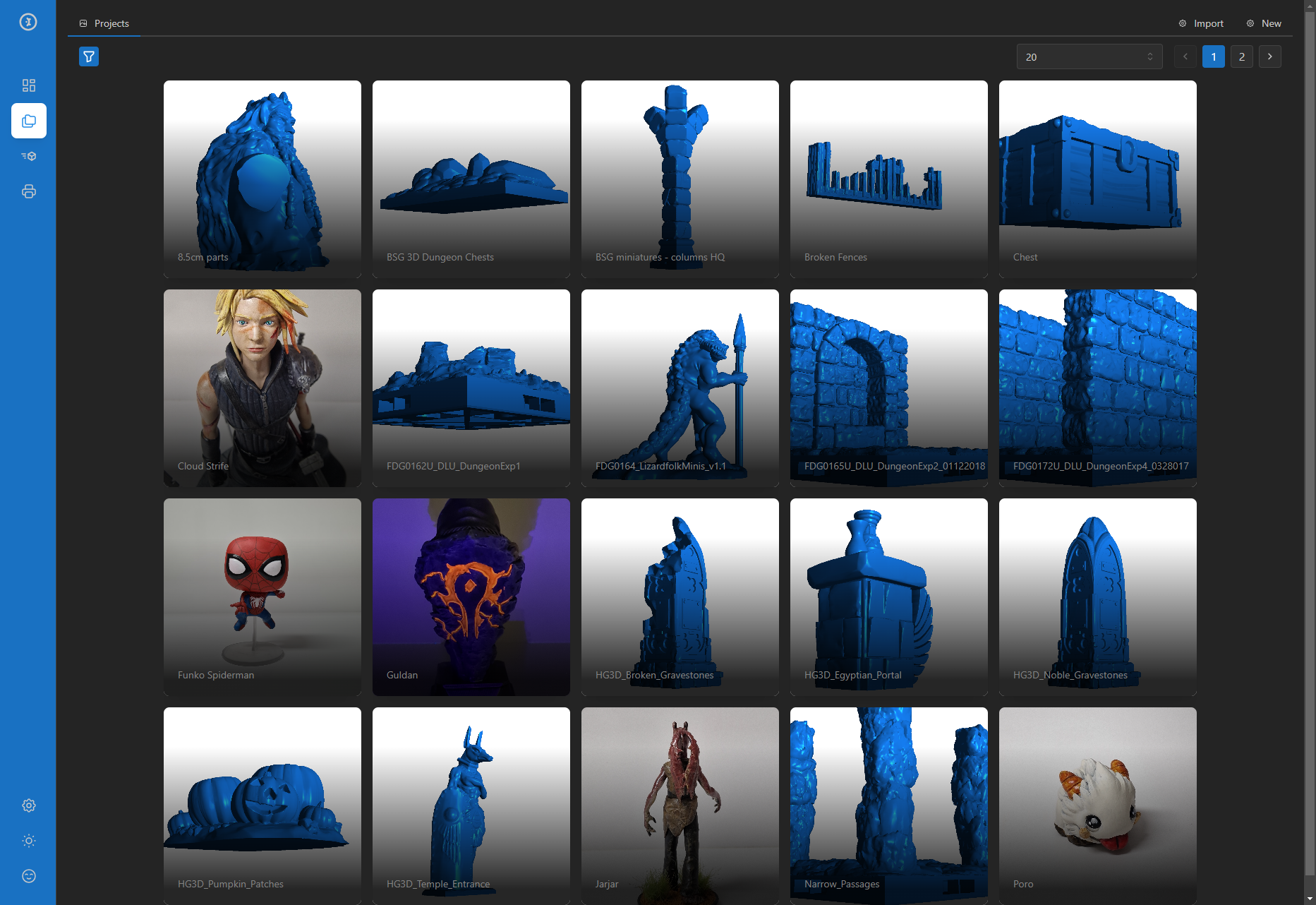
Maker Management Platform (MMP) is an open-source self-hosted system for organising and managing 3D printing and maker projects. It provides a web UI with a visual library of STL and 3MF files, automatically renders 3D model thumbnails, manages project collections with linked assets (models, slices, images, and documents), and integrates…

Your infrastructureAutomatic HTTPSNo lock-in

Screenshots

A closer look at MMP.

MMP screenshot 1

Setup time

A few minutes

Deployment

Your own server

Services

2 connected services

Why MMP

Everything you need, running where you choose.

Get the full MMP experience with Easypanel handling the repetitive infrastructure work around it.

Automatic Model Rendering
The Go agent renders STL and 3MF files to PNG thumbnails in parallel using a configurable worker pool (default 5 workers) so large libraries are processed quickly.
Asset Management
Each project can hold multiple asset types — models, print profiles, reference images, and documents — all browsable from a single project detail view.
Printer Integration
Add Klipper or OctoPrint printer endpoints and upload slice files (G-code) directly from the MMP UI without leaving the browser.
Thingiverse Import
Provide a Thingiverse API token to import public projects (models, images, descriptions) directly into your local MMP library.
Slicer Integration
Configure PrusaSlicer or Orca Slicer to post-process prints through MMP via port 8000 for a seamless library-to-printer workflow.
Visual 3D Library
MMP automatically scans your library folder and renders colour-coded 3D preview thumbnails for every STL and 3MF file, giving you a visual grid of all your models without opening a slicer.
How it works

From template to live app in three steps.

Easypanel turns the template into real services, storage, and domains on the server you already control.

Already have Easypanel? Open your dashboard at the URL or IP of your own installation.

Installation guide
1
Open your dashboard
Visit the URL or IP of your Easypanel installation and choose the target project.
2
Choose MMP
Open Templates, select MMP, then review its service names and configuration.
3
Deploy and open your app
Easypanel starts every service and provisions an HTTPS domain for you.
Installation options
The template asks for these values before creating your services.
OptionDefaultRequired

App Service Name

mmpRequired

Agent Image

ghcr.io/maker-management-platform/agent:v1.3.2Required

UI Image

ghcr.io/maker-management-platform/mmp-ui:v1.3.0Required

Thingiverse API Token

Optional. Allows MMP to import projects directly from Thingiverse. Get a token at https://www.thingiverse.com/apps/create.

Set during installOptional

3D Model Render Color

Hex colour used when rendering 3D model preview images.

#167DF0Optional
Resources
Project documentation and source code.
Latest template update
Jun 26, 2026

First Release

Questions

Deploy with confidence.

The template handles the application setup while Easypanel keeps the infrastructure understandable and under your control.

Keep exploring

Related templates

Browse all
MediaManager logo
MediaManager
MediaManager is a self-hosted media management application designed to help you organize, catalog, and manage your media collection. The application provides a clean web interface for browsing and managing your media files including movies, TV shows, music, and other digital content. With support for custom metadata, tagging, and categorization, MediaManager makes it easy to keep your media library organized and accessible. The application features automatic media scanning, metadata extraction, thumbnail generation, and search capabilities to quickly find content in large collections. Built with a PostgreSQL backend for reliable data storage, MediaManager can handle extensive media libraries with thousands of items. The flexible configuration system allows you to customize media directories, scanning behavior, and display preferences to match your needs. Perfect for home media enthusiasts who want to organize their digital collections, content creators managing large media archives, small organizations needing a simple media asset management solution, or anyone looking for a lightweight self-hosted alternative to complex media management systems.
View template
4ga Boards logo
4ga Boards
4ga Boards is a modern, open-source project management and collaboration platform inspired by Trello. It provides a powerful Kanban-style board system for organizing tasks, projects, and workflows. With its intuitive drag-and-drop interface, 4ga Boards makes it easy to visualize work, track progress, and collaborate with teams. The application features customizable boards, lists, and cards, along with support for attachments, user avatars, and project backgrounds. Built with modern web technologies, 4ga Boards offers a seamless experience for managing projects of any size. It's perfect for teams looking for a self-hosted alternative to commercial project management tools, providing full control over your data and workflows. Whether you're managing software development sprints, marketing campaigns, or personal todo lists, 4ga Boards provides the flexibility and features you need.
View template
BamBuddy logo
BamBuddy
BamBuddy is a self-hosted command center for managing Bambu Lab 3D printers locally, with no cloud dependency. It supports single printers up to 40-printer farms and includes real-time monitoring, live camera streaming, print archive with 3D preview, timelapse editing, scheduling, multi-printer dispatch, server-side slicing of STL/3MF files, spool tracking with usage analytics, smart plug integration, HMS error alerts, and automated notifications.
View template
MMP logo
Ready to deploy MMP?
Open your own Easypanel dashboard, choose MMP from Templates, and review the deployment options.