All templates

Deploy Octobox on your own server.

Octobox logo

Octobox is an innovative app designed to help you manage your GitHub notifications more efficiently. With Octobox, you no longer have to worry about losing track of important issues or waking up to hundreds of notifications. The app adds an extra 'archived' state to each notification, allowing you to mark it as 'done'. If there's any…

Your infrastructureAutomatic HTTPSNo lock-in

Screenshots

A closer look at Octobox.

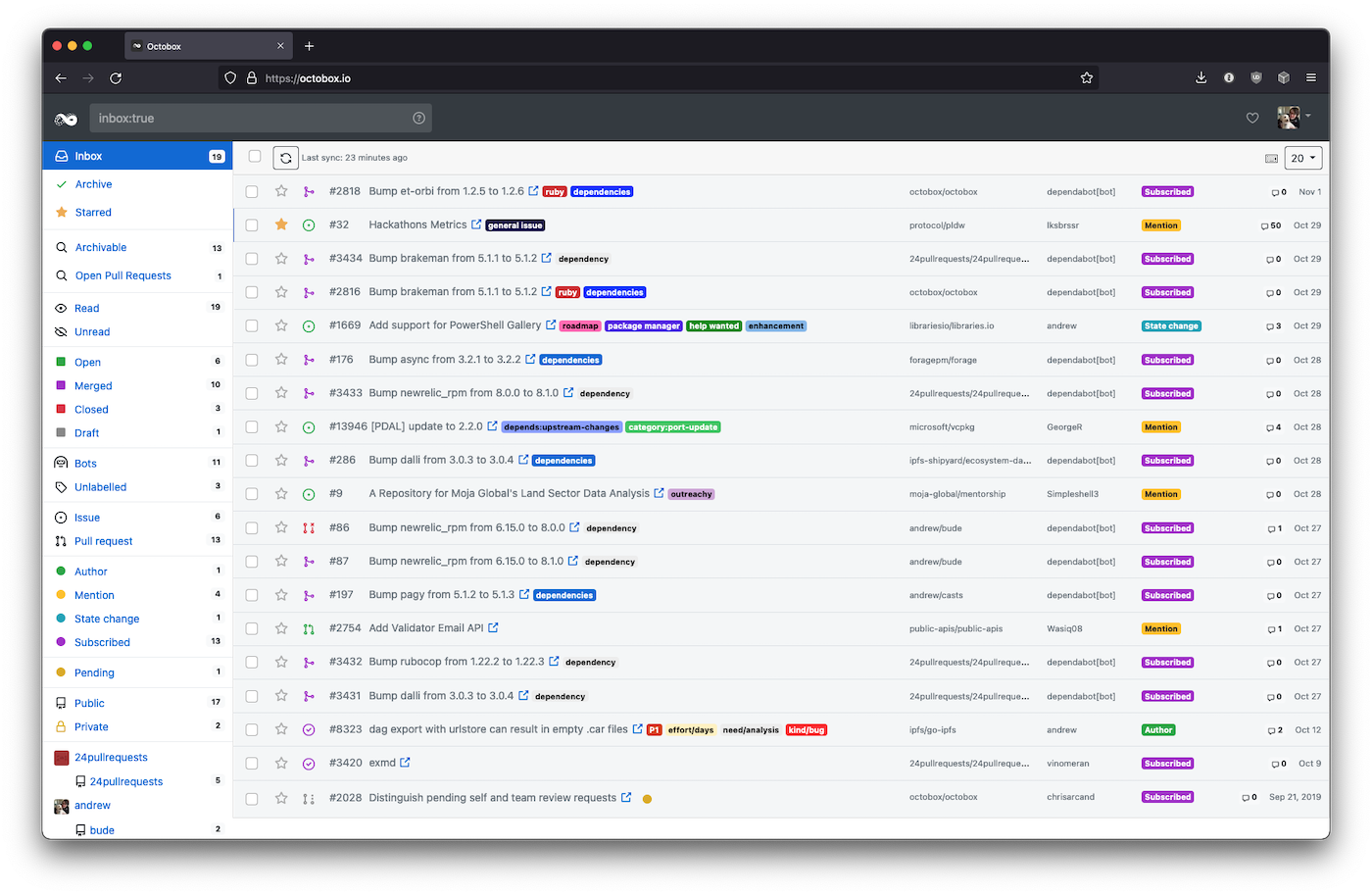
Octobox screenshot 1

Setup time

A few minutes

Deployment

Your own server

Services

3 connected services

Why Octobox

Everything you need, running where you choose.

Get the full Octobox experience with Easypanel handling the repetitive infrastructure work around it.

Archiving
Octobox extends GitHub's notification model by providing an additional 'archived' status, much like Gmail's email client. Archived notifications will not appear in your inbox again unless the thread, issue or PR receives a new notification.
Starring
Octobox also adds a starred status to help you highlight important notifications with a star so you can come back and find them easily. Starred notifications are not social, they are more like bookmarks that GitHub stars.
Muting
Muting a notification will mark the notification as read, move it to the archive and ignore all further notifications from this thread, issue or PR. Muting also sets the thread to ignore:true ignoring further notifications on GitHub too.
Syncing
By default Octobox will synchronize every time you hit the synchronize button. You can set automatic refresh interval on the settings page.
Searching
Octobox's search bar supports various filter prefixes. Combine them together and with free text searches, for example: 'github enterprise type:issue owner:octobox reason:assign'. Many prefixes accept multiple arguments when separated by commas or passed twice.
Efficient Notification Management
Octobox helps you manage your GitHub notifications efficiently, freeing up more time for you to focus on your projects. It adds an extra 'archived' state to each notification so you can mark it as 'done'. If anything happens on an archived thread, issue or PR, Octobox will move it back into your inbox.
How it works

From template to live app in three steps.

Easypanel turns the template into real services, storage, and domains on the server you already control.

Already have Easypanel? Open your dashboard at the URL or IP of your own installation.

Installation guide
1
Open your dashboard
Visit the URL or IP of your Easypanel installation and choose the target project.
2
Choose Octobox
Open Templates, select Octobox, then review its service names and configuration.
3
Deploy and open your app
Easypanel starts every service and provisions an HTTPS domain for you.
Installation options
The template asks for these values before creating your services.
OptionDefaultRequired

App Service Name

octoboxRequired

App Service Image

octoboxio/octobox:december-2025Required

Database Service Name

octobox-dbRequired

Database Service Name

octobox-redisRequired

Github Client ID

Required

Github Client Secret

Set during installRequired
Resources
Project documentation and source code.
Latest template update
Dec 29, 2025

Version bumped to december-2025

Questions

Deploy with confidence.

The template handles the application setup while Easypanel keeps the infrastructure understandable and under your control.

Keep exploring

Related templates

Browse all
OneDev logo
OneDev
OneDev is a versatile app designed to streamline your project management and development processes. It offers a comprehensive suite of features including pull requests, issue tracking, and build management. With OneDev, you can easily manage your projects, track commits, and handle branches and tags. The app also provides a platform for managing pull requests, merging them, and discarding when necessary. It allows you to keep track of open and closed issues, as well as those that have been released. OneDev also offers a robust build management system, enabling you to monitor successful builds across various projects. The app is designed to support multiple projects, each with its own set of files, commits, branches, tags, pull requests, and builds. With OneDev, you can streamline your workflow, enhance collaboration, and improve productivity in your development projects.
View template
Gitea logo
Gitea
Gitea is a lightweight DevOps platform designed to streamline operations from planning to production. It enables the creation and management of repositories, exploration of commit history and code files, review and merging of code commits, and more. Gitea also supports standard Git features, including tags, cherry-picking, hooks, and integrated collaboration tools. It features an integrated CI/CD system, Gitea Actions, that is compatible with GitHub Actions. With Gitea, you can efficiently manage a project's requirements, features, and bugs through issue tasks, labeling, and kanban project boards. It supports more than 20 different kinds of public or private package management. Gitea is an open-source project that accelerates development and collaboration, offering universal compatibility and flexible deployment options. It also provides a powerful built-in CI/CD system and is developed with a focus on security. Gitea can be tailored to your requirements and is integrated with your favorite tools to boost your workflow.
View template
Ghost File Sharing logo
Ghost File Sharing
Our app is a powerful tool designed to streamline your workflow and enhance productivity. It allows you to easily find code, projects, and people on GitHub, making it simpler than ever to collaborate and contribute to open-source projects. With this app, you can stay updated with product updates, company news, and more by subscribing to our newsletter. It also offers a range of features designed to ensure the security of your work, making it a reliable choice for enterprises. Whether you're a developer looking for a robust platform or a company seeking to leverage the power of open-source, our app is the perfect solution for you.
View template
Octobox logo
Ready to deploy Octobox?
Open your own Easypanel dashboard, choose Octobox from Templates, and review the deployment options.