All templates

Deploy OliveTin on your own server.

OliveTin logo

OliveTin is a web interface for running Linux shell commands. It provides a simple, elegant dashboard that lets you execute predefined commands with a single click. Perfect for system administrators, home automation enthusiasts, or anyone who wants to simplify repetitive tasks without memorizing complex command-line syntax. OliveTin is…

Your infrastructureAutomatic HTTPSNo lock-in

Screenshots

A closer look at OliveTin.
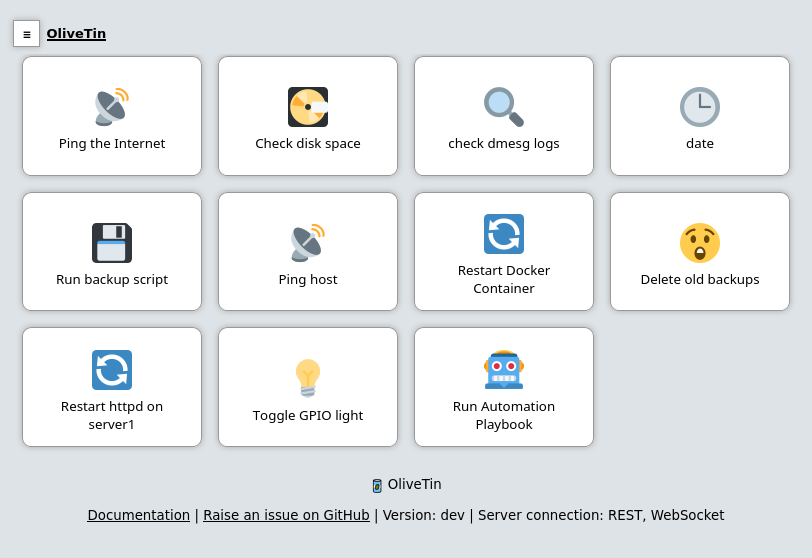
OliveTin screenshot 1

Setup time

A few minutes

Deployment

Your own server

Services

1 connected service

Why OliveTin

Everything you need, running where you choose.

Get the full OliveTin experience with Easypanel handling the repetitive infrastructure work around it.

Web Dashboard
Access your predefined commands through a clean, responsive web interface that works on desktop and mobile devices.
Customizable Commands
Define any shell command as a button with parameters, descriptions, and visual customizations to create a personalized control panel.
Actionable Output
View the output of your commands directly in the web interface, with proper formatting and error reporting.
Lightweight Footprint
Run OliveTin with minimal resource usage, making it ideal for both powerful servers and resource-constrained environments.
YAML Configuration
Configure your command buttons using simple YAML files, making setup and modification straightforward and version-controllable.
Simple Command Execution
Transform complex shell commands into simple buttons on a clean web interface, making system administration tasks accessible to users of all skill levels.
How it works

From template to live app in three steps.

Easypanel turns the template into real services, storage, and domains on the server you already control.

Already have Easypanel? Open your dashboard at the URL or IP of your own installation.

Installation guide
1
Open your dashboard
Visit the URL or IP of your Easypanel installation and choose the target project.
2
Choose OliveTin
Open Templates, select OliveTin, then review its service names and configuration.
3
Deploy and open your app
Easypanel starts every service and provisions an HTTPS domain for you.
Installation options
The template asks for these values before creating your services.
OptionDefaultRequired

App Service Name

olivetinRequired

App Service Image

jamesread/olivetin:3000.11.3Required
Resources
Project documentation and source code.
Latest template update
May 5, 2026

Version bumped to 3000.11.3

Questions

Deploy with confidence.

The template handles the application setup while Easypanel keeps the infrastructure understandable and under your control.

Keep exploring

Related templates

Browse all
Red-DiscordBot logo
Red-DiscordBot
Red-DiscordBot is a fully modular bot for Discord, designed to be easy to use and highly customizable. It features a robust command system, extensive documentation, and a large collection of community-created cogs (modules). The bot supports features like moderation, music playback, games, utility functions, and much more. With its modular design, users can easily add or remove functionality by loading and unloading cogs, making it perfect for both small and large Discord communities.
View template
Tooljet logo
Tooljet
Tooljet is an open-source low-code platform for building internal tools and business applications. It provides a visual interface builder, database connectors, API integrations, and workflow automation capabilities. With Tooljet, teams can quickly build custom dashboards, admin panels, CRUD applications, and complex business tools without extensive coding. The platform supports multiple data sources, real-time collaboration, and enterprise-grade security features.
View template
PruneMate logo
PruneMate
PruneMate is a self-hosted Docker cleanup and management tool that provides a web-based interface for pruning unused Docker resources from your system. It helps you reclaim disk space by identifying and removing unused containers, images, volumes, networks, and build cache. With its intuitive dashboard, you can easily monitor Docker resource usage, schedule automatic cleanup tasks, and manually trigger pruning operations without using command-line tools. PruneMate connects directly to your Docker daemon via the Docker socket, allowing it to safely analyze and clean up orphaned resources that accumulate over time. The application features configurable cleanup schedules, selective pruning options to choose which resource types to clean, detailed logging of all cleanup operations, and real-time statistics showing disk space recovered. With timezone support and customizable time format settings, you can schedule cleanup operations to run during off-peak hours. Perfect for developers and system administrators who manage Docker environments and want to automate the cleanup of unused resources, homelab enthusiasts running multiple containers who need to manage disk space efficiently, CI/CD environments where frequent image builds create significant cleanup overhead, or anyone looking for a simple web interface to manage Docker resource cleanup without remembering complex docker system prune commands.
View template
OliveTin logo
Ready to deploy OliveTin?
Open your own Easypanel dashboard, choose OliveTin from Templates, and review the deployment options.