All templates

Deploy Paperless-ngx on your own server.

Paperless-ngx logo

Paperless-ngx is a modern document management system designed to convert your physical documents into a searchable online archive, helping you maintain a clutter-free, paperless environment. It uses advanced OCR technology to add selectable text to image-only documents, and allows you to organize and index your scanned documents with…

Your infrastructureAutomatic HTTPSNo lock-in

Screenshots

A closer look at Paperless-ngx.
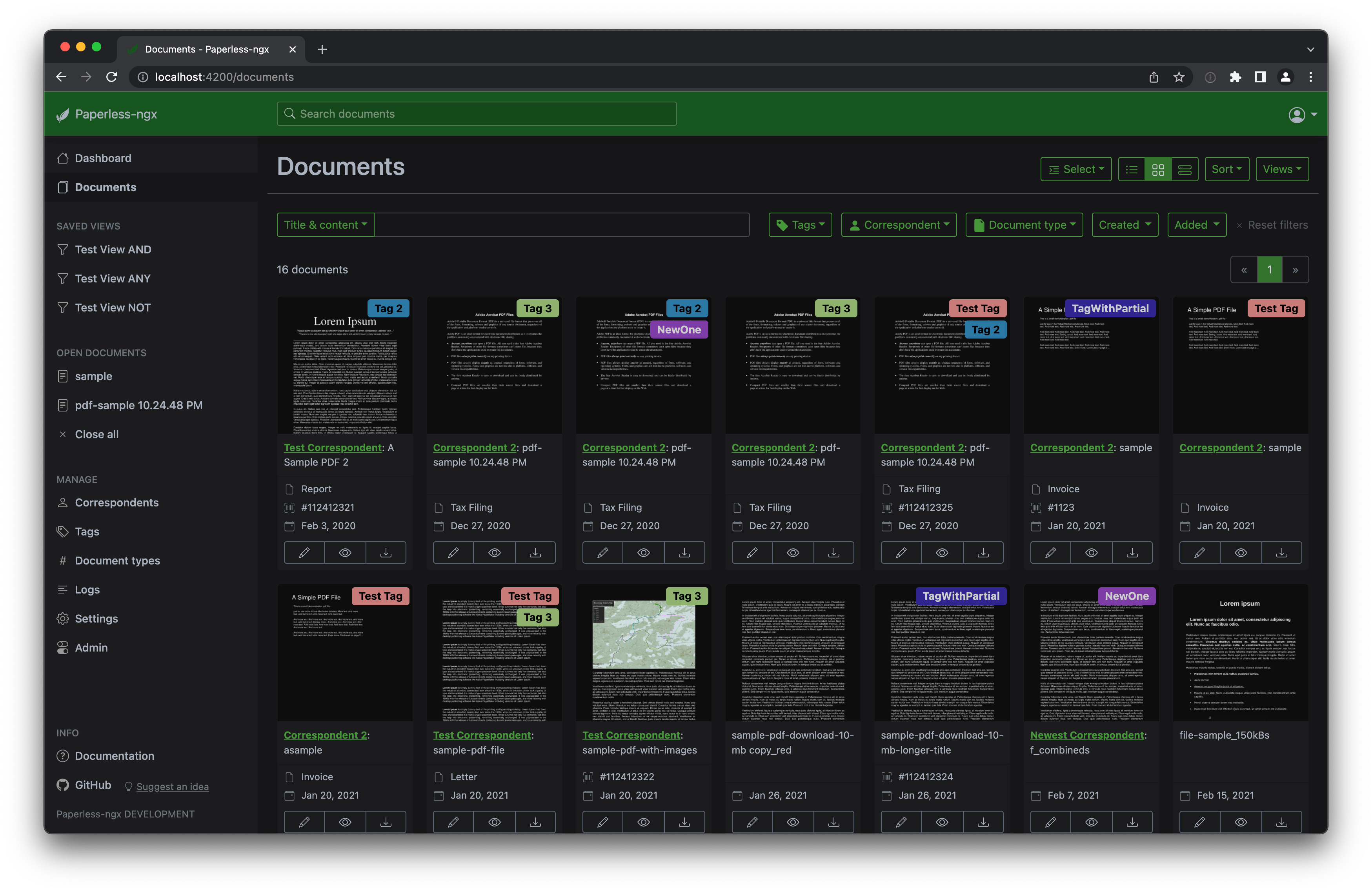
Paperless-ngx screenshot 1

Setup time

A few minutes

Deployment

Your own server

Services

2 connected services

Why Paperless-ngx

Everything you need, running where you choose.

Get the full Paperless-ngx experience with Easypanel handling the repetitive infrastructure work around it.

Document Scanning and Indexing
Paperless-ngx allows you to organize and index your scanned documents with tags, correspondents, types, and more. It performs OCR on your documents, adds selectable text to image-only documents, and adds tags, correspondents, and document types to your documents.
Support for Various Document Types
Paperless-ngx supports PDF documents, images, plain text files, and Office documents (Word, Excel, Powerpoint, and LibreOffice equivalents). Office document support is optional and provided by Apache Tika.
Customizable Views
You can customize views in Paperless-ngx, save them, and display them on the dashboard. This allows you to tailor the system to your specific needs and preferences.
Email Processing
When adding documents from mail, Paperless-ngx can move these mail to a new folder, mark them as read, flag them as important or delete them. This helps in managing your email documents efficiently.
Sanity Checker
The integrated sanity checker in Paperless-ngx makes sure that your document archive is in good health, providing peace of mind and ensuring the integrity of your document archive.
Efficient Document Management
Paperless-ngx is a document management system that transforms your physical documents into a searchable online archive, reducing the need for physical storage and making document retrieval easier and faster.
How it works

From template to live app in three steps.

Easypanel turns the template into real services, storage, and domains on the server you already control.

Already have Easypanel? Open your dashboard at the URL or IP of your own installation.

Installation guide
1
Open your dashboard
Visit the URL or IP of your Easypanel installation and choose the target project.
2
Choose Paperless-ngx
Open Templates, select Paperless-ngx, then review its service names and configuration.
3
Deploy and open your app
Easypanel starts every service and provisions an HTTPS domain for you.
Installation options
The template asks for these values before creating your services.
OptionDefaultRequired

App Service Name

paperlessngxRequired

App Service Image

paperlessngx/paperless-ngx:2.20.15Required

Redis Service Name

paperlessngx-redisRequired
Resources
Project documentation and source code.
Latest template update
May 5, 2026

Version bumped to 2.20.15

Questions

Deploy with confidence.

The template handles the application setup while Easypanel keeps the infrastructure understandable and under your control.

Keep exploring

Related templates

Browse all
WPS Office logo
WPS Office
WPS Office is a comprehensive office suite that is lightweight yet feature-rich. It offers high compatibility and a range of professional office software tools. With WPS Office, you can edit files in Writer, Presentation, Spreadsheet, and PDF, enhancing your work efficiency. The application can be accessed at your host on ports 3000 and 3001. This container is based on Docker Baseimage KasmVNC, which provides additional environment variables and run configurations to enable or disable specific functionality. The application also supports the docker manifest for multi-platform awareness, ensuring the correct image for your architecture is retrieved.
View template
Gotenberg logo
Gotenberg
Gotenberg is a Docker-powered stateless API designed to handle PDF files. It offers a developer-friendly interface to interact with robust tools like Chromium and LibreOffice, enabling the conversion of various document formats such as HTML, Markdown, Word, Excel, and more into PDF files. The app also supports an asynchronous workflow with a webhook feature, allowing you to upload the output file to your preferred destination. Gotenberg is a modular platform, meaning you can customize each module according to your needs. Additionally, it provides the option to build your own Docker image by adding new tools and creating modules that offer new routes to the API.
View template
LibreOffice logo
LibreOffice
LibreOffice is a free and powerful office suite app that serves as a successor to OpenOffice.org. It features a clean interface and feature-rich tools that help you unleash your creativity and enhance your productivity. The app can be accessed at http://yourhost:3000/ or https://yourhost:3001/. It is designed to deliver a true lossless image at a high framerate to your web browser. The app also supports multiple architectures, ensuring that it can be used on a variety of platforms. This app is perfect for those who need a comprehensive office suite for their daily tasks.
View template
Paperless-ngx logo
Ready to deploy Paperless-ngx?
Open your own Easypanel dashboard, choose Paperless-ngx from Templates, and review the deployment options.