All templates

Deploy Reactive Resume on your own server.

Reactive Resume logo

Reactive Resume is a free and open-source resume builder that simplifies the process of creating, updating, and sharing your resume. With zero user tracking or advertising, your privacy is a top priority. The platform is extremely user-friendly and can be self-hosted in less than 30 seconds if you wish to own your data completely. It's…

Your infrastructureAutomatic HTTPSNo lock-in

Screenshots

A closer look at Reactive Resume.
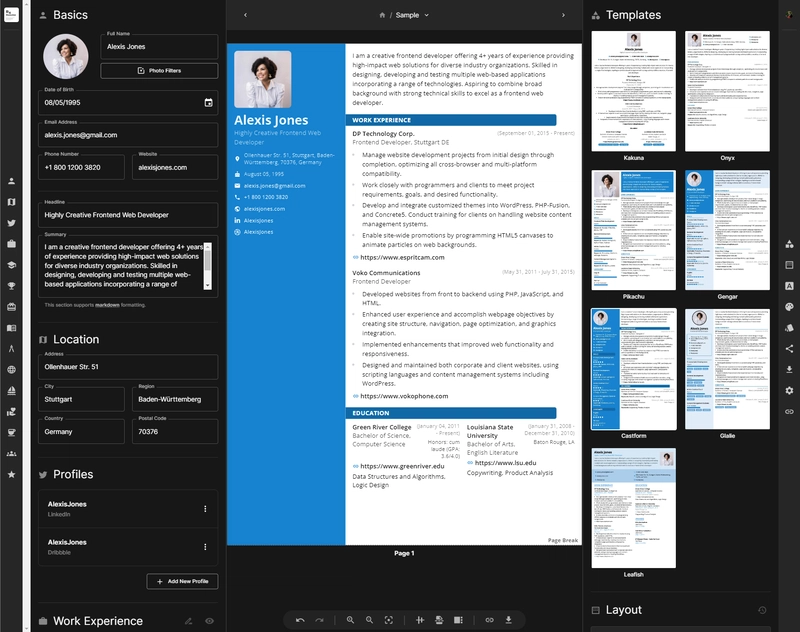
Reactive Resume screenshot 1

Setup time

A few minutes

Deployment

Your own server

Services

4 connected services

Why Reactive Resume

Everything you need, running where you choose.

Get the full Reactive Resume experience with Easypanel handling the repetitive infrastructure work around it.

Drag & Drop Builder
Intuitive drag-and-drop interface to customize your resume layout, reorder sections, and create custom sections specific to your industry.
Real-time Collaboration
Share personalized links with potential employers, track views and downloads, and make real-time updates that are instantly available.
Multi-format Export
Export your resume as PDF in A4 or Letter format, or save as JSON for easy backup and portability between instances.
Multi-language Support
Available in multiple languages with full internationalization support, and use AI to translate your resume content.
Privacy-First Design
No user tracking, no analytics, no advertising. Your data stays on your server and under your complete control.
Professional Templates
Choose from dozens of professionally designed templates ranging from traditional to modern styles, all fully customizable.
How it works

From template to live app in three steps.

Easypanel turns the template into real services, storage, and domains on the server you already control.

Already have Easypanel? Open your dashboard at the URL or IP of your own installation.

Installation guide
1
Open your dashboard
Visit the URL or IP of your Easypanel installation and choose the target project.
2
Choose Reactive Resume
Open Templates, select Reactive Resume, then review its service names and configuration.
3
Deploy and open your app
Easypanel starts every service and provisions an HTTPS domain for you.
Installation options
The template asks for these values before creating your services.
OptionDefaultRequired

App Service Name

reactive-resumeRequired

App Service Image

Image for the app service

amruthpillai/reactive-resume:v4.4.5Required

MinIO Service Image

Image for the internal MinIO storage service

minio/minio:RELEASE.2025-09-07T16-13-09ZRequired

Disable Public Signups

Prevent new users from registering accounts

falseOptional

Disable Email Authentication

Disable email/password authentication (OAuth only)

falseOptional
Resources
Project documentation and source code.
Latest template update
Apr 1, 2026

Initial release

Questions

Deploy with confidence.

The template handles the application setup while Easypanel keeps the infrastructure understandable and under your control.

Reactive Resume logo
Ready to deploy Reactive Resume?
Open your own Easypanel dashboard, choose Reactive Resume from Templates, and review the deployment options.