All templates

Deploy The Lounge on your own server.

The Lounge logo

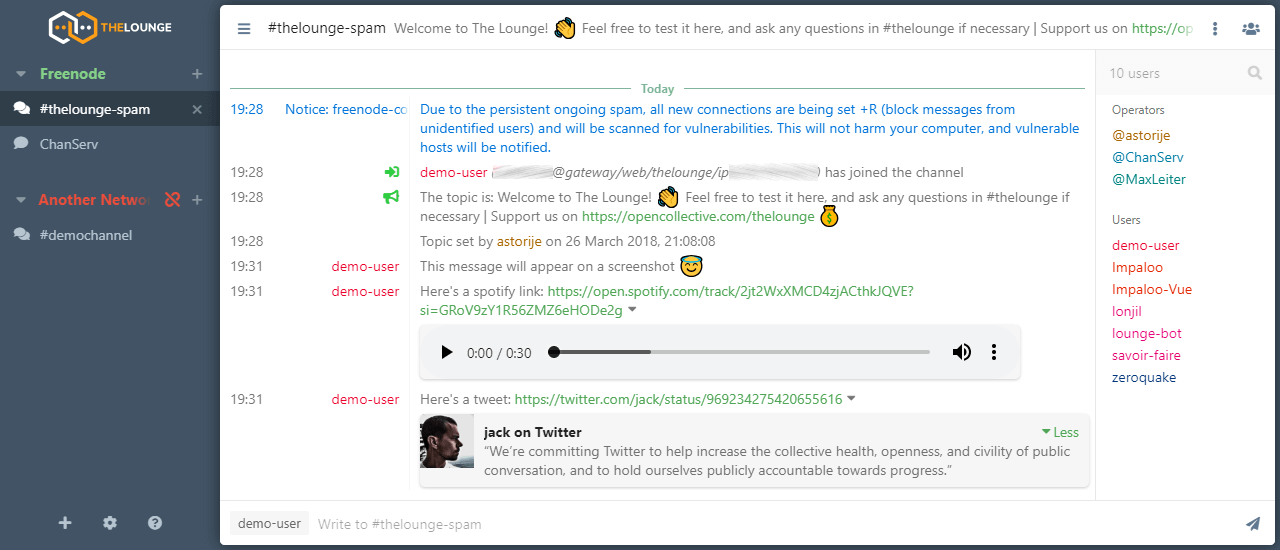
Welcome to The Lounge, your self-hosted web IRC client for the 21st century. With modern features such as push notifications, link previews, and file uploads, The Lounge brings IRC into the modern era. Stay connected to IRC servers even when you're offline and resume where you left off on any device, thanks to its responsive interface…

Your infrastructureAutomatic HTTPSNo lock-in

Screenshots

A closer look at The Lounge.

The Lounge screenshot 1

Setup time

A few minutes

Deployment

Your own server

Services

1 connected service

Why The Lounge

Everything you need, running where you choose.

Get the full The Lounge experience with Easypanel handling the repetitive infrastructure work around it.

Modern Features
The Lounge brings IRC to the 21st century with modern features like push notifications, link previews, and file uploads.
Responsive Interface
The Lounge boasts a responsive interface that works smoothly on every device, be it a desktop, smartphone, or tablet.
Free and Open-Source
The Lounge is a free and open-source web IRC client, licensed under the MIT license. This means you can use it without any cost and even contribute to its development.
Private and Public Modes
The Lounge offers both private and public modes. In private mode, it acts like a bouncer and a client combined, offering an experience similar to other modern chat applications. In public mode, it acts as an open chat available to anyone without registration.
Always Connected
With The Lounge, you can remain connected to IRC servers even when you're offline. You can resume where you left off on any device, ensuring you never miss out on any conversation.
Cross-Platform Compatibility
The Lounge is designed to work smoothly on every desktop, smartphone, and tablet. It doesn't matter what operating system you use, as long as Node.js runs on it, The Lounge will work.
How it works

From template to live app in three steps.

Easypanel turns the template into real services, storage, and domains on the server you already control.

Already have Easypanel? Open your dashboard at the URL or IP of your own installation.

Installation guide
1
Open your dashboard
Visit the URL or IP of your Easypanel installation and choose the target project.
2
Choose The Lounge
Open Templates, select The Lounge, then review its service names and configuration.
3
Deploy and open your app
Easypanel starts every service and provisions an HTTPS domain for you.
Installation options
The template asks for these values before creating your services.
OptionDefaultRequired

App Service Name

theloungeRequired

App Service Image

ghcr.io/thelounge/thelounge:4.4.3Required
Resources
Project documentation and source code.
Latest template update
Jul 9, 2023

First Release

Questions

Deploy with confidence.

The template handles the application setup while Easypanel keeps the infrastructure understandable and under your control.

Keep exploring

Related templates

Browse all
Cloudreve logo
Cloudreve
Cloudreve is a self-hosted cloud storage platform that allows you to build your own file hosting and sharing service with support for multiple storage backends. Designed as a powerful alternative to commercial cloud storage services, Cloudreve provides a feature-rich web interface for uploading, organizing, and sharing files with complete control over your data. The application supports various storage providers including local storage, remote servers, OneDrive, S3-compatible storage, and more, allowing you to leverage existing infrastructure or cloud services as backends. Key features include drag-and-drop uploads, file previews for images, videos, and documents, shareable download links with optional password protection and expiration dates, and WebDAV support for seamless integration with desktop and mobile applications. Cloudreve offers user management with customizable storage quotas, group permissions, and file policies to control how users interact with the system. The modern, responsive interface works across devices, providing a smooth experience whether accessing from desktop or mobile. Built with performance in mind, Cloudreve uses PostgreSQL for reliable data storage and Redis for caching, ensuring fast and responsive file operations. Perfect for individuals wanting private cloud storage, teams needing collaborative file sharing, organizations requiring self-hosted file management, or anyone seeking an alternative to commercial cloud storage with complete data ownership and privacy.
View template
Owncast logo
Owncast
Owncast is a free and open-source live video and web chat server that works seamlessly with your existing broadcasting software. It gives you complete control and ownership over your stream, allowing you to create the content you want. The app comes with a frictionless built-in chat feature that enables your viewers to engage and be a part of the action. You can include custom emotes and build chat bots to encourage viewer engagement. Owncast also allows your live stream to reach a wider audience on The Fediverse, including platforms like Mastodon and other Fediverse services. It's a self-hosted and independent solution for live streaming, offering a high level of performance comparable to proprietary platforms.
View template
Sharkord logo
Sharkord
Sharkord is a lightweight, open-source, self-hosted chat platform designed as a privacy-focused alternative to Discord for small groups. It provides voice, video, text chat, and screen sharing—all running on your own server. Supports screen sharing up to 4K@60fps. Designed for 5-25 users.

View template
The Lounge logo
Ready to deploy The Lounge?
Open your own Easypanel dashboard, choose The Lounge from Templates, and review the deployment options.