All templates

Deploy Xwiki on your own server.

Xwiki logo

XWiki is a powerful, open source enterprise wiki platform designed for collaboration and content management. It offers extensive features to create, manage, and share knowledge effectively.

Your infrastructureAutomatic HTTPSNo lock-in

Screenshots

A closer look at Xwiki.

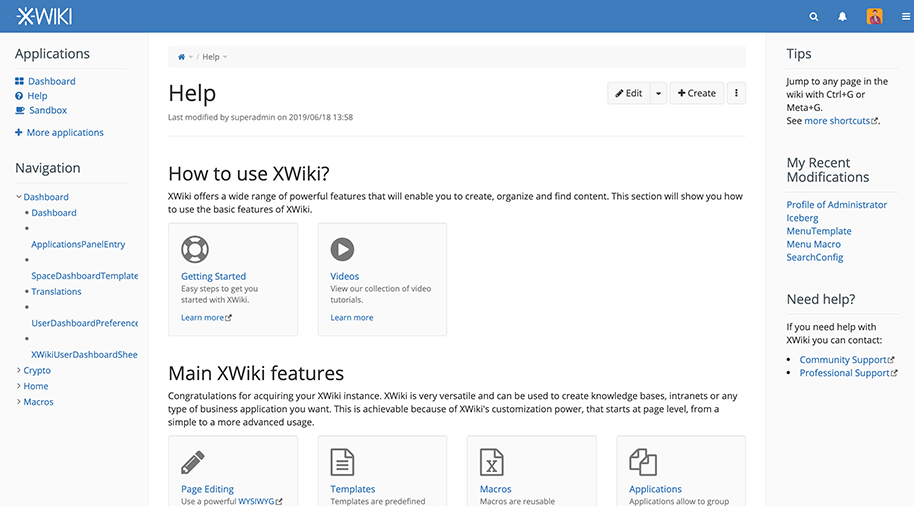
Xwiki screenshot 1

Setup time

A few minutes

Deployment

Your own server

Services

2 connected services

Why Xwiki

Everything you need, running where you choose.

Get the full Xwiki experience with Easypanel handling the repetitive infrastructure work around it.

Wiki Engine
Provides a powerful wiki engine for creating and managing content.
WYSIWYG Editor
Enables easy content editing with a user-friendly interface.
Extensible Architecture
Supports customization and extension to fit diverse organizational needs.
Collaborative Tools
Includes tools for discussion, version control, and collaborative work.
Collaborative Editing
XWiki offers robust collaborative editing features for real-time teamwork.
Enterprise Integration
XWiki seamlessly integrates with various enterprise systems for flexible workflows.
How it works

From template to live app in three steps.

Easypanel turns the template into real services, storage, and domains on the server you already control.

Already have Easypanel? Open your dashboard at the URL or IP of your own installation.

Installation guide
1
Open your dashboard
Visit the URL or IP of your Easypanel installation and choose the target project.
2
Choose Xwiki
Open Templates, select Xwiki, then review its service names and configuration.
3
Deploy and open your app
Easypanel starts every service and provisions an HTTPS domain for you.
Installation options
The template asks for these values before creating your services.
OptionDefaultRequired

App Service Name

xwikiRequired

App Service Image

XWiki Docker image with PostgreSQL support

xwiki:18.2.1-postgres-tomcatRequired

Database Service Image

PostgreSQL Docker image

postgres:17Required
Resources
Project documentation and source code.
Latest template update
May 7, 2026

Version bumped to 18.2.1-postgres-tomcat

Questions

Deploy with confidence.

The template handles the application setup while Easypanel keeps the infrastructure understandable and under your control.

Keep exploring

Related templates

Browse all
Bookstack logo
Bookstack
BookStack is a free and open-source platform designed to help you organize and store information in a simple and efficient way. It is a self-hosted solution that allows you to create, edit, and manage content through an easy-to-use interface. The content is divided into three real-world groups: Books, Chapters, and Pages, making it easy to navigate and find the information you need. The platform also includes a powerful search feature that allows you to search at the book level or across all books, chapters, and pages. You can also link directly to any paragraph, keeping your documentation interconnected. BookStack offers configuration options that let you customize the system to suit your needs, including changing the name, logo, and registration options. It also includes built-in diagrams.net drawing capability for creating diagrams within your documentation, a markdown editor for those who prefer to write in markdown, and integrated authentication options. The platform supports multiple languages and offers both dark and light modes for a comfortable user experience. It also includes a full role and permission system, multi-factor authentication, and features like cross-book sorting, page revisions, and image management.
View template
MediaWiki logo
MediaWiki
MediaWiki is a powerful, open-source wiki platform that powers some of the largest collaborative projects, including Wikipedia. It offers a flexible and extensible framework for creating and managing content, supporting features like user management, version control, and powerful extensions. MediaWiki provides multilingual support, ensuring global accessibility, and includes built-in tools for content organization, search, and collaboration. It is an ideal solution for knowledge bases, documentation sites, and community-driven content platforms. With a vibrant ecosystem of plugins and themes, MediaWiki can be customized to suit diverse use cases.
View template
Confluence logo
Confluence
Confluence is a powerful team collaboration and knowledge-sharing tool. It allows you to create, organize, and collaborate on content in a centralized space. Designed for project management, documentation, and team communication, Confluence helps streamline workflows and enhances productivity. It offers seamless integration with other Atlassian products such as Jira and Bitbucket, making it an ideal solution for agile teams. The intuitive editor and advanced search capabilities ensure that team knowledge is easily accessible. With extensive customization, permission controls, and plugin support, Confluence is a scalable solution for teams of all sizes.

View template
Xwiki logo
Ready to deploy Xwiki?
Open your own Easypanel dashboard, choose Xwiki from Templates, and review the deployment options.