All templates

Deploy CloudBeaver on your own server.

CloudBeaver logo

CloudBeaver is a web-based database management tool developed by DBeaver team. It provides a modern, intuitive interface for managing databases through your web browser. CloudBeaver supports multiple database types including PostgreSQL, MySQL, MariaDB, SQLite, Oracle, SQL Server, and many others. Perfect for teams who need collaborative…

Your infrastructureAutomatic HTTPSNo lock-in

Screenshots

A closer look at CloudBeaver.
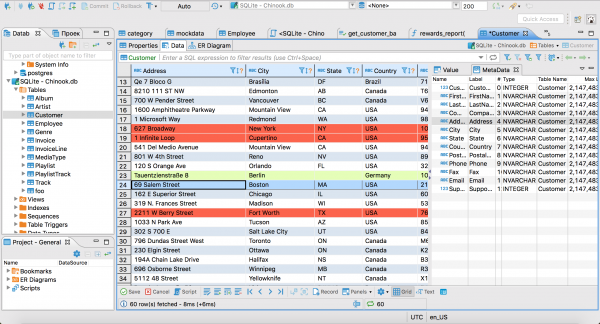
CloudBeaver screenshot 1

Setup time

A few minutes

Deployment

Your own server

Services

1 connected service

Why CloudBeaver

Everything you need, running where you choose.

Get the full CloudBeaver experience with Easypanel handling the repetitive infrastructure work around it.

Visual Query Builder
Build complex SQL queries using an intuitive drag-and-drop interface
Data Editor
View, edit, and manage database records with spreadsheet-like functionality
SQL Editor
Advanced SQL editor with syntax highlighting, autocomplete, and execution planning
Database Navigator
Browse database schemas, tables, views, and other objects in a tree structure
Connection Management
Manage multiple database connections with secure credential storage
Data Export/Import
Export query results and import data in various formats including CSV, JSON, and SQL
How it works

From template to live app in three steps.

Easypanel turns the template into real services, storage, and domains on the server you already control.

Already have Easypanel? Open your dashboard at the URL or IP of your own installation.

Installation guide
1
Open your dashboard
Visit the URL or IP of your Easypanel installation and choose the target project.
2
Choose CloudBeaver
Open Templates, select CloudBeaver, then review its service names and configuration.
3
Deploy and open your app
Easypanel starts every service and provisions an HTTPS domain for you.
Installation options
The template asks for these values before creating your services.
OptionDefaultRequired

App Service Name

cloudbeaverRequired

App Service Image

dbeaver/cloudbeaver:26.0.3Required
Resources
Project documentation and source code.
Latest template update
Apr 29, 2026

Version bumped to 26.0.3

Questions

Deploy with confidence.

The template handles the application setup while Easypanel keeps the infrastructure understandable and under your control.

CloudBeaver logo
Ready to deploy CloudBeaver?
Open your own Easypanel dashboard, choose CloudBeaver from Templates, and review the deployment options.