Deploy Flash API on your own server.

Flash API logo

Flash API is a self-hosted multi-session WhatsApp API platform built on the Baileys library. It lets you connect multiple WhatsApp accounts simultaneously, manage sessions via QR code, and send text, images, video, audio, documents, locations, and polls through a REST API secured by an API key. Features include real-time webhooks and…

Your infrastructureAutomatic HTTPSNo lock-in

Screenshots

A closer look at Flash API.
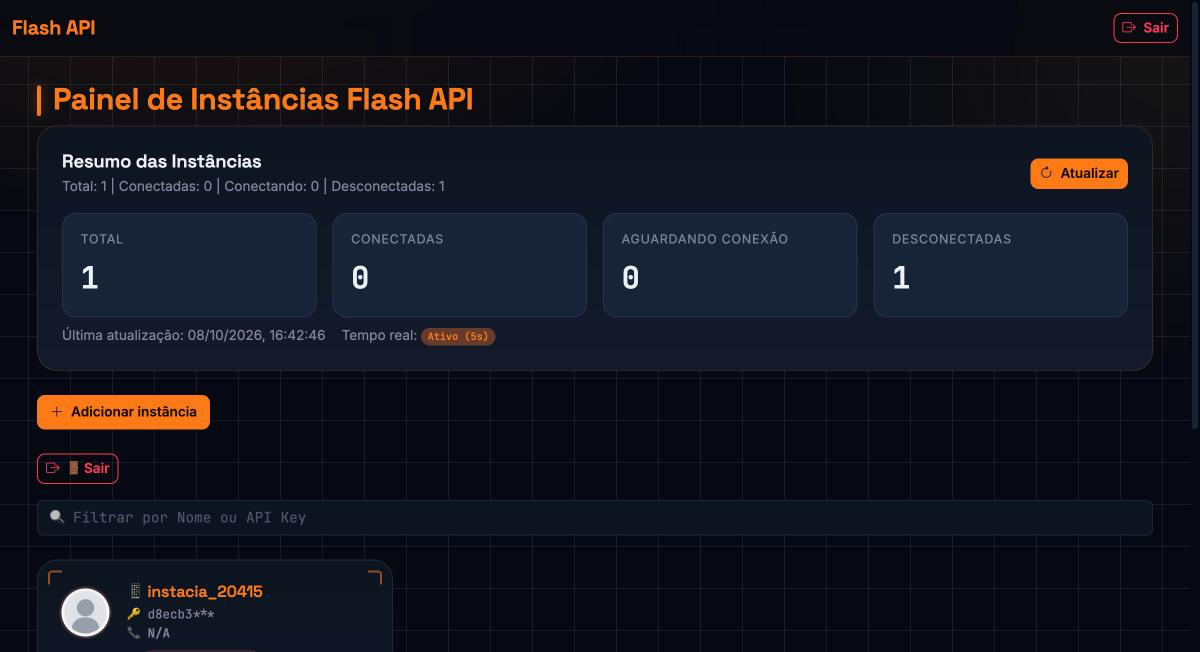
Flash API screenshot 1

Setup time

A few minutes

Deployment

Your own server

Services

3 connected services

Why Flash API

Everything you need, running where you choose.

Get the full Flash API experience with Easypanel handling the repetitive infrastructure work around it.

QR Code Authentication
Authenticate new WhatsApp sessions by generating a Base64 QR code via the API and scanning it with the WhatsApp mobile app — no browser automation required.
Contact and Group Management
Query contact details, check if numbers are registered on WhatsApp, create and manage groups, update descriptions, and add or remove participants through dedicated API endpoints.
Manager Dashboard
A built-in web panel at /manager lets you view and operate sessions — generate QR codes, check connection status, and manage sessions — without calling the API directly.
Webhook Support
Configure per-session or global webhooks to push incoming messages, read receipts, connection status changes, and call events to any HTTP endpoint.
Session Lifecycle Control
Create, reconnect, restart, and delete sessions via API, with configurable auto-deletion of disconnected sessions and automatic cleanup of temporary messages.
Multi-Session WhatsApp
Connect and manage multiple WhatsApp accounts from a single deployment. Each session is isolated, persisted in Postgres, and can be reconnected independently without affecting other sessions.
How it works

From template to live app in three steps.

Easypanel turns the template into real services, storage, and domains on the server you already control.

Already have Easypanel? Open your dashboard at the URL or IP of your own installation.

Installation guide
1
Open your dashboard
Visit the URL or IP of your Easypanel installation and choose the target project.
2
Choose Flash API
Open Templates, select Flash API, then review its service names and configuration.
3
Deploy and open your app
Easypanel starts every service and provisions an HTTPS domain for you.
Installation options
The template asks for these values before creating your services.
OptionDefaultRequired

App Service Name

flash-apiRequired

App Service Image

flashconect/flash-api:v1.0.6Required

Manager Password

Leave blank to auto-generate a random password.

Set during installOptional
Resources
Project documentation and source code.
Latest template update
Oct 8, 2026

First Release

Questions

Deploy with confidence.

The template handles the application setup while Easypanel keeps the infrastructure understandable and under your control.

Flash API logo
Ready to deploy Flash API?
Open your own Easypanel dashboard, choose Flash API from Templates, and review the deployment options.