All templates

Deploy RStudio on your own server.

RStudio logo

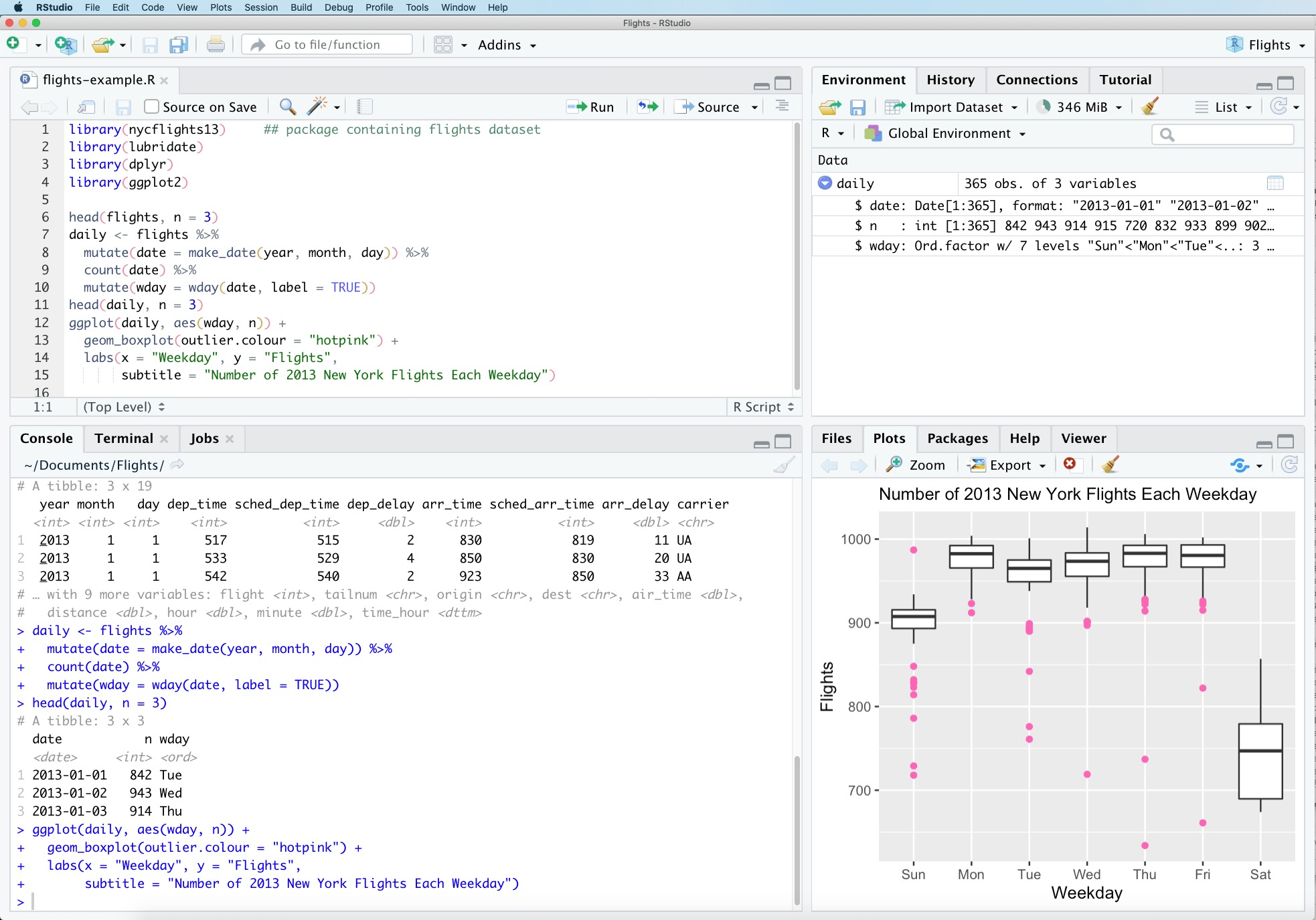
RStudio is a powerful integrated development environment (IDE) for R programming and statistical computing. It provides a comprehensive set of tools for data analysis, visualization, and statistical modeling. This server-based version allows you to access RStudio through your web browser, enabling collaborative work and remote access to…

Your infrastructureAutomatic HTTPSNo lock-in

Screenshots

A closer look at RStudio.

RStudio screenshot 1

Setup time

A few minutes

Deployment

Your own server

Services

1 connected service

Why RStudio

Everything you need, running where you choose.

Get the full RStudio experience with Easypanel handling the repetitive infrastructure work around it.

Code Editor
Advanced code editor with syntax highlighting, code completion, and debugging tools specifically designed for R.
Data Visualization
Create interactive plots and visualizations using ggplot2, plotly, and other R visualization libraries.
Package Management
Easy installation and management of R packages from CRAN, Bioconductor, and GitHub repositories.
R Markdown Support
Create reproducible reports and documents combining code, output, and narrative text using R Markdown.
Web-Based IDE
Access a full-featured R development environment through your web browser from any device without local installation.
Statistical Computing
Powerful tools for statistical analysis, data visualization, and machine learning with extensive R package support.
How it works

From template to live app in three steps.

Easypanel turns the template into real services, storage, and domains on the server you already control.

Already have Easypanel? Open your dashboard at the URL or IP of your own installation.

Installation guide
1
Open your dashboard
Visit the URL or IP of your Easypanel installation and choose the target project.
2
Choose RStudio
Open Templates, select RStudio, then review its service names and configuration.
3
Deploy and open your app
Easypanel starts every service and provisions an HTTPS domain for you.
Installation options
The template asks for these values before creating your services.
OptionDefaultRequired

App Service Name

rstudioRequired

App Service Image

rocker/rstudio:4.5.2Required

Password

Set during installRequired
Resources
Project documentation and source code.
Latest template update
Oct 13, 2025

Initial Template Release (4.5)

Questions

Deploy with confidence.

The template handles the application setup while Easypanel keeps the infrastructure understandable and under your control.

Keep exploring

Related templates

Browse all
Cloud9 logo
Cloud9
Cloud9 is a cloud-based integrated development environment (IDE) designed for developers to code, build, and debug applications collaboratively in real time. It supports a wide range of programming languages and provides a full-featured development environment directly in the browser. Cloud9 allows developers to work on their projects from anywhere, using any device, with the power of a full Linux server behind it. It includes features like built-in terminal, code editor, and support for debugging and running applications seamlessly. Cloud9 is trusted by developers for its efficiency, collaboration tools, and ability to streamline the development workflow.
View template
JupyterNotebook logo
JupyterNotebook
Jupyter Notebook is a popular, free, and open-source web application that allows you to create and share documents containing live code, equations, visualizations, and narrative text. It supports numerous programming languages and is widely used for data cleaning and transformation, numerical simulation, statistical modeling, data visualization, machine learning, and much more. The app is designed to be accessed via your web browser, providing an interactive interface for easy development and experimentation. It supports hardware acceleration for enhanced performance in computational tasks. The app is compatible with multiple architectures, ensuring it can run on various systems.
View template
Atheos logo
Atheos
Atheos is a self-hosted browser-based cloud IDE, updated from Codiad IDE with a modern approach to web development. This lightweight development environment provides fast, interactive coding without the massive overhead of desktop editors. Atheos features built-in Git integration, a comprehensive plugin system, multi-user support with permissions, and supports multiple programming languages. Perfect for developers who want a complete IDE that runs entirely in the browser with minimal server requirements and maximum functionality.
View template
RStudio logo
Ready to deploy RStudio?
Open your own Easypanel dashboard, choose RStudio from Templates, and review the deployment options.