All templates

Deploy Shaarli on your own server.

Shaarli logo

Shaarli is a personal, minimalist, super-fast, and database-free bookmarking service. It allows you to manage and share the links you discover, making it an ideal tool for those who frequently come across interesting content on the web. With Shaarli, you can share, comment, and save links, use it as a minimal blog or writing platform, or…

Your infrastructureAutomatic HTTPSNo lock-in

Screenshots

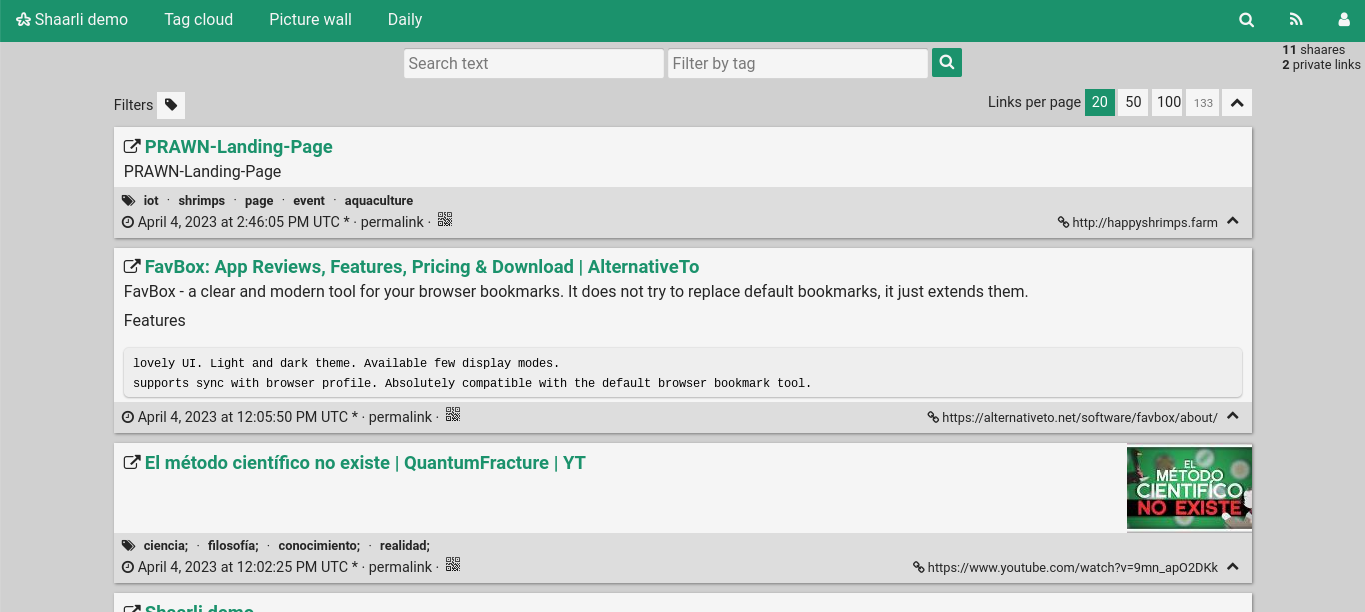
A closer look at Shaarli.

Shaarli screenshot 1

Setup time

A few minutes

Deployment

Your own server

Services

1 connected service

Why Shaarli

Everything you need, running where you choose.

Get the full Shaarli experience with Easypanel handling the repetitive infrastructure work around it.

Editable Links
Shaarli allows you to edit the URL, title, description, tags, and private/public status for all your shares.
Search and Organization
You can organize your shares with tags, search in all fields, and view your shares in a paginated list view with image and video thumbnails.
Extensibility
Shaarli is extensible through plugins and can be easily extended by any client using the REST API exposed by Shaarli.
Bookmarklet and Sharing Tools
Shaarli provides a bookmarklet and other tools to share links in one click. It also supports mobile browsers and degrades gracefully with Javascript disabled.
Easy Setup
Setting up Shaarli is simple. Just drop the files on your server, open the page, and you're good to go. No database is required, making backup easy.
Personalized Bookmarking
Shaarli offers a personal, minimalist, and super-fast bookmarking service. It allows you to share, comment, and save interesting links on your own server.
How it works

From template to live app in three steps.

Easypanel turns the template into real services, storage, and domains on the server you already control.

Already have Easypanel? Open your dashboard at the URL or IP of your own installation.

Installation guide
1
Open your dashboard
Visit the URL or IP of your Easypanel installation and choose the target project.
2
Choose Shaarli
Open Templates, select Shaarli, then review its service names and configuration.
3
Deploy and open your app
Easypanel starts every service and provisions an HTTPS domain for you.
Installation options
The template asks for these values before creating your services.
OptionDefaultRequired

App Service Name

shaarliRequired

App Service Image

ghcr.io/shaarli/shaarli:v0.16.1Required
Resources
Project documentation and source code.
Latest template update
Feb 24, 2026

Version bumped to v0.16.1

Questions

Deploy with confidence.

The template handles the application setup while Easypanel keeps the infrastructure understandable and under your control.

Keep exploring

Related templates

Browse all
OtterWiki logo
OtterWiki
OtterWiki is a simple, easy-to-use wiki software for personal use and small teams. It's designed to be minimalist, focusing on the essentials without unnecessary complexity. OtterWiki stores all content as Markdown files in a Git repository, providing automatic version control and the ability to edit pages using your favorite text editor. It features a clean, modern interface with syntax highlighting, file attachments, full-text search, and dark mode support. The wiki requires no database setup - everything is stored in plain text files, making backups and migrations simple. OtterWiki supports user authentication, page permissions, and comes with a built-in editor with live preview. Perfect for documentation, note-taking, knowledge management, and collaborative writing in small teams.
View template
Nanote logo
Nanote
Nanote is a lightweight, self-hosted note-taking application that provides a simple and clean interface for managing your notes. Built with privacy-focused design, Nanote allows you to store and organize your notes locally or on your own server. It features markdown support, file uploads, and a minimalistic interface that focuses on productivity without distractions.
View template
Bookstack logo
Bookstack
BookStack is a free and open-source platform designed to help you organize and store information in a simple and efficient way. It is a self-hosted solution that allows you to create, edit, and manage content through an easy-to-use interface. The content is divided into three real-world groups: Books, Chapters, and Pages, making it easy to navigate and find the information you need. The platform also includes a powerful search feature that allows you to search at the book level or across all books, chapters, and pages. You can also link directly to any paragraph, keeping your documentation interconnected. BookStack offers configuration options that let you customize the system to suit your needs, including changing the name, logo, and registration options. It also includes built-in diagrams.net drawing capability for creating diagrams within your documentation, a markdown editor for those who prefer to write in markdown, and integrated authentication options. The platform supports multiple languages and offers both dark and light modes for a comfortable user experience. It also includes a full role and permission system, multi-factor authentication, and features like cross-book sorting, page revisions, and image management.
View template
Shaarli logo
Ready to deploy Shaarli?
Open your own Easypanel dashboard, choose Shaarli from Templates, and review the deployment options.