All templates

Deploy Weblate on your own server.

Weblate logo

Weblate is a powerful, web-based continuous localization system. It is designed to simplify the process of translating text from one language to another, making it an invaluable tool for projects and companies operating in multiple countries. With Weblate, users can easily translate using the platform, download and upload translations,…

Your infrastructureAutomatic HTTPSNo lock-in

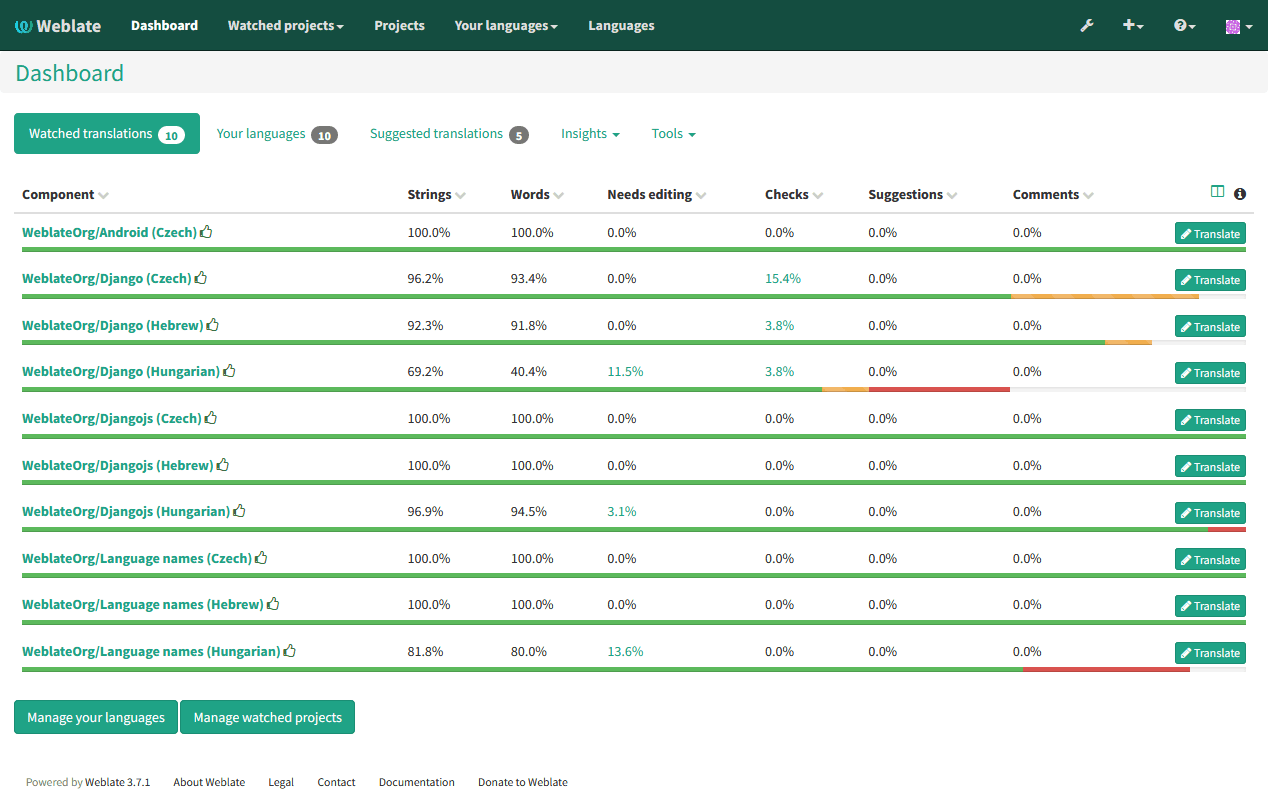
Screenshots

A closer look at Weblate.

Weblate screenshot 1

Setup time

A few minutes

Deployment

Your own server

Services

3 connected services

Why Weblate

Everything you need, running where you choose.

Get the full Weblate experience with Easypanel handling the repetitive infrastructure work around it.

Web-Based Interface
Weblate provides a user-friendly web-based interface that allows you to easily manage your translation projects. You can add new languages, import and export translations, and track the progress of translations.
Glossary and Translation Memory
Weblate includes features like glossary and translation memory, which help to improve translation consistency and efficiency. The glossary allows you to define and manage a list of terms and their translations, while the translation memory suggests previously translated segments for reuse.
Automatic Checks and Fixups
Weblate automatically checks translations for common errors and inconsistencies, such as missing placeholders or incorrect formatting. It also provides fixup suggestions to help translators correct these issues quickly.
Efficient Localization
Weblate is a web-based continuous localization system that allows you to easily translate and manage your software projects. With Weblate, you can streamline the localization process and ensure that your app is available in multiple languages.
Collaborative Translation
Weblate enables collaboration among translators, making it easy for multiple contributors to work on translations simultaneously. This helps to speed up the translation process and ensures high-quality translations.
Version Control Integration
Weblate seamlessly integrates with version control systems like Git, allowing you to manage translations directly from your code repository. This simplifies the workflow and ensures that translations are always in sync with the latest code changes.
How it works

From template to live app in three steps.

Easypanel turns the template into real services, storage, and domains on the server you already control.

Already have Easypanel? Open your dashboard at the URL or IP of your own installation.

Installation guide
1
Open your dashboard
Visit the URL or IP of your Easypanel installation and choose the target project.
2
Choose Weblate
Open Templates, select Weblate, then review its service names and configuration.
3
Deploy and open your app
Easypanel starts every service and provisions an HTTPS domain for you.
Installation options
The template asks for these values before creating your services.
OptionDefaultRequired

App Service Name

weblateRequired

App Service Image

weblate/weblate:5.16.0.0Required

Database Service Name

weblate-dbRequired

Redis Service Name

weblate-redisRequired

No Reply Email

Required

Email Host

Required

Email Username

Required

Email Password

Set during installRequired
Resources
Project documentation and source code.
Latest template update
Feb 24, 2026

Version bumped to 5.16.0.0

Questions

Deploy with confidence.

The template handles the application setup while Easypanel keeps the infrastructure understandable and under your control.

Keep exploring

Related templates

Browse all
Tolgee logo
Tolgee
Tolgee is a revolutionary localization platform designed to simplify and speed up the translation process of your application. With Tolgee, you can translate your app into any language without modifying your code. It offers a range of features including in-context translating, translation memory, machine translations, auto translation, and activity log. The in-context translating feature allows you to translate strings directly in the app you develop, even in production. Translation memory ensures you don't translate the same string twice by reusing strings you've already translated. Machine translations let you leverage the power of DeepL, Google Translate, and AWS translate. Auto translation delivers your translations instantly right after you add them. The activity log feature helps you monitor the translation activities. Tolgee also allows users to add screenshots with a single click, providing context for translations. It is designed to be developer-friendly with easy integration with all major JS frameworks. Tolgee is not only easy to use for developers but also for translators, making the localization process seamless and efficient.
View template
Traduora logo
Traduora
Traduora is a modern, self-hosted translation management platform designed for teams and developers. It provides a clean and intuitive interface for managing translation projects across multiple languages. With Traduora, you can easily import and export translations in various formats, collaborate with translators, and integrate translations into your applications via API. The platform supports real-time updates, version control of translations, and role-based access control to manage translator permissions. Traduora helps streamline the localization workflow by providing a centralized place to manage all your translation needs while maintaining full control over your translation data and processes.
View template
Lingva Translate logo
Lingva Translate
Lingva Translate is a free, open-source alternative front-end for Google Translate. Supports 100+ languages via scraping—no direct Google access, no user tracking. Built with Next.js and ChakraUI. Provides REST API for translation, audio, and language detection. Privacy-focused translation.
View template
Weblate logo
Ready to deploy Weblate?
Open your own Easypanel dashboard, choose Weblate from Templates, and review the deployment options.